
If you sell products online, you already know the drill. You need professional-looking product photos, social media graphics, and marketing visuals — but hiring a graphic designer costs money you’d rather spend on inventory. Meanwhile, stock photos look generic and everyone else is using them too. That’s exactly where GenCraft Studio 2.0 steps in.
GenCraft Studio 2.0 is an AI-powered design platform that transforms rough sketches into polished product images, photorealistic mockups, and marketing visuals — no design skills required. Released in June 2025 by the team behind GenCraft (gencraft.com), it targets e-commerce sellers, print-on-demand creators, and small business owners who need professional visuals without the designer price tag. The platform has over 5 million downloads on Android alone, and it’s available on web, iOS, and Android.
In this review, we’ll break down what GenCraft Studio actually does, how the sketch-to-image feature works, what it costs, and whether it’s worth your time — especially if you’re running an Etsy shop, a Shopify store, or a print-on-demand side hustle.
What is GenCraft Studio 2.0?
GenCraft launched in 2023 as a straightforward AI art generator. Since then, it has grown into a full creative suite with text-to-image generation, video creation, image editing, and custom AI model training. The “Studio 2.0” update, released in June 2025, brought the most significant feature yet: real-time sketch-to-image rendering through a tool called Sketch Guide.
On top of that, the platform offers 13 different creative tools, including Photobooth for transforming photos, Character Guide for building consistent AI characters, FaceSwap, Magic Edit 2.0 for modifying generated images, and Video Gen for creating short video content from text prompts.
What sets GenCraft apart from most AI image generators is that it bundles generation, editing, and style training in one platform. You don’t need to bounce between Midjourney for creating and Photoshop for editing — GenCraft handles both. The web-based interface is clean and approachable, and the mobile apps make it easy to create on the go. For comparison, you can see how other AI tools balance free and paid tiers in our Wispr Flow free vs paid breakdown.
How GenCraft sketch-to-image works
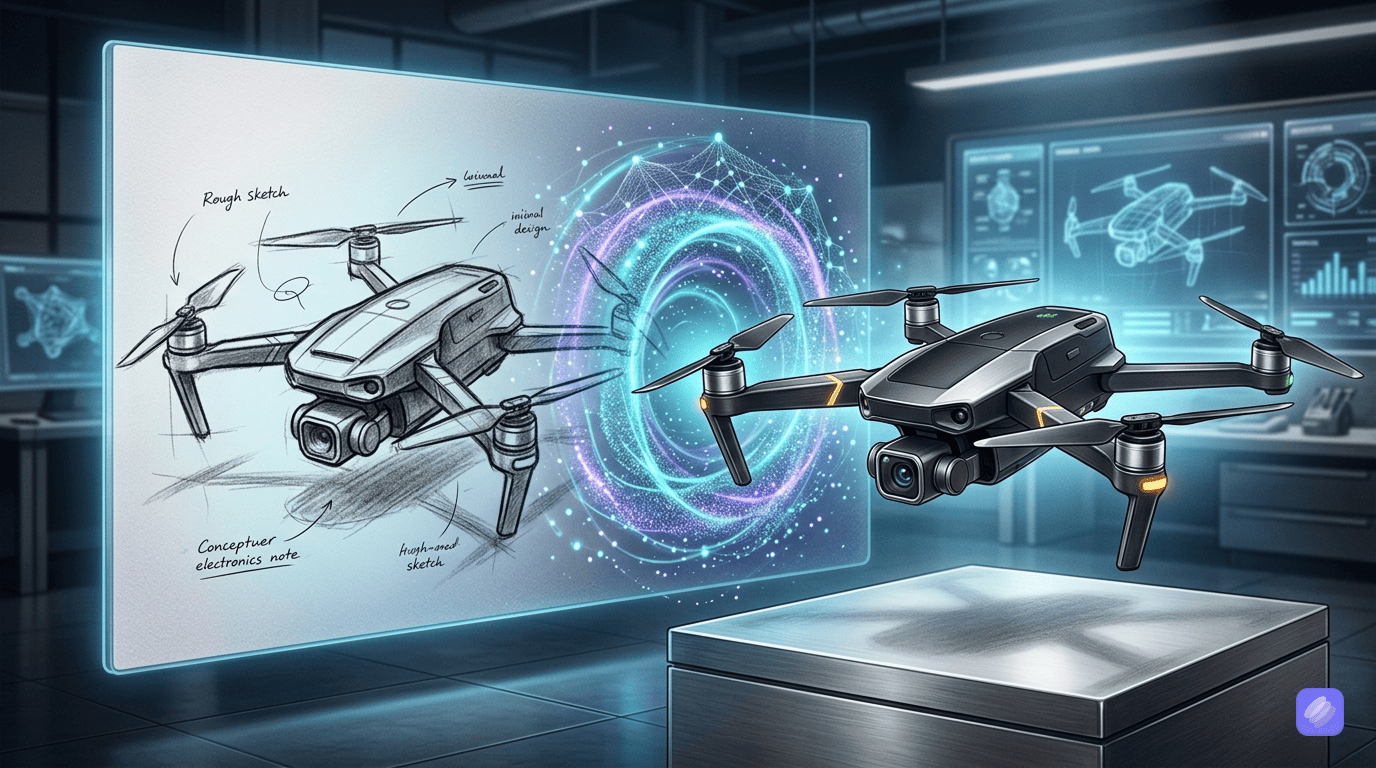
The headline feature of Studio 2.0 is Sketch Guide, and it does exactly what the name suggests. You upload a rough sketch — literally anything from a napkin drawing to a quick digital draft — and the AI renders it into a polished, professional-looking image.
Here’s how the process works in practice. First, you open the Sketch Guide tool in your GenCraft dashboard. Then you upload your sketch file (JPG, PNG, or most common image formats). After that, you can adjust the output by selecting a generation model — Image 3.0 for general use or Realism 3.2 Ultra for photorealistic results — choosing an aspect ratio, and adding a text prompt to guide the style or add details.
Within seconds, GenCraft produces multiple variations of your sketch rendered as a finished image. From there, you can further refine the output using Magic Edit 2.0 to tweak specific elements, swap colors, or add objects.
For example, imagine you sketch a basic t-shirt design on paper, snap a photo of it, and upload it to GenCraft. You type something like “vintage sunset graphic on a white t-shirt, flat lay product photo” — and the AI renders a photorealistic product shot you could list on Etsy or Shopify within minutes.
This feature alone is worth exploring if you’re tired of relying on stock images or paying designers for simple visual concepts.
GenCraft features that matter for Ecommerce
While sketch-to-image gets the attention, GenCraft packs several other features that are genuinely useful for online sellers.
Photobooth transforms basic smartphone photos into polished product shots. If you’ve got a handmade candle sitting on your kitchen table, Photobooth can make it look like it was photographed in a professional studio. For Etsy sellers who can’t afford a photographer, this is a game-changer.
Training a Custom AI Model lets you upload up to 500 reference images to train a style-specific model. For instance, if you sell minimalist jewelry and want all your product images to share a consistent aesthetic, you can train a model on your existing best-performing photos and use it to generate new ones in the same style.
Magic Edit 2.0 lets you add, replace, or modify elements in any generated image or uploaded photo. Need to swap a background from white to marble? Want to add seasonal decorations to a product shot? Magic Edit handles this without requiring Photoshop skills.
Video Gen creates short video content from text prompts. While it’s not going to replace a professional video production, it’s useful for quick social media content — Instagram Reels, TikTok clips, or product showcase videos.
Image to Image lets you upload a reference photo and generate variations. This is helpful when you like the composition of an existing image but want to explore different color schemes, styles, or lighting.
Character Guide builds and maintains consistent AI-generated characters. If your brand uses a mascot or you create illustrated content, this keeps your character visually consistent across all generated images.
All of these features work together in a single platform, which means less tab-switching and faster content creation overall. If you’re exploring multiple AI tools to build a visual workflow, our OpenRouter tutorial for beginners covers how to access different AI models from one place.
How to use GenCraft for product mockups: A quick walkthrough
Here’s how to go from zero to a finished product image in under five minutes.
Step 1: Create your free account. Head to gencraft.com and sign up. The free tier gives you 5 credits per day, and each credit generates multiple image variations. This is enough to test the platform before committing.
Step 2: Choose your tool. If you have a rough design or concept, select Sketch Guide. If you have an existing product photo you want to enhance, use Photobooth. If you want to generate product visuals from scratch, use Image Gen with the Realism 3.2 Ultra model.
Step 3: Upload or describe. Upload your sketch, photo, or type a detailed prompt describing the image you want. For product mockups, be specific — “ceramic mug on a wooden shelf with morning light, warm tones, overhead angle” produces much better results than “mug product photo.”
Step 4: Generate and refine. Hit generate and review the output variations. If something isn’t right, adjust your prompt, swap the model, or use Magic Edit 2.0 to fix specific elements.
Step 5: Download and use. Once you’re happy with the result, download the image and use it on your store, social media, or print-on-demand platform. Pro users get lifetime image storage and priority generation speeds.
The free tier lets you test this entire workflow with basic models and limited credits. However, for daily product image creation, the Pro plan unlocks the tools that make this process genuinely efficient.
GenCraft pricing: Free vs paid
GenCraft offers two tiers, and the free option is generous enough to actually be useful — not just a tease.
Free Plan ($0): You get 5 credits per day, with each credit producing multiple image variations. Access to core AI models including Image 3.0 and Realism 3.2 Ultra, text-to-image generation, the community explore feed, and prompt enhancement tools like Enhance Prompt and Ask Gennie. However, image uploads are locked out, which means Sketch Guide, Photobooth, Image to Image, and custom model training are all unavailable on the free tier.
Pro Plan (~$19.99/month): This unlocks everything — Sketch Guide, Photobooth, Character Guide, FaceSwap, Magic Edit 2.0, custom AI model training (up to 500 images per model), up to 1,500 prompts per day, lifetime image storage, Video Gen, and Generation Presets for saving your favorite settings. Priority support is also included.
For context, Midjourney starts at $10/month for a basic plan but lacks editing tools and requires Discord. Canva AI is $12.99/month but doesn’t offer true sketch-to-image or custom model training. At $19.99/month, GenCraft sits in the middle of the market but packs more features per dollar than most competitors for e-commerce use cases. If you’re weighing AI tool costs more broadly, check out our GitHub Copilot pricing beginner guide for another real-world pricing breakdown.
GenCraft vs Midjourney, Canva AI, and DALL-E for product images
Here’s how GenCraft stacks up against the biggest names in AI image generation — specifically for online sellers who need product visuals.
| Feature | GenCraft | Midjourney | Canva AI | DALL-E |
|---|---|---|---|---|
| Price | Free / $19.99/mo | $10–60/mo | Free / $12.99/mo | Free / $20/mo |
| Sketch-to-Image | Yes (Sketch Guide) | No dedicated tool | Limited | No |
| Custom Model Training | Yes (up to 500 images) | No | No | No |
| Image Editing | Yes (Magic Edit 2.0) | Limited | Yes (basic) | Limited |
| Photorealism | Good (Realism 3.2 Ultra) | Excellent | Moderate | Good |
| Batch Generation | 1,500 prompts/day | No batch UI | Moderate | Limited daily |
| Ease of Use | Web + mobile apps | Discord-based | Very easy | Easy (ChatGPT) |
When to choose GenCraft: You want sketch-to-image, custom style training, and an all-in-one platform for generating and editing product visuals. It’s the strongest pick for e-commerce sellers and print-on-demand creators who need original visuals, not just pretty pictures.
When to choose Midjourney: You prioritize raw image quality above everything else and don’t mind the learning curve of a Discord-based interface. Midjourney produces arguably the best-looking AI images available, but it lacks editing tools, model training, and batch generation.
When to choose Canva AI: You already use Canva for your marketing materials and want AI image generation built into your existing workflow. Canva is unbeatable for template-based design but limited for original image creation.
When to choose DALL-E: You’re a ChatGPT Plus subscriber and want image generation as part of your broader AI assistant. DALL-E is convenient but lacks the specialized tools that make GenCraft valuable for product-specific workflows.
Who should use GenCraft Studio?
GenCraft Studio 2.0 is built for a specific audience, and it serves that audience well.
E-commerce sellers on Shopify, WooCommerce, or BigCommerce who need professional product photography without a studio setup will find GenCraft’s Photobooth and Image Gen tools genuinely useful for day-to-day listing images.
Etsy and print-on-demand creators working with Redbubble, Printify, Merch by Amazon, or similar platforms can turn rough design sketches into print-ready graphics using Sketch Guide — potentially saving hours per design iteration.
Social media marketers who need a steady stream of visual content will benefit from the combination of image generation, video creation, and batch output capabilities.
Small business owners who can’t justify hiring a designer but still need professional visuals for their website, ads, and promotional materials.
On the flip side, if you’re a professional graphic designer with existing Photoshop and Illustrator skills, or if you need enterprise-grade design tools for a large team, GenCraft probably isn’t the right fit yet.
GenCraft pros and cons
Pros:
- Free tier is actually usable — 5 credits per day with access to good AI models
- Sketch Guide is a genuinely unique feature that competitors don’t offer
- Custom model training keeps your brand visuals consistent across all output
- All-in-one platform combines generation, editing, and style training
- Available on web, iOS, and Android — create from anywhere
- Photobooth transforms basic photos into professional-looking product shots
- Active community with contests, shared models, and an explore feed
Cons:
- The platform is still relatively young compared to established tools
- Output quality varies depending on the model and prompt
- No dedicated 3D mockup builder — photorealistic mockups come from text prompts, not a specialized tool
- Free tier locks out image uploads, which limits Sketch Guide and Photobooth access
- Pricing isn’t prominently displayed on the official site (the $19.99/mo figure comes from third-party listings)
- Fewer artistic style options compared to Midjourney’s extensive style library
Is GenCraft worth it? our honest verdict
For the audience GenCraft targets — e-commerce sellers, print-on-demand creators, and small business owners who need professional visuals fast — it’s one of the most complete AI image tools available right now. The combination of sketch-to-image rendering, custom model training, and built-in editing makes it a practical single platform where most competitors require you to string together multiple tools.
The free tier is worth trying today. Five credits per day with access to solid AI models is enough to evaluate whether the platform fits your workflow. If you’re generating product images daily and need Sketch Guide, Photobooth, or custom model training, the Pro plan at roughly $20/month is reasonable value — especially compared to the cost of hiring a designer or subscribing to multiple separate tools.
GenCraft Studio 2.0 isn’t perfect. It’s a younger platform, quality can be inconsistent, and there’s no dedicated 3D mockup tool. But for turning rough ideas into polished product visuals quickly and cheaply, it does the job well. If you’re looking to build a broader AI skillset beyond just visuals, our vibe coding career guide walks through other ways to monetize AI tools. Otherwise, start with the GenCraft free tier and see for yourself.
Frequently asked questions
Is GenCraft Studio free?
Yes, GenCraft offers a free plan with 5 credits per day. Each credit generates multiple image variations using core AI models including Image 3.0 and Realism 3.2 Ultra. However, advanced features like Sketch Guide, Photobooth, and custom model training require the Pro plan.
How does GenCraft sketch-to-image work?
You upload a rough sketch or drawing to the Sketch Guide tool, select a generation model and aspect ratio, optionally add a text prompt for style guidance, and the AI renders multiple polished variations of your sketch. The process takes seconds, and results can be further refined with Magic Edit 2.0.
Can GenCraft create product mockups?
Yes. While GenCraft doesn’t have a dedicated 3D mockup builder, its Realism 3.2 Ultra model combined with specific product-shot prompts generates photorealistic product mockups. Photobooth also transforms basic product photos into professional-looking shots.
Is GenCraft better than Midjourney for product images?
For e-commerce sellers specifically, GenCraft offers more practical value — sketch-to-image, custom model training, built-in editing, and batch generation at 1,500 prompts per day. Midjourney produces higher raw image quality but lacks these workflow tools and operates through Discord.
Can I use GenCraft for Etsy print-on-demand?
Absolutely. Sketch Guide lets you upload design sketches and render them into print-ready graphics. Custom model training keeps your design style consistent, and the batch generation on Pro makes it efficient to create multiple product variations quickly.
What file formats does GenCraft export?
GenCraft exports standard image formats suitable for e-commerce and print-on-demand platforms. Downloaded images work with major platforms like Etsy, Shopify, Printify, and Redbubble.