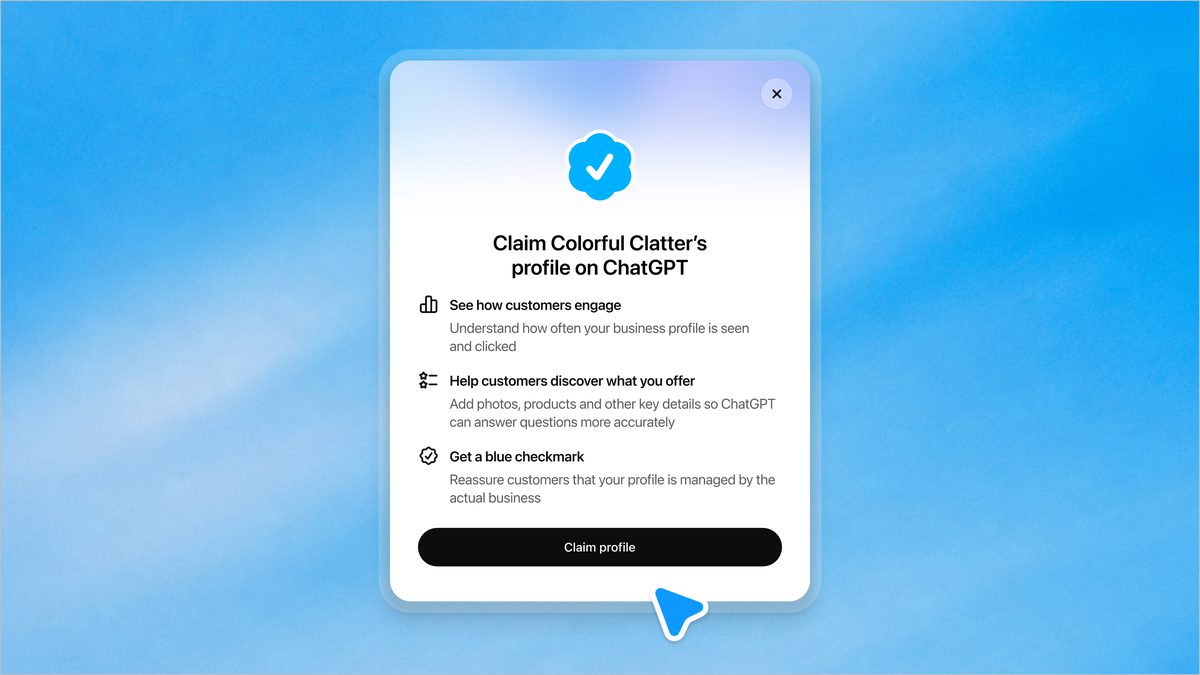

ChatGPT quietly turned into a search engine your customers already use, and most small businesses have no idea they’re already listed there. OpenAI launched Businesses in ChatGPT on November 10, and if you run a business, someone may be describing your products to customers right now without your input.
Here’s the uncomfortable part. When someone asks ChatGPT “where should I get my car serviced near me,” the model answers with something. If you haven’t claimed your profile, that something is based on scraped, possibly outdated data. Your old address, your closed hours, your discontinued services. Claiming fixes that, and it’s free.
What businesses in ChatGPT actually is
Think Google Business Profile, but inside ChatGPT. That’s the closest comparison, and honestly it undersells it a little.
The new system runs through something OpenAI calls Business Hub. You claim your business, prove you actually own it, and from there you control what ChatGPT says about the basics. Website, description, product categories, logo, delivery policy, return policy. All of it editable, all of it yours.
Once your claim and the Persona verification go through, a blue checkmark shows up on your profile inside ChatGPT. Same trick Twitter/X and Instagram use, and it works: customers can tell at a glance that this listing comes from the actual business, not from a web crawl that happened fourteen months ago.
There’s more, though. You can attach a product feed with pricing and availability. Shopify merchants already have this handled automatically through Shopify Catalog. Everyone else adds products manually through the Hub.
And here’s the piece most coverage glossed over: businesses can build a Business Agent. That’s an AI agent that answers customer questions and helps people explore what you sell, right inside the chat. We’ll get to that.
How to claim your business profile
The whole thing takes maybe twenty minutes if your business info is already in order. Here’s the path.
- Go to Business Hub at chatgpt.com/business-hub. Sign in with your ChatGPT account. Accept the Businesses in ChatGPT terms when prompted.
- Search for your business. Here’s the catch most people miss: physical businesses can only claim an existing listing. OpenAI’s systems have probably already scraped your business from public data, so your profile likely exists whether you made it or not. You’re claiming it, not creating it.
- Verify your identity through Persona, OpenAI’s verification partner. You’ll need to prove you own or are authorized to represent the business. Have your business documents handy.
- Wait for approval. Claim and verification both need to pass before you can edit anything.
- Update your profile. Once approved, open your profile in the Hub and fix the details: website, business description, category, logo, delivery and return policies.
- Check your Insights tab. This shows aggregated data on how people engage with your business in ChatGPT: mentions, clicks to your website, that kind of thing.
One note on eligibility. Any business located where ChatGPT operates can claim its profile. If you’re an OpenAI enterprise customer or an advertiser, you’ll work through your OpenAI rep instead of self-serve. Full details live in OpenAI’s announcement.
For product feeds, add your items with pricing and availability through the Hub’s self-service tools. This part matters more than it sounds, because product data feeds straight into shopping answers.
What to put in your profile first
Rushing through the fields is the most common mistake, and it costs you later. The Business Agent only sounds as smart as the data you gave it, so fill things in a specific order.
Start with the business description, because the model leans on it when summarizing what you do. Write it the way a good customer would describe you, not the way a mission statement would. Then the product feed: your five to ten best sellers with real prices. Prices go stale fast, so only list items whose prices you update anyway. Policies come last, and they matter more than you’d think, since “do you take returns” is one of the most common pre-purchase questions in any chat.
Photos and your logo round it out. A profile with a logo and current info looks maintained. A profile with a 2019 stock photo looks abandoned, and customers read that difference instantly.
Set up your Business Agent
A profile is passive. An agent works the floor.
After claiming, eligible businesses can build, test, and launch a Business Agent. When your business appears in a ChatGPT response, people click through to your profile, and the agent answers their questions there: what you sell, what things cost, whether you deliver, when you’re open.
Setup follows the same build-test-launch flow OpenAI describes in the announcement. You feed it your business details, test how it responds, then put it live. For a solo operator or a five-person shop, this is a customer service layer that never sleeps and never puts anyone on hold.
Don’t expect magic, though. The agent only knows what you give it. A thin, half-filled profile produces a thin, half-useful agent. Fill in your product feed properly first, then build the agent on top of that solid base.
What it costs (and what you get)
Free. The Businesses in ChatGPT beta has no price attached, and OpenAI hasn’t announced one. You need a ChatGPT account and the time to verify ownership.
What you get breaks down into three things:
- Accurate info: the model uses your data instead of stale scraped listings
- A blue checkmark: customers see the profile is verified, which builds trust instantly
- Insights: aggregated data showing how many people mention you and click through
Compare that to Google Business Profile, which took years to become essential and punished latecomers. The businesses that claimed early dominated local search for a decade. Businesses in ChatGPT is at that same starting line right now, in beta, with almost nobody’s name on the roster.
Who should skip it
Being honest, this isn’t for everyone yet.
If you’re purely online with no physical presence, claiming may not work at all, since the beta leans on existing scraped listings for physical businesses. If your customers have never heard of ChatGPT and never will, the ROI is theoretical. And if your business info changes constantly, you’re signing up for maintenance work every time something shifts.
For everyone else, especially local services, restaurants, clinics, contractors, retail shops: your customers are already asking ChatGPT these questions. Businesses in ChatGPT profiles are how the right answer includes you.
Want the bigger picture on where ChatGPT’s commerce push is heading? We covered how Shopify stores now sell through AI agents directly, plus what ChatGPT ads mean for advertisers. And if you’re curious about the internal version of this idea, our guide to ChatGPT company knowledge covers how companies feed AI their internal docs. Together they sketch the full map: ChatGPT as storefront, ad platform, and now business directory.
Your next move
Block twenty minutes this week. Go to Business Hub, search your business, and start the claim. While verification processes, gather your product info so the feed goes in the same day you’re approved.
The businesses that claim early will be the ones the model learns to recommend. That’s not hype, it’s how every platform shift starts.