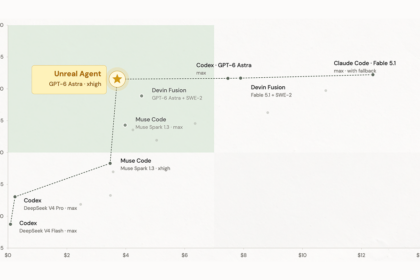

Imagine getting 97% of the performance of a $1,000/month AI assistant — for about $110.
In fact, that’s not a hypothetical. A Chinese AI company called StepFun just released a model called Step 3.7 Flash that pulls off exactly that trick, and it’s completely open-source.
Here’s what it does, what it costs, and whether it’s worth your attention.
The problem: AI that costs a fortune to actually use
You’ve probably noticed that using AI for real work — not just chatting, but actual coding, analyzing documents, running agents — gets expensive fast.
Claude Opus charges $5 per million input tokens and $25 per million output tokens. GPT-5.5 isn’t cheap either. Moreover, if you’re running AI agents that read code, browse websites, and iterate through tasks, those tokens add up to hundreds or even thousands of dollars per month.
For freelancers, startups, and solo developers, that’s a real problem. You want the capability of a frontier model — but not the bill.
What is Step 3.7 Flash?
Specifically, Step 3.7 Flash is an open-source AI model built for agents — AI systems that don’t just answer questions, but actually do things: browse the web, read files, write code, and execute multi-step workflows.
It was released on May 29, 2026 by StepFun, a Shanghai-based AI company, and it’s available under the Apache 2.0 license, meaning anyone can use it, modify it, or run it on their own hardware for free.
The numbers: Specs that matter
To start, here’s the quick version of what’s under the hood:
- 198 billion parameters total — but only about 11 billion are active at any time
- Think of it like having 198 experts on staff but only calling the 11 who are relevant to your current question. That’s what makes it so fast and cheap
- 256,000 token context window — enough to process an entire codebase or a massive document in one go
- Up to 400 tokens per second — faster than most models in its class
- Three reasoning levels — low, medium, or high, so you can dial up brainpower when you need it and save money when you don’t
- Native multimodal — it understands text, images, and video input, not just text
As a result, Step 3.7 Flash is one of the most efficient large models ever released. It activates only about 5.5% of its total 198 billion parameters per response, which is why it’s so fast and so cheap.
What makes Step 3.7 Flash different?
However, there are dozens of open-source AI models out there. So what sets this one apart?
It sees — multimodal understanding
By contrast, most AI models only read text. Step 3.7 Flash can look at images too — screenshots, charts, documents, product interfaces — and understand what it’s seeing.
For example, this means you can show it a UI mockup and ask it to build the code. Or feed it a financial report with charts and ask it to summarize the key takeaways. Importantly, it scored #1 on SimpleVQA Search (79.2), a benchmark that tests visual understanding with search augmentation.
Furthermore, the vision capability isn’t an afterthought. Step 3.7 Flash includes a dedicated 1.8 billion parameter vision encoder built specifically for processing images alongside text.
It thinks — reasoning and tool use
This is where Step 3.7 Flash really shines — in its ability to use tools and reason through complex problems. On ClawEval-1.1, the leading benchmark for adversarial agent reliability, it scored 67.1 — the highest score of any model tested. The next closest competitor scored 59.8.
What does that mean in plain English? Essentially, when you tell Step 3.7 Flash to complete a multi-step task — like finding a bug, fixing the code, and running tests — it stays on track. It doesn’t get confused, break tool calls, or lose the plot halfway through. Consequently, fewer failed runs mean less wasted money.
It acts — real agentic workflows
Step 3.7 Flash is designed from the ground up to power coding agents. On SWE-Bench PRO — a benchmark that measures real bug-fixing ability on actual GitHub issues — it scored 56.3, ranking #2 overall and #1 among all open-weight models.
Compared to the competition, that puts it ahead of DeepSeek V4 Flash (55.6) and Gemini 3.5 Flash (55.1), and just behind GPT-5.5 (58.6) and Claude Opus 4.7 (64.3). Not bad for a model that costs a fraction of the price.
The 9x cost advantage: How Step 3.7 Flash saves you money
Naturally, this is the part that should make you pay attention.
Step 3.7 Flash vs GPT: Pricing head-to-head
Here’s what Step 3.7 Flash costs through the StepFun API or OpenRouter:
- Input: $0.20 per million tokens
- Output: $1.15 per million tokens
- Cached input: $0.04 per million tokens (when the model has already seen your context)
Now compare that to the competition:
- Claude Opus 4.6: $5.00 input / $25.00 output
- GPT-5.5: $5.00 input / $30.00 output
- Claude Sonnet 4: $3.00 input / $15.00 output
That means Step 3.7 Flash is 25x cheaper than Claude Opus on input tokens and about 22x cheaper on output tokens. Even more striking, it’s also 25x cheaper than GPT-5.5 on input and 26x cheaper on output. The savings are dramatic across the board.
Still, the real headline number comes from Advisor Mode.
Advisor mode: Frontier quality at Flash prices
Here’s where things get genuinely clever.
Step 3.7 Flash has a feature called Advisor Mode. Here’s how it works:
- Step 3.7 Flash handles the actual work — reading code, running tools, writing patches, checking results. This is the “executor” role, and it handles about 95% of what an agent needs to do
- When it hits a roadblock — planning a complex strategy, recovering from repeated failures — it consults a larger frontier model (like Claude Opus 4.6) for guidance. This is the “advisor”
- The crucial detail: Step 3.7 Flash stays in control. It decides when to ask for help, not the other way around
The result? You get 97% of Claude Opus 4.6’s coding performance at 1/9th the cost per task — roughly $0.19 versus $1.76 per task.
Think of it like this: you have a fast, cheap intern who does 95% of the daily work brilliantly, and they only call in the expensive senior partner when they’re truly stuck. You get senior-level results without the senior-level invoice.
Who should use Step 3.7 Flash?
Developers and agencies
If you’re running coding agents daily, the cost savings are significant. At $0.20/M input tokens, you can process entire codebases for pennies. In addition, it works with popular agent frameworks like Claude Code, OpenClaw, Kilo Code, and Hermes Agent — so you don’t need to rewire your existing setup.
Startups on a budget
Alternatively, if you’re building AI-powered products and paying for Claude or GPT API calls, switching to Step 3.7 Flash for routine tasks could cut your AI bill by 5-25x. Save the expensive models for the tasks that truly need them.
AI enthusiasts and experimenters
On the other hand, want to run a powerful AI model on your own hardware? If you have a Mac Studio or Mac Pro with 128GB of unified memory, you can run Step 3.7 Flash locally using tools like vLLM or llama.cpp. No API calls, no monthly bills, and your data never leaves your machine.
How to get started with Step 3.7 Flash
Option 1: Use the API (easiest)
Fortunately, the fastest way to try Step 3.7 Flash is through the StepFun platform or OpenRouter. Both use the standard OpenAI-compatible API format, so if you’ve ever used ChatGPT’s API, you already know how to use this.
To get started, sign up at platform.stepfun.ai or openrouter.ai, grab an API key, and start making calls. You can even choose your reasoning level (low, medium, or high) to balance speed and quality.
Option 2: Run it locally (free)
Of course, if you have the hardware — specifically, a machine with at least 128GB of unified memory — you can download the model from HuggingFace and run it entirely on your own machine.
Supported frameworks include vLLM, SGLang, HuggingFace Transformers, and llama.cpp. However, quantized versions are available if you want to squeeze it onto less memory, though even the most compressed version needs around 102GB.
Option 3: Use via OpenRouter
Already using OpenRouter for other models? Just switch your model name to stepfun/step-3.7-flash and keep your existing setup. OpenRouter handles the routing, you get the same pricing, and it plays nicely with tools like Cursor, Continue, and other AI coding assistants.
Step 3.7 Flash benchmarks: How good is it, really?
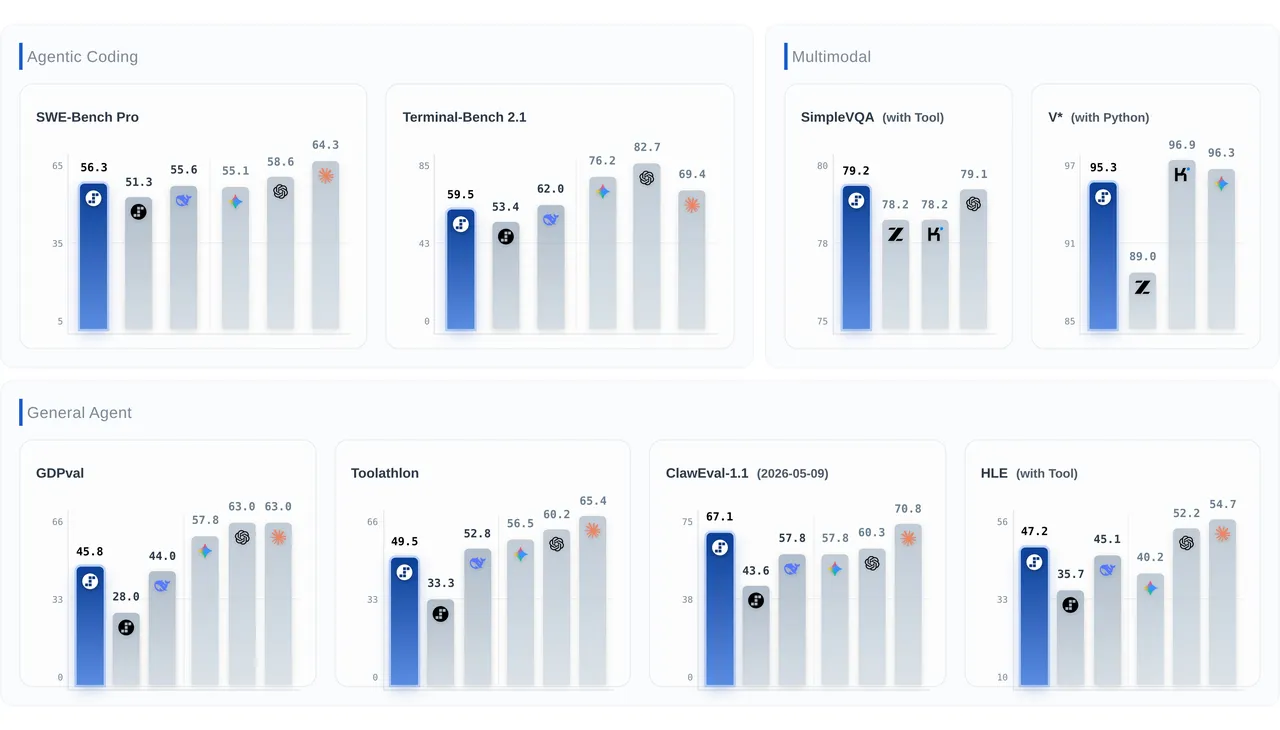
Overall, the pattern is clear: Step 3.7 Flash excels at agent reliability and visual understanding, performs competitively on coding tasks, and still has room to improve on general enterprise tasks.
The catch: What Step 3.7 Flash can’t do (yet)
Of course, no review is complete without the honest part. Here’s what Step 3.7 Flash doesn’t do well:
1. It’s not as smart as Claude Opus for complex coding. While 56.3 on SWE-Bench PRO is impressive for an open model, Claude Opus 4.7 scores 64.3. For really complex, multi-file debugging, the gap is real.
2. Local deployment needs serious hardware. You need 128GB of memory minimum. That means a Mac Studio, Mac Pro, or high-end workstation. Your regular laptop isn’t going to cut it.
3. It’s brand new. Admittedly, the model launched on May 29, 2026. Most reviews and benchmarks right now are based on official numbers, not independent testing. The real-world track record is still being written.
4. Some community hesitation. StepFun’s previous model (3.5 Flash) received mixed reviews on Hacker News, with some users calling it “kind of weak.” Step 3.7 Flash is a major improvement, but early trust matters.
5. China-based company. StepFun is headquartered in Shanghai. For some businesses, data residency and geopolitical concerns are a factor worth considering.
Final verdict: Should you care about Step 3.7 Flash?
Ultimately, yes — especially if you’re paying for AI API calls right now.
Rather than trying to replace Claude Opus or GPT-5.5 at the very top, Step 3.7 Flash is carving out a different space: the high-efficiency, low-cost workhorse that handles 90% of your AI tasks at a fraction of the price.
Moreover, the Advisor Mode concept is genuinely innovative — letting a cheap model do most of the work and only escalating to an expensive one when needed is smart economics. The fact that it’s open-source under Apache 2.0 makes it even more compelling for teams who want control over their AI stack.
Above all, here’s what to do right now: if you’re already using OpenRouter or a similar API gateway, try switching routine tasks to Step 3.7 Flash and compare the results. You might find that the quality gap is smaller than the price gap — and that’s a win.