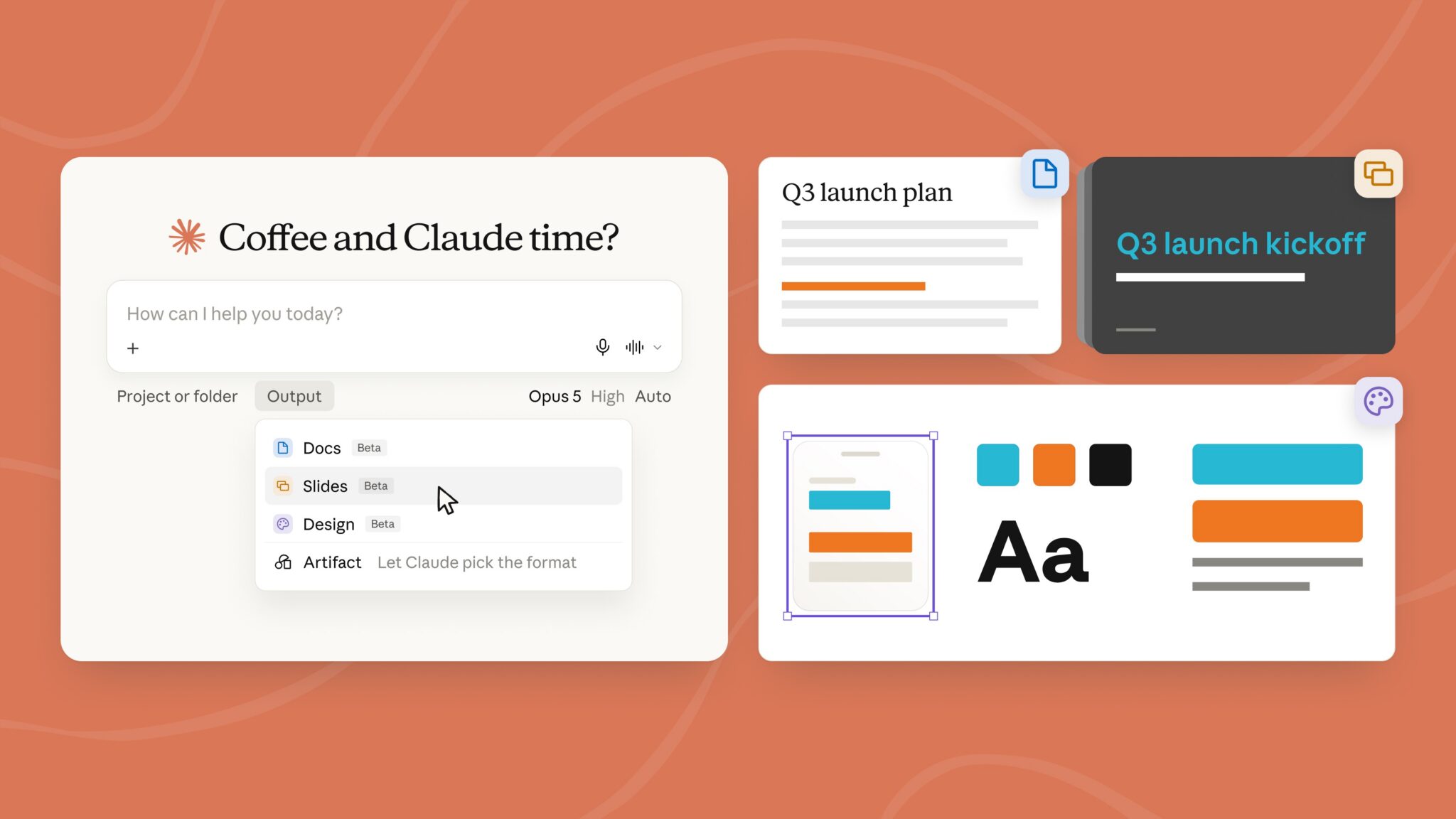

Anthropic just collapsed half of its app into a single window. Claude Docs and Claude Slides landed in beta on September 16, and they turn the chat into something closer to Google Docs than a chatbot. If you make documents for a living, this one matters.
What Anthropic actually launched
Here’s the short version. Before this week, Claude split work across separate tabs: regular chat, Cowork for bigger projects, and Artifacts for interactive outputs. Users kept picking the wrong tab, so Anthropic merged all of it. Now chat, Cowork, and Artifacts share one interface, and Claude routes your request to whatever capability it needs. Anthropic detailed the rollout on its official newsroom.
Claude Design, the site and prototype builder from April, also works from any conversation now. You don’t open a special mode. You just ask.
The change came directly from user feedback. People were frustrated choosing between tools before they even knew what the task required. So the router decides instead. Ask a quick question, get a quick answer. Ask for a full project, and the same window spins up everything it needs.
Claude Docs, explained
Claude Docs is the headline feature. You ask for a document, and instead of spitting out static text, Claude builds a living file right in the conversation. Then you edit it like a Google Doc.
Three things make it feel different from the old copy-paste workflow:
- Real-time collaboration. Files start private, but you can share them with a link, and multiple people (including Claude itself) edit at the same time.
- Inline comments. Claude drafts a section, explains its choices in the margin, and asks clarifying questions before moving on. You can leave comments back, thread-style.
- Mobile handoff. Start a document on desktop, then check progress from your phone while it generates.
That last one sounds small. It isn’t. Anyone who has waited on a long generation with a laptop held hostage knows why.
How the editing actually works
You can highlight a section and type instructions like “tighten the intro and add a risks section.” Changes save automatically and appear instantly for everyone with access. Nothing locks while Claude works, so you can type in one section while it rewrites another.
If you’ve used the Claude memory rollout or connected Claude to Gmail, the pattern feels familiar: Claude stops being a text vending machine and starts being a workspace. The document is where the work lives now. The chat is just how you direct it.
Claude Slides: decks without the tab-hopping
Slides work the same way. Describe the deck you want, and Claude drops a presentation into the chat. You can tweak individual slides, present directly from the interface, or export to PowerPoint and PDF. Editing happens slide by slide, and the whole thing stays shareable through a link like Docs do.
For anyone who builds weekly decks, that’s a real workflow change. The export step matters too, because “my AI tool doesn’t open in PowerPoint” has killed a thousand adoptions at normal companies.
Where everything lives now
| Feature | Before | After September 16 |
|---|---|---|
| Quick questions | Chat tab | Same window |
| Multi-step projects | Cowork tab | Same window, auto-routed |
| Interactive outputs | Artifacts tab | Same window |
| Website prototypes | Claude Design mode | Available in any conversation |
| Documents and decks | Static text to copy out | Claude Docs and Slides, editable in place |
Who gets it first
The rollout started with Pro and Max subscribers on web, desktop, and mobile. It’s rolling out over the coming weeks, so don’t panic if your app still looks old. Team and Free tiers come later, and Anthropic says enterprise admins get at least 30 days notice before the unified interface reaches their orgs.
That staging tells you something. Anthropic wants feedback from power users before the feature hits millions of free accounts. Beta means beta.
How to try it today
- Log in to Claude on web or desktop with a Pro or Max account.
- Look for the unified window. If chat and Cowork still show as separate tabs, the rollout hasn’t reached your account yet.
- Type a document request into the chat, like “draft a one-page project brief for a website redesign.”
- Open the document it creates, then try a comment: select a paragraph and ask Claude to expand it.
- Share the file with a teammate’s email or link, and watch the edits appear live.
- For a deck, ask for slides on the same topic and export to PowerPoint before your next meeting.
Ten minutes with step 3 through 5 will tell you more than any review, including this one.
Why Anthropic is doing this now
Follow the money. OpenAI launched ChatGPT Work in July, folding its chatbot and Codex coding tool into one product aimed at exactly these customers. Both companies are racing toward IPOs, and both want enterprises to think of them as work infrastructure, not toys.
Anthropic also pushed Claude deeper into Salesforce and Slack this month, plus a partnership with Charles Schwab. Docs and Slides extend that same pitch: keep your work inside Claude, and the subscription pays for itself in cancelled tool sprawl.
Google is the other elephant. Gemini already lives inside Docs, Sheets, and Slides for billions of users. Anthropic can’t match that distribution, so it’s betting on depth instead: collaborative AI-native documents built around the model, rather than an assistant bolted onto legacy files. We covered how the new Claude 5.1 model fits into this push if you want the model side of the story.
What it costs
Nothing extra. Docs and Slides ride along with the Claude Pro and Max subscriptions that already exist, no add-on and no separate product to buy. If you’re on a paid plan, you’re getting the whole workspace. Free users get access later, though Anthropic hasn’t said exactly when.
That pricing is the point. Anthropic would rather you cancel a separate writing tool than pay them more per feature. Every workflow that moves inside Claude makes the subscription harder to drop.
How it stacks up against ChatGPT and Gemini
So should you switch? Depends on where your work already lives.
| Tool | Where documents happen | Collaboration | Best for |
|---|---|---|---|
| Claude Docs and Slides | Inside the Claude chat | Live co-editing with comments | Teams already paying for Claude |
| ChatGPT (Work, since July) | Chat combined with Codex | Sharing, less doc-style editing | Mixed chat and coding work |
| Gemini in Workspace | Inside Docs, Sheets, and Slides | Full Google Docs collaboration | Anyone living in Google files |
The honest read: if your company runs on Google Workspace, Gemini is already where your files are, and Claude won’t change that this month. If you do writing-heavy work and prefer Claude’s drafting style, the new setup removes the biggest reason you kept switching away.
The catch
It’s beta software, and it shows. Formatting quirks, missing export options, and rollout inconsistencies are all fair game for a few more weeks. Free users will wait a while longer. And if your company runs on Microsoft Office, nothing here replaces Excel.
There’s also a habit problem. Millions of people have “copy from chat, paste into Word” burned into their muscle memory. The feature only saves time if you let it replace that loop, and that takes a week of conscious effort.
Still, the direction is obvious. The chat window stopped being a place where you ask for work and became the place where the work lives.
Takeaway
If you pay for Claude Pro or Max, open the app today and generate one real document with Claude Docs, something you’d normally write by hand. Export a slide deck while you’re there. If it sticks, you just dropped one more tool from your stack.