
Your phone already knows where you’ve been, what you watched, and what you googled at 2am. Google Dreambeans finally makes that creepy pile of data useful: it turns your Gmail, Calendar, Photos, and YouTube history into a small batch of illustrated stories about your actual life, delivered every morning.
What Dreambeans actually does
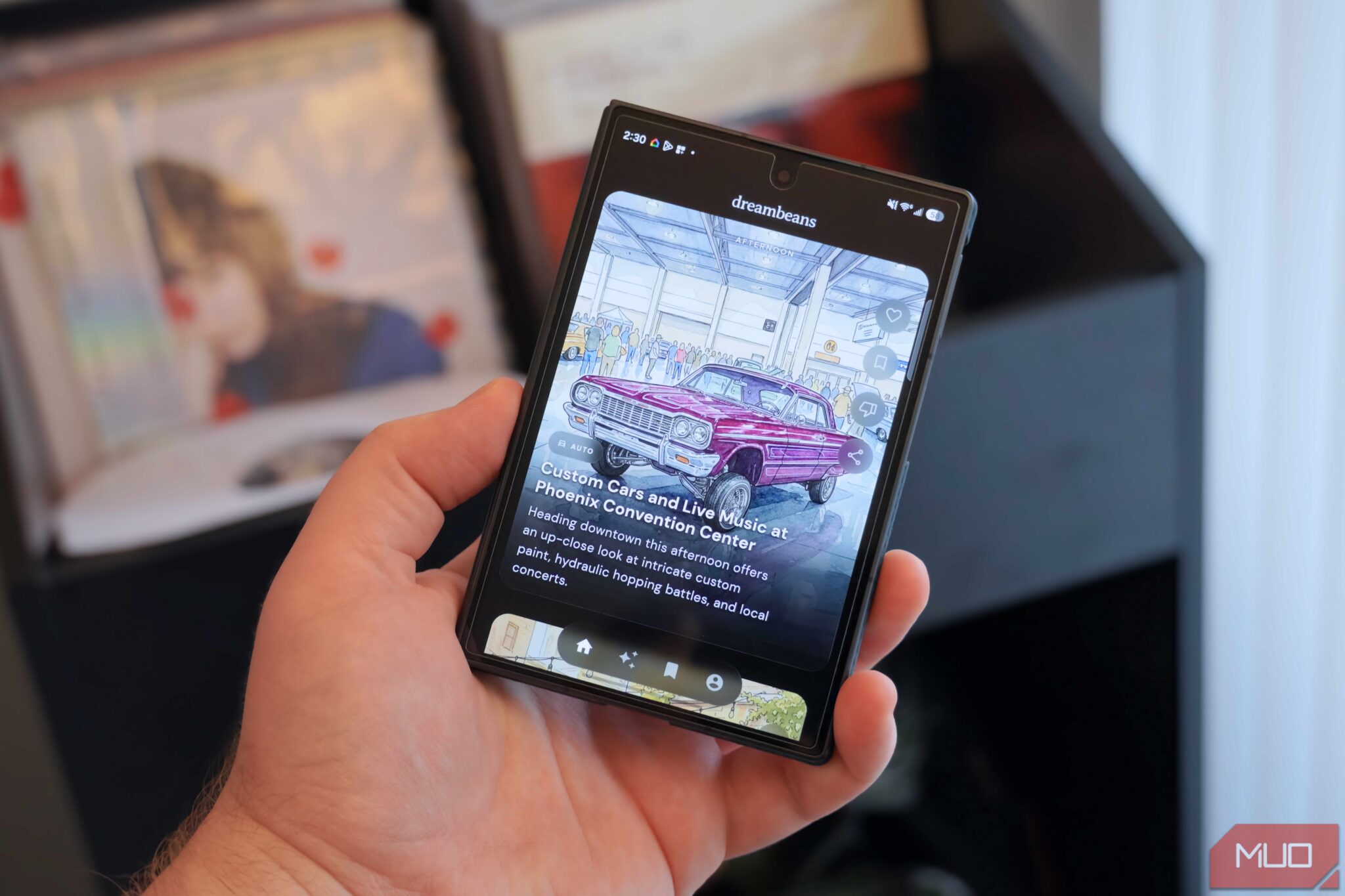
Google Dreambeans is an experimental app from Google Labs, and honestly, it’s the strangest-named thing Google has shipped in a while. The name makes sense once you know how it works. While you sleep, the app digs through your connected apps (“the dream” part). Then, like a fresh cup of coffee, it hands you your “beans” in the morning: 10 to 14 short stories, each one illustrated by AI.
These aren’t news articles or a social feed. They’re personal. One day you might get a story about a hiking trail two hours from your house, complete with where to park and what to pack. Another day, a reminder that your friend’s visit (which you added to Google Calendar) is coming up, plus dog-friendly restaurants near you because it noticed you just got a puppy. That example is real, by the way. Google’s own product lead described getting training tips for her puppy after a Gmail receipt for dog treats showed up.
Two things make it different from every feed you currently hate. First, the collection is finite. You get your Google Dreambeans stories, you’re done, go live your life. Google built it as an antidote to doomscrolling, which sounds like a marketing line until you open it and realize there’s genuinely nothing to endlessly scroll. Second, the artwork is generated for you specifically. If a story involves you or your people, it pulls context from Google Photos and uses Nano Banana 2 to draw the scene, so instead of stock photos you get illustrations that actually look like your hike, your friends, your dog.
How to set up Dreambeans in 10 minutes
Setting up Google Dreambeans takes minutes. Getting your first stories takes about a day, so plan for that.
- Go to labs.google/dreambeans and download the Google Dreambeans app on Android or iOS. It’s US-only right now, and you need to be 18 or older with a personal Google account (work accounts don’t count).
- Log in and set up your user profile. Nothing fancy here, just the basics.
- Connect at least one app. Dreambeans needs data to work with, and you choose exactly what it can see: Gmail, Calendar, Photos, YouTube, Search, or any mix.
- Wait. Your first batch takes up to 24 hours, because the system genuinely processes your stuff overnight.
- Read your morning drop. Each story links out to real web content when it’s useful, so a trail story connects to actual trail guides.
- Use “Ask anything” if a story raises questions. There’s a chat built into it, so you can dig deeper without leaving the app.
That’s the whole process. No spreadsheet of preferences, no quiz about your interests.
What each connected app adds
The apps you connect decide how personal your stories get. Here’s the breakdown Google gives:
| App | What it contributes |
|---|---|
| Gmail + Calendar | Ground truth: receipts, confirmations, upcoming flights and events |
| Google Photos | Visual memories and insight into who matters in your life |
| YouTube | Your actual hobbies, not the ones you claim to have |
| Search | Budding interests you haven’t told anyone about yet |
For what it’s worth, I’d connect Gmail and Calendar first. Those two carry the “real life” signals, the flights and appointments and purchases that make stories feel relevant instead of generic. Photos and YouTube make the illustrations and hobby angle richer, but the schedule stuff is what turns a story from “neat” into “how did it know that.”
Privacy-minded readers are already side-eyeing this whole thing, and that’s fair. You’re handing Google permission to read across your stuff in exchange for daily stories. The controls are real, though: you pick which apps connect, and Google says choices you make in Dreambeans don’t change your Personal Intelligence settings elsewhere. If that trade doesn’t sit right with you, skip it. There’s no shame in that math.
Tuning: the part most people skip
Here’s the feature nobody talks about and everybody should use on day one: tuning.
Every story has a thumbs down button and suggestion chips. Tap thumbs down and you get a quick chat where you can fix the record: “that’s not my city,” “I did that already,” “not for me, stop showing this.” There’s also a general “Tune your feed” setting where you name what you want more of and what should never appear again.
One catch, and it trips people up: corrections don’t rewrite today’s stories. They process overnight and shape your future drops. So if Dreambeans recommends an escape room and you hate escape rooms, tell it once and the app won’t serve you another one next week. People who skip tuning get mediocre feeds and then blame the app. Spend five minutes on it in your first three days and the stories get noticeably sharper.
This is the same personalization play Google is running across its AI apps, by the way. The company’s Gemini features now lean on what it calls Personal Intelligence, the same system behind things like voice commands in Gmail and Docs that we covered in our guide to Google’s AI voice features. Dreambeans is just the most visible example of it.
Who should bother (and when Google Dreambeans is worth it)
If you already live inside Google’s ecosystem, Google Dreambeans is a free experiment that costs you ten minutes of setup and one day of patience. The morning-drop format fits people who want useful ideas without another infinite feed, and the illustrations make it feel more like a tiny daily magazine than a product test.
Is it life-changing? No. Some stories will be obvious, a few will be slightly off, and you’ll tune them out. But the core loop of Google Dreambeans (your data, turned into a finite, personal, genuinely useful morning briefing) is the most interesting take on “AI for regular people” Google has shipped this year. Check the app’s official Dreambeans page for the current rollout status, since Google expands access in waves. Free access is rolling out to US Google accounts now; before that you needed a pricey AI Ultra or Pro subscription, so the timing is good.
And if you like this kind of setup-once, benefits-daily tool, you’ll probably get more out of Gemini automations on Android, which runs on the same personal-data idea but automates actions instead of stories. Between the two, your phone stops being just a phone and starts quietly working for you.
Give Dreambeans three mornings in a row before judging it. That’s how long your tuning feedback needs to kick in, and it’s also how long it took me to stop comparing it to a feed and start treating it like a briefing. Different product once you make that switch.
Takeaway: Download Dreambeans, connect Gmail and Calendar first, wait a day, then spend five minutes tuning. Do that and you’ll get a personal morning briefing no social feed can copy.