
Google quietly gave Gemini Notebook a website builder, and most people haven’t noticed yet. Not a joke and not a mockup: your research notes become an interactive website, no code involved. The Gemini Notebook website builder might be the most overlooked AI release of the month.
Most people still think of NotebookLM as the “AI podcast generator” app. It outgrew that label a while ago, and this new feature is the clearest sign yet. Your notes are becoming an actual product you can share.
What the Gemini Notebook website builder actually does
Gemini Notebook (the rebranded NotebookLM) is Google’s AI research tool. You feed it sources: documents, links, YouTube videos, your own notes. Then you ask questions, generate study guides, or turn the material into flashcards, quizzes, audio overviews, video explainers, mind maps, and infographics.
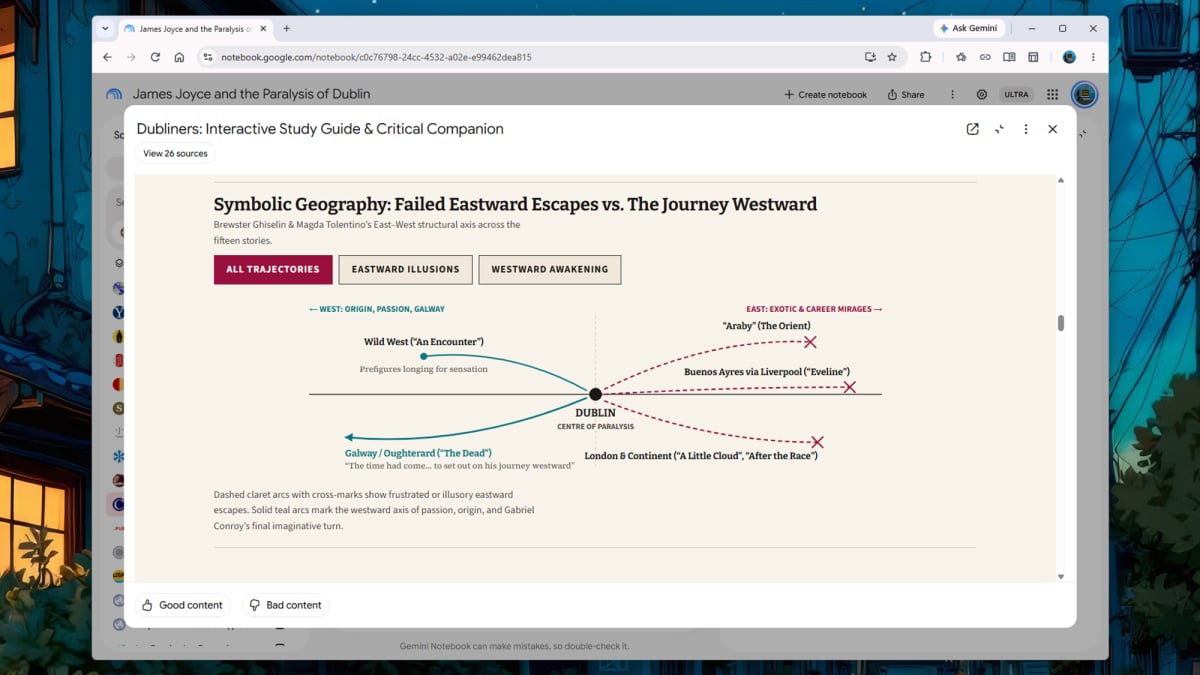
The Gemini Notebook website builder is the newest output on that list. It takes the sources in your notebook and builds an interactive site from them. Think of it as a study guide that grew up: pages with structure, navigation, and interactive elements instead of a wall of text.
The reasonable question: is this just a fancy document? No, and the difference matters. A document reads top to bottom. These sites let a visitor jump between sections, explore what interests them, and interact with the material. Lifehacker tested it and came away genuinely surprised at how useful it was, though with real limitations I’ll get to.
How to build your first site (step by step)
The Gemini Notebook website builder works straight from your sources, so the whole thing takes about five minutes.
Step 1: Open Gemini Notebook at notebook.google.com (or through Gemini). Create a notebook or open one you already have.
Step 2: Add your sources. PDFs, Google Docs, website links, pasted text, YouTube URLs. The site is only as good as what you feed it, so spend a minute here. Garbage in, garbage site out.
Step 3: Find the website option. It sits alongside the other outputs: the Audio Overview button, flashcards, mind map, and the rest. Pick the interactive website option.
Step 4: Let it build, then steer. Gemini generates the site from your sources. You can ask for changes the way you’d ask a colleague: “make the summary section shorter,” “add a comparison table for these three options.” Iterate a couple of times.
Step 5: Share it. Here’s the catch worth knowing upfront: you can’t publish these sites to the open web. No custom domain, no public URL that Google indexes. You share them with specific people, who open them directly. For studying, team docs, or client-ready summaries, that’s usually enough.
One more workflow note: the site updates when you regenerate it, not automatically. Add a source tomorrow and the site you shared stays as-is until you rebuild it. Minor thing, but it trips people up on the second day.
A worked example (so you can picture it)
Say you run a small bakery and you’ve collected everything about sourdough starters over the months: a recipe PDF, three YouTube tutorials, a few notes from failed batches. Drop them into one notebook. The builder turns that pile into a site with a quick-start section, a troubleshooting page (“why did my starter smell like acetone?”), and a feeding schedule table. You share the link with two employees instead of repeating yourself every Monday. That’s the shape of the thing: your scattered knowledge, organized and navigable.
I tried a version of this with a pile of saved articles about home espresso, and the output handled conflicting sources better than expected. Where two sources disagreed on grind size, the site presented both positions instead of silently picking one. That’s the synthesis quality you want. Teachers and trainers: swap the bakery for your course material and the same pattern holds, which is why study use keeps topping the user reports.
Where it actually shines
A few use cases where this beats everything else I’ve tried:
- Study guides that don’t suck. Feed it a semester of lecture notes and get a navigable site instead of 40 pages of scribbles. Quiz yourself with the built-in flashcards, then read the deep sections.
- Project handoffs. New teammate needs context on a project? A notebook site beats a stale wiki page because it’s generated from the actual sources and it’s interactive.
- Research briefs for clients. Consultants and freelancers: this is a legit deliverable. Sources in, polished interactive summary out. It looks more professional than a slide deck, and it takes minutes.
- Job hunting. Paste a job description, your resume, and three company articles into a notebook, then build a prep site: company facts, likely questions, your talking points. Cheaper than any interview-prep course I’ve seen.
- Family stuff. Vacation planning, a guide to grandma’s recipes, a school project. Non-technical people can build this. That’s the point.
The honest limitations
No tool review from me is all sunshine, so here’s what annoyed me:
- No public publishing. The big one. You can’t turn a notebook site into a real website on the internet. The Gemini Notebook website builder is for sharing, not hosting. If you want a public page, you’re pairing this with an actual host, or using a different tool entirely.
- Limited design control. You get less control than the marketing implies. Request changes in plain language, yes. Rearrange everything pixel by pixel, no.
- It inherits your sources’ quality. Thin sources, thin site. There’s no magic here, just good synthesis.
None of these are dealbreakers for the target use, which is sharing knowledge with a specific group of people. But go in knowing it’s not a web host.
How it compares to the other options
Quick orientation if you’re shopping around:
| Tool | Best for | Publish to web? | Effort |
|---|---|---|---|
| Gemini Notebook site | Interactive sites from your own sources | No, share only | Minutes |
| Gemini Canvas / ChatGPT Canvas | Quick single-page drafts and apps | Gemini pages shareable via link | Minutes |
| Framer AI / v0 | Real websites with design control | Yes | Longer |
The honest takeaway: if you need a real public website, use a real website builder. If you need to make your collected knowledge useful to a handful of people fast, the Gemini Notebook website builder is the fastest path I’ve seen. And if you’re still catching up on what changed when NotebookLM became Gemini Notebook, my guide to the rebrand and its new features covers that ground.
Pro tips before you start
- Add 5-10 strong sources rather than 40 weak ones. The builder synthesizes, and synthesis over a small, quality set reads better.
- Ask for a specific audience in your steering prompt: “make this for beginners” actually changes the output tone.
- Regenerate the sections you care about; the first pass is good, not final.
- Keep one notebook per topic. Mixing your sourdough research with your work project produces a site that serves nobody. One project, one notebook, one site: that’s the whole discipline.
- If your notes live in another AI tool, moving them is quick; here’s how to transfer your ChatGPT history to Gemini.
Your move
Grab the messiest pile of notes you have (a work project, a class, a hobby) and spend five minutes building a site with the Gemini Notebook website builder. You’ll know within one notebook whether this earns a spot in your workflow. And if your notes are still scattered across tools, it might be time to consolidate them first; that alone upgrades every output this thing generates.