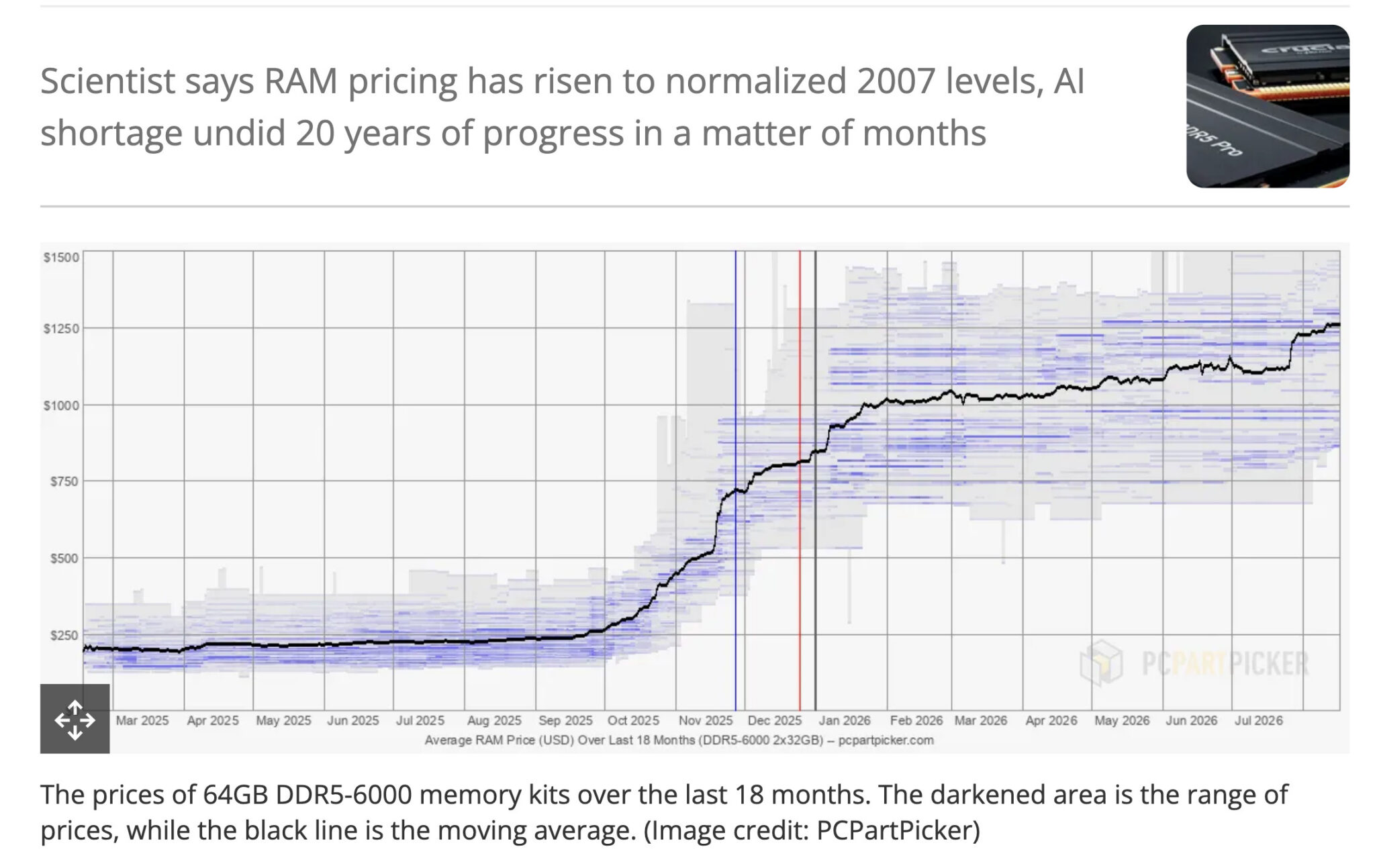

You want to run Llama 3.1 70B locally. You check RAM prices. Your jaw drops. 128GB of DDR5 costs $340. It was $120 a year ago. Same kit. Same speed. Five hundred percent increase.
Welcome to the memory crisis. Moore’s Law didn’t just stall for DRAM — it reversed. Memory now costs what it did in 2007. Hyperscalers have locked up 2027 production. If you’re building a local AI rig today, you’re fighting Google and Microsoft for every stick.
Here’s the good news: you don’t need 128GB. You don’t even need DDR5. And the best value platform for local LLMs isn’t a DIY PC at all.
The Memory Crisis: What Happened and Why It Matters
Tom’s Hardware calls it “RAMageddon.” Latent Space tracks it as Moore’s Law reversing to 2007 levels. The numbers:
- 128GB DDR5-6000: $340 (was $120 in 2024)
- Mainstream DRAM per kg: >50% the price of gold
- 2027 production: Essentially sold out to hyperscalers via advance deposits
- HBM3/4 for AI GPUs: Consuming all leading-edge fab capacity
Why? AI training needs bandwidth. HBM (High Bandwidth Memory) shares fabs with DDR5. Every HBM stack for an H100 is DDR5 that doesn’t exist. Nvidia, AMD, Google, Amazon — they’re buying years of output upfront.
For you, this means: building a new DDR5 PC for local AI is lighting money on fire. Unless you need cutting-edge bandwidth for something else, you’re paying a massive AI tax.
How Much RAM Do You Actually Need? (By Model Size)
Forget marketing specs. Here’s what actually works with quantization (4-bit/8-bit):
| Model Size | 4-bit Quantized | 8-bit Quantized | Full Precision (don’t) |
|---|---|---|---|
| 1B-3B | 2-4 GB | 4-6 GB | 8-16 GB |
| 7B-8B | 5-7 GB | 8-12 GB | 16-24 GB |
| 13B-14B | 8-10 GB | 14-18 GB | 28-32 GB |
| 32B-34B | 18-22 GB | 32-38 GB | 64-72 GB |
| 70B-72B | 38-44 GB | 68-76 GB | 140+ GB |
Key insight: 4-bit quantization loses maybe 5-10% quality for 50% memory savings. For most use cases, it’s the only rational choice.
Add 2-4GB for OS overhead. Add context length: roughly 1GB per 32K tokens at 4-bit. A 128K context 70B model needs ~48GB just for KV cache.
The Quantization Cheat Code: Run Bigger Models on Less RAM
Quantization isn’t magic. It’s math. 4-bit means each weight uses 4 bits instead of 16. 4x compression. Quality drop is real but often negligible for chat, coding, summarization.
Tools that handle this automatically:
- llama.cpp / ollama: Download quantized GGUF, run instantly
- LM Studio: GUI for the above, model search built in
- llamafile: Single executable, runs anywhere
- ExLlamaV2 / GPTQ: GPU-only, faster inference
Rule of thumb: If your GPU VRAM + system RAM (for offloading) exceeds the 4-bit requirement, it runs. Speed depends on how much fits in VRAM.
Best Hardware Options Right Now (Ranked by Value)
Option 1: Apple Silicon (Best Price/Performance)
MacBook Pro M2/M3 Max (96GB unified) or Mac Studio M2 Ultra (192GB).
Why it wins: Unified memory = GPU and CPU share the same pool. No VRAM limit. 96GB runs 70B at 4-bit. 192GB runs 70B at 8-bit or 405B at 4-bit.
Pricing (used/refurbished):
- M2 Max 96GB: $1,800-2,200
- M3 Max 96GB: $2,400-2,800
- M2 Ultra 192GB: $3,500-4,500
Trade-offs: Not upgradeable. macOS only (mostly). But for pure local LLM price/performance, nothing touches it.
Option 2: Used DDR4 + Consumer GPU (Best Budget PC)
Don’t buy DDR5. Buy a used DDR4 platform + the right GPU.
Sweet spot build (2026 prices):
- CPU: Ryzen 5 5600 / i5-12400 (~$100 used)
- Motherboard: B550 / B660 (~$80 used)
- RAM: 64GB DDR4-3600 (2x32GB) ~$120 used
- GPU: RTX 3060 12GB (~$220 used) or RTX 4060 Ti 16GB (~$380 new)
- Total: ~$520-680
What this runs:
- RTX 3060 12GB + 64GB RAM: 32B at 4-bit (offloaded), 13B fully in VRAM
- RTX 4060 Ti 16GB + 64GB RAM: 70B at 4-bit (heavily offloaded), 32B comfortably
Avoid: RTX 4060 8GB, 4070 12GB (VRAM too low for price). Used 3090 24GB (~$600) is king if you can find it.
Option 3: Cloud Hybrid (Best for Occasional Heavy Work)
Don’t own the hardware. Rent it.
- RunPod: $0.44/hr for A100 40GB, $1.64/hr for H100 80GB
- Lambda: Similar pricing, better UI
- Modal: Serverless, pay per second, great for batch
- Ollama + cloud: Run small models local, burst to cloud for big jobs
Monthly cost: If you need 70B for 10 hours/month = ~$4-16. Beats a $2,000 GPU that sits idle.
What to Avoid: The DDR5 Trap
| Build | Cost | What It Runs | Verdict |
|---|---|---|---|
| New DDR5 + RTX 4070 12GB | $1,500+ | 13B comfortably | Bad value – DDR5 tax |
| New DDR5 + RTX 4090 24GB | $3,000+ | 70B at 4-bit | Only if you need 4090 for other work |
| Threadripper + 256GB DDR5 | $5,000+ | 405B at 4-bit | Overkill for beginners |
The DDR5 premium buys you bandwidth you don’t need for inference. Latency matters more. DDR4-3600 CL16 is fine.
Decision Framework: Pick Your Setup in 3 Questions
Q1: What’s your biggest model?
- 7B-13B: Option 2 (used DDR4 + 12-16GB GPU) — $500-700
- 32B-70B: Option 1 (Mac M2/M3 Max 96GB) — $1,800-2,200 used
- 405B+: Option 3 (cloud) or Option 1 (M2 Ultra 192GB) — $3,500+
Q2: How often?
- Daily: Own hardware (Option 1 or 2)
- Weekly: Option 1 or cloud hybrid
- Monthly: Pure cloud (Option 3)
Q3: Mac or PC?
- Mac okay: Option 1 (best value)
- PC required: Option 2 (used DDR4) or Option 3
Future Outlook: When Will Prices Normalize?
Short answer: Not before 2027.
Long answer:
- Samsung, SK Hynix, Micron all expanding fabs. 2-3 year lead time.
- AI demand accelerating. HBM4 (2025-2026) will consume MORE leading-edge capacity.
- CXL memory expansion may help servers, not consumers.
- DDR6 is 2027+ at earliest.
Strategy: Buy used. Buy Apple Silicon. Or rent. Don’t feed the DDR5 premium.
Takeaway: The memory crisis is real, but it doesn’t mean local AI is dead. It means you buy smart. Used DDR4 + 12-16GB GPU for $600 runs most models you’ll actually use. Mac M2 Max 96GB for $2,000 runs everything up to 70B. Cloud fills the gaps. Don’t build a $2,000 DDR5 PC “for AI” — you’re subsidizing Nvidia’s HBM supply. Be smarter than that.