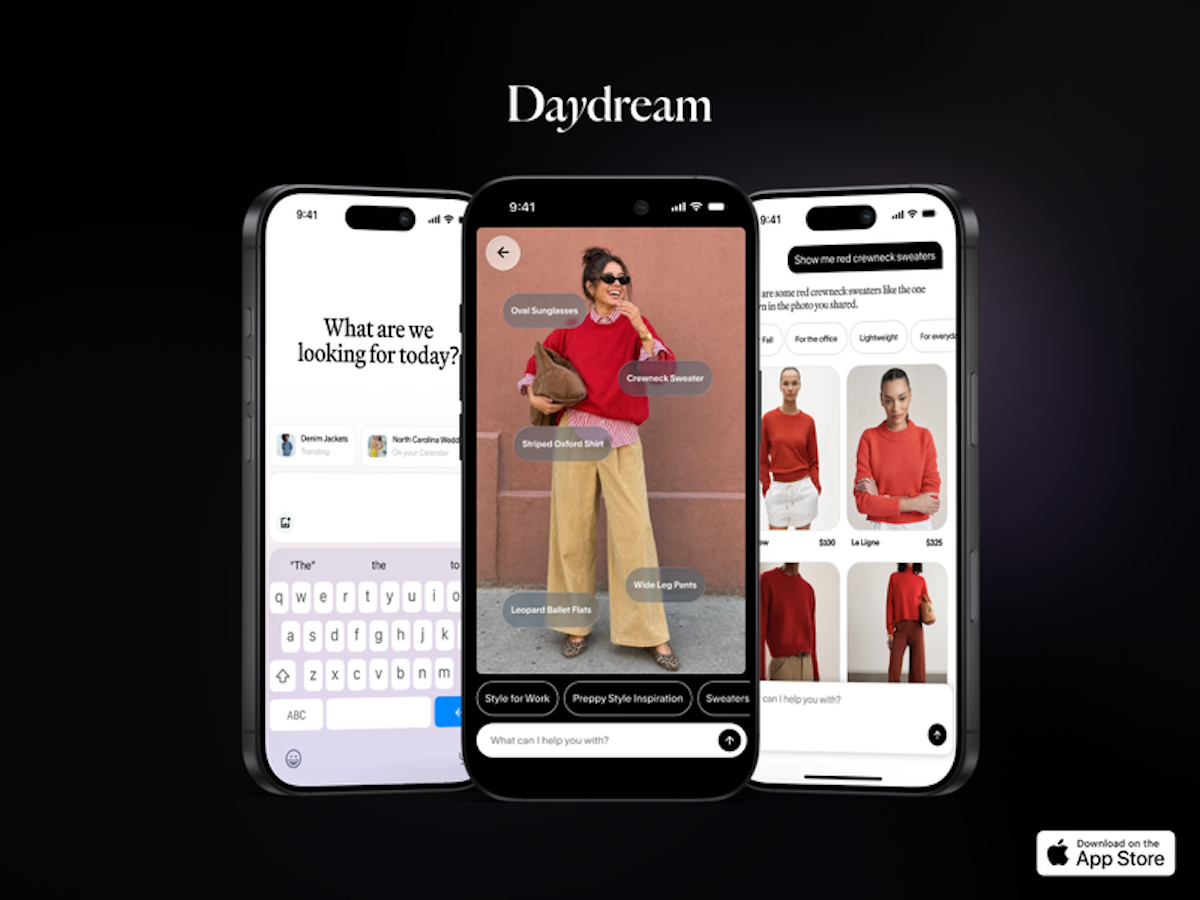

You screenshot an outfit on Instagram, tell yourself you’ll hunt it down later, and never do. Meanwhile the photo just sits in your camera roll, collecting digital dust. Daydream AI shopping wants to end that ritual, and its new iOS 27 update makes the idea feel real for the first time.
What Daydream’s new features actually do
Daydream AI shopping is a free fashion discovery app for iPhone, and it pulls from a catalog of roughly 3 million products across 325-plus retailers and 10,000 brands. Think Anthropologie, Uniqlo, J.Crew, Nordstrom, Gucci, Reformation and plenty more. The app already let you chat your way toward outfit ideas. This week it added two tricks built on Apple’s iOS 27 developer tools.
The first one is camera roll shopping. You pick an outfit photo you already saved, and Daydream studies it, identifies the individual pieces, and finds shoppable matches for each one. If the exact item is still available, the app points you to the retailer selling it. Sold out? You get similar options instead.
The second is Siri search. You can now ask for clothes by voice or text without even opening the app. Say something like “Hey Siri, search Daydream for a cool blazer for my board meeting on Monday,” and personalized results come back at you.
Both features need an iPhone running iOS 27 with Siri AI enabled, plus the Daydream app installed. That’s the whole checklist. No new hardware, no subscription.
Some context on where this company came from, because the name might be new to you. Daydream launched its app last year and picked up $50 million in seed funding along the way. Time magazine also gave it a Best Inventions mention in 2025. The iOS 27 integration is its biggest push yet to turn “I saw something cute” into “I bought it” in under a minute.
How to shop an outfit photo from your camera roll
Daydream AI shopping takes about a minute to set up, and the flow itself is quick.
- Install Daydream from the App Store. It’s free to download.
- Make sure your iPhone runs iOS 27 and Siri AI is turned on.
- Open Daydream and pick a saved outfit photo, or share one straight from your Photos app.
- The app breaks the look into pieces: the sweater, the pants, the shoes, the jewelry.
- Tap any piece to see shoppable matches, then filter by brand or price if the first round misses.
Here’s the part that separates this from the visual search you’ve already tried with general AI image tools. You can say you like the sweater in the photo but want it in red, and Daydream reruns the search around that change. For example, a general-purpose lens sees “a red sweater.” A fashion-trained one sees “a cropped red knit with balloon sleeves,” which is what you actually need to find a match. That distinction sounds small until you’ve spent twenty minutes scrolling through near-identical results that miss the point.
Julie Bornstein, Daydream’s co-founder and CEO, made exactly this argument to TechCrunch. In her words, most visual search tools lack fashion category expertise, so they return results that don’t feel accurate or link to images you can’t even buy. Daydream is betting a fashion-only catalog fixes that. So far the bet looks reasonable.
Search for clothes with Siri
Voice search inside Daydream AI shopping works the way you’d hope. Instead of opening an app, typing a query, and scrolling, you just talk.
Ask Siri to search Daydream for whatever you need, in plain language. “Search Daydream for a wedding guest dress under $150” works. So does “find me office shoes that aren’t boring.” Results come back personalized, which matters more than it sounds, because clothing search lives or dies on fit and taste.
Voice search for shopping has existed for years, and it has mostly been terrible. However, there’s a real difference between a speaker reading you three random products and an app that knows your sizes returning a curated set. As a result, this feels less like a party trick and more like the thing voice shopping was supposed to be.
Make results match your style
Personalization runs through Daydream’s Style Passport. You fill in your sizes, preferred brands, personal style, and budget once. After that, every search, whether it starts from a photo or from Siri, gets filtered through those preferences.
It’s the same idea as letting an assistant shop for you with a crib sheet. Skip it, and you’ll still get results. Fill it out, and the “similar options” actually resemble your taste instead of the algorithm’s.
How it compares to the other ways you already shop
You’ve got options when it comes to visual and AI shopping, so here’s the honest layout.
| Tool | What it searches | Best for |
|---|---|---|
| Daydream AI shopping | Fashion only, ~3M products from 10,000 brands | Outfit photos and style-matched fashion finds |
| Target AI photo search | Target’s own catalog | Quick household and clothing buys from one retailer |
| Google visual search | The open web | Identifying an exact item you saw in public |
Each one has a lane. Target’s app is great when you want the thing and you want it from Target, as we covered in our look at its AI photo search. Google is the tool for “what jacket is that?” Daydream AI shopping is trying to own the messier middle, where you know the vibe but not the product. Meanwhile, grocery-side AI like Instacart’s Clementine assistant shows the same playbook spreading across retail categories.
What Daydream gets right, and where it falls short
The strengths are obvious. Fashion-only focus means results come from brands that actually sell clothes you’d wear. The variation requests work, which is rarer than it should be. And the whole thing is free, with no ads, at least for now.
The catch is the iOS 27 requirement. If your iPhone can’t run it, or you haven’t updated yet, none of this works. Android users are out of luck entirely. On top of that, a 3-million-product catalog is big but not infinite, so niche or vintage pieces may never match.
Daydream’s longer-term plan is a shopping agent that understands your style well enough to work across every surface of your life. That’s the pitch from Bornstein, and honestly it tracks with where retail is heading. Today’s update is one step in that direction, not the destination.
Tips for better photo matches
Visual search quality depends a lot on the photo you feed it, so a little prep goes a long way.
Use full-outfit shots when you want the whole look, and tight close-ups when you only care about one piece. A screenshot of a shirt on a cluttered desk forces the AI to guess what you’re after. Good lighting helps too, since washed-out colors produce matches in the wrong shades.
Also, be specific in your follow-ups. Instead of accepting the first set of results, type what you’d tell a friend: “same jacket but cropped” or “these boots in brown under $200.” The tool rewards the same clarity that a personal shopper would.
None of this is complicated. It’s just the difference between a sloppy search and a good one, and it applies to basically every visual shopping app, not just this one.
Is it worth trying?
If your camera roll is a graveyard of outfit screenshots, yes. Setup takes five minutes, the app is free, and photo-to-purchase finally behaves the way you’d expect. Update to iOS 27, grab Daydream AI shopping from the App Store, and feed it that one photo you’ve been saving since spring. Worst case, you find the sweater. Best case, you stop screenshotting outfits altogether.