
ChatGPT Images 2.5 just landed, and OpenAI claims it’s faster, sharper, and way better at editing than anything it shipped before. Google’s Nano Banana 2 has been the default answer for most people since February. So which one actually deserves your prompts now?
What OpenAI actually shipped
ChatGPT Images 2.5 is what OpenAI announced on September 8, and the scale behind it is wild: people create more than 3 billion images every week across ChatGPT Images and the GPT-Image API models. That’s not a niche feature anymore. That’s mainstream infrastructure.
The headline upgrades are speed and control. Generation latency dropped by up to 50% compared with Images 2.0, so you can iterate without staring at a spinner. Editing got smarter too: the model changes only what you ask it to change and leaves the rest of the picture alone, even on busy backgrounds.
There’s a batch of new creative tools as well. Sketch lets you draw a rough guide directly in ChatGPT and use it as the reference for the final image. Templates cover popular formats like flyers and product photos, you can drop comments on specific parts of a picture, and you can share prompts so other people can run your idea with their own photos. Developers get two API models: GPT-Image-2.5 Flare for speed, and GPT-Image-2.5 Sunburst for detailed work where precision matters more than seconds. Everything is rolling out to all ChatGPT users on web, desktop, and mobile, with usage limits that vary by plan.
What it costs and where to find it
Here’s the good news if you’re broke or just cautious: Images 2.5 is available to all ChatGPT users, including free accounts. OpenAI ships it across web, desktop, and mobile apps at the same time. The catch is usage limits, and those vary by plan. Free users get a daily allowance that resets, paid tiers get more headroom, and heavy users on ChatGPT Work get the most. OpenAI keeps the exact numbers vague, so the practical approach is simple: start creating, and when you hit the wall, you’ll know.
To find the new tools, open a fresh chat and tap the plus button next to the prompt box. Sketch lives in that menu, and on mobile it hides behind a second tap on Plugins. Templates show up as ready-made starting points for flyers, product shots, and social posts. Gemini’s Nano Banana 2, meanwhile, is free inside the Gemini app with its own limits.
The food test: realistic AI images are still hard
Bad AI food photos have quietly taken over restaurant menus and posters, so this is the test everybody runs first. Can the new model make a burger that doesn’t look like plastic?
Lifehacker prompted both tools for a 1:1 menu grid with a cheeseburger, six nuggets, fries, and a Coke, asking for photorealistic food with natural lighting and imperfections. Both delivered items that look edible. The difference was subtle: ChatGPT Images 2.5 produced food that read slightly more like an actual photo, while Gemini’s version nailed the background and the wider scene better.
Neither tool will draw a Burger King logo on request, by the way. Trademark filters are alive and well on both sides.
Sketch to image: Gemini takes this round
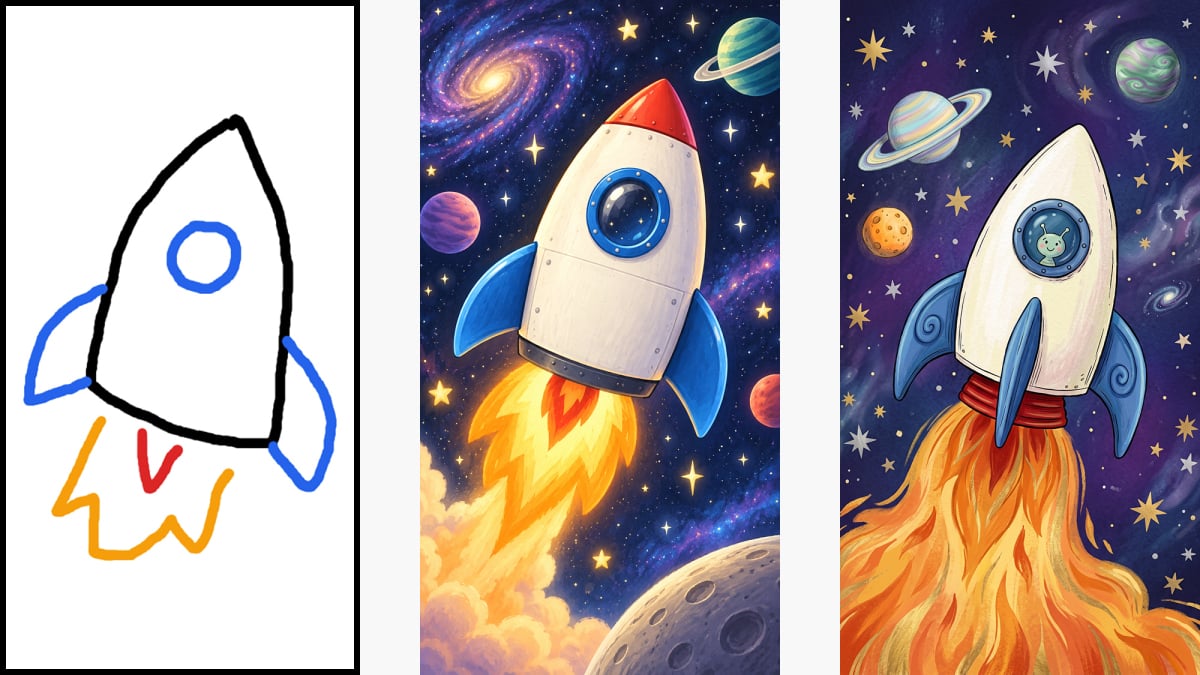
The Sketch tool is ChatGPT’s flashiest new party trick, and it works like this: tap the plus button in the prompt box, draw shapes, colors, and text, then add a written prompt describing the style you want. On mobile you’ll need to pick Plugins from the submenu first. It’s fun, and it kills the “I can’t describe what I want” problem entirely.
Gemini has no equivalent sketch mode. You can still attach an image for inspiration, though, and in Lifehacker’s children’s book illustration test, Google’s output won. ChatGPT went more realistic, while Gemini went traditional storybook and dropped in an alien astronaut that fit the brief better. Feature lists matter less than taste sometimes.
If you want the full walkthrough of how drawing references work, we already covered the Sketch feature in detail.
Precision editing: this is where ChatGPT wins
Editing is the part with actual money attached to it. Product photos, social content, menu fixes: most commercial image work is editing, not creation from scratch.
Lifehacker generated a cabin in the woods with both models, then asked each one to remove furniture and shift the light from early morning to dusk. ChatGPT’s new commenting system lets you click a part of the image, say what should change, and mark up regions to fix. The edited scene stayed believable, and the rearranged shadows were the clever bit. Gemini’s toolset is simpler, and it handled the same edits fine, but the ChatGPT result looked more lived-in and less artificial.
Honestly, this matches OpenAI’s whole pitch for 2.5: touch only what you point at, keep everything else. When an edit survives a second and third pass without melting the background, that’s the moment an image tool becomes a work tool.
Side by side
| Test | ChatGPT Images 2.5 | Nano Banana 2 |
|---|---|---|
| Food realism | Slightly more convincing photos | Good food, better backgrounds |
| Sketch to image | Built-in Sketch tool | No sketch mode, image prompts work |
| Precision editing | Comments, markup, erase, subtle relighting | Simpler tools, solid basics |
| Speed | Up to 50% faster than Images 2.0 | Fast |
| Extras | Templates and prompt sharing | Deep Google app integration |
| Best for | Product shots and edits | Scenes and illustrations |
One honest caveat: these rankings reshuffle every few months, because both companies ship updates constantly. The FLUX 3 vs Gemini Omni matchup looked completely different half a year ago.
Which one should you use
For most beginners, ChatGPT Images 2.5 is the pick. It’s faster, the editing tools are a generation ahead, and templates plus prompt sharing make repeatable results easier when you’re producing for clients. If your work is scene-heavy, like book illustrations, mood backgrounds, or wide marketing visuals, keep Gemini in the toolbox, because Nano Banana 2 still composes a scene beautifully.
The smart move costs nothing: run the same prompt in both and keep the winner. Free-tier limits reset, and the comparison takes two minutes. And if you’d rather use a dedicated design app for social posts, our Google Pics vs Canva breakdown covers when a design tool beats both chatbots.
Three beginner workflows to try today
All the benchmarks in the world matter less than what you actually make with this thing. Here are three quick wins, each doable in under ten minutes.
First, the product photo cleanup. Snap your product on a plain surface, upload it, then comment directly on the background and tell the model what to replace. Etsy sellers and eBay flippers, this alone justifies learning the tool, because clean backgrounds sell.
Second, the menu and flyer refresh. Open a template, swap in your own text and photos, and let the model handle layout. A local bakery paid a designer for this last year. Today it’s a five-minute job with better fonts than the designer used, and that’s coming from someone who respects designers.
Third, the sketch-to-social pipeline. Doodle your idea rough in the Sketch tool, add a style prompt, and generate three variations for Instagram. The drafts won’t all be keepers. But when one lands, you’ve gone from napkin to post in a single sitting.
The takeaway
ChatGPT Images 2.5 takes the crown on editing precision and speed, while Nano Banana 2 keeps the edge on scenes and illustration style. Open both, paste the same prompt, and judge with your own eyes today. Your next product listing, menu, or social batch will thank you.