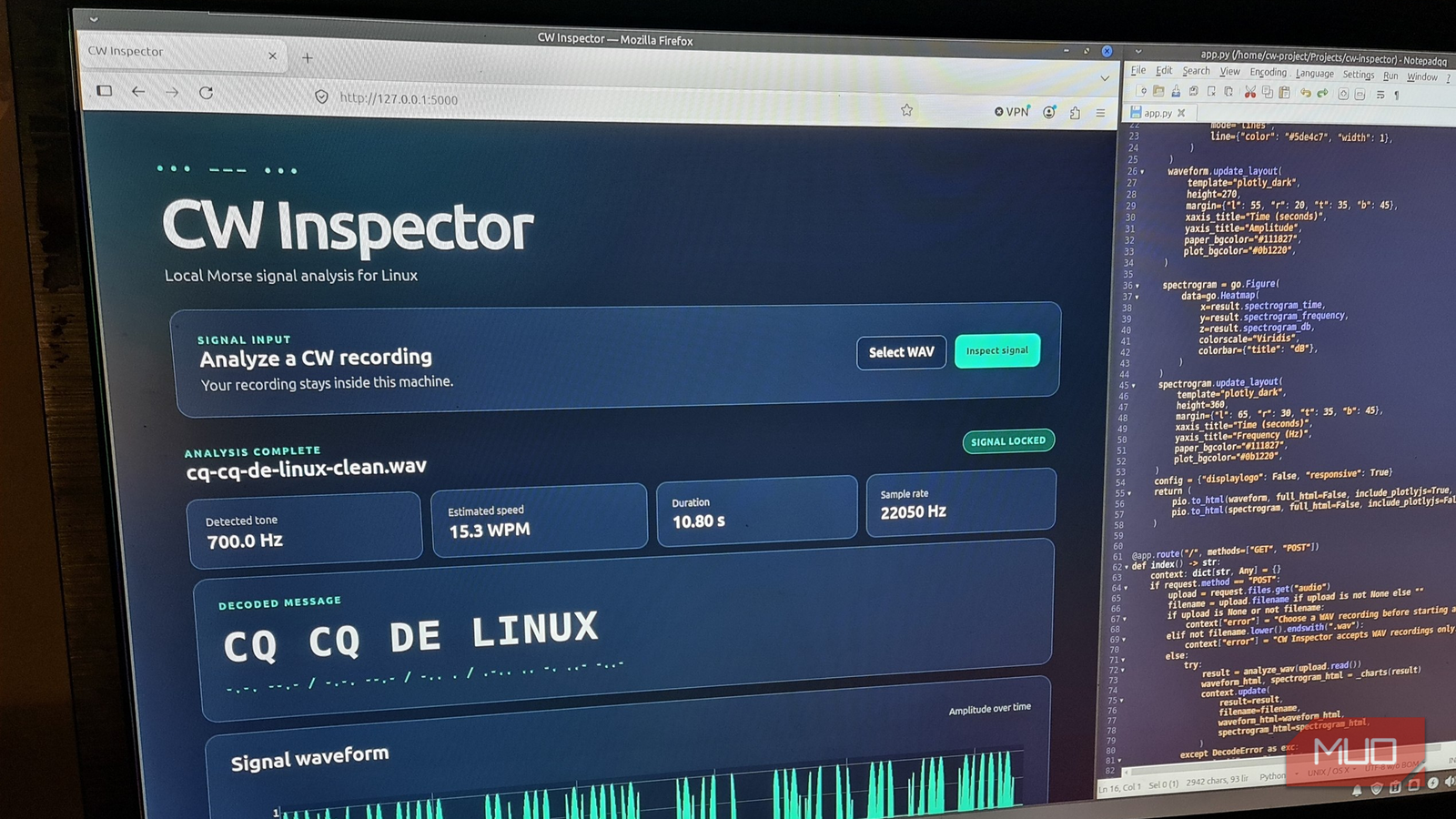

The app compiled on the first try. Tests passed. Then a simple test message, three dashes and a dot, got decoded completely wrong, and the app reported zero errors the whole time. That’s not a horror story from some corporate codebase. It’s what happened to a tech writer who vibe-coded a Morse code decoder, using the strongest AI coding tools available, and it’s the reason the Linux kernel maintainers now publish official vibe coding rules for AI-generated code.
Kernel maintainers deal with more submitted code than almost anyone on earth. So when they write guidance for AI-assisted contributions, it’s worth stealing for your own projects, even if you’ll never touch a kernel patch. Here are the five rules, translated from kernel-speak into plain steps you can apply tonight.
Why the kernel wrote rules for AI code
The kernel’s contribution docs now include a whole page on tool-generated content, plus separate guidance for AI coding assistants. The short version: AI can write the code, but a human has to stand behind it. An AI agent can’t sign off on a contribution, because sign-off means taking responsibility, and responsibility can’t be delegated to software.
That matters for beginners more than for kernel veterans. When you build with a chatbot, the code arrives polished, confident, and plausible. Errors don’t crash. They just quietly produce wrong output. The Linux kernel’s vibe coding rules exist precisely because confident wrongness is the default failure mode of AI code.
The five rules that keep AI code honest
Before diving in, one clarification: these rules don’t reject AI code. They’re transparency requirements. You can build with AI as much as you want, as long as everyone (including future you) can see where AI was involved.
| # | Kernel rule | What it means for you |
|---|---|---|
| 1 | Name the AI tool | Record which tool generated the important parts |
| 2 | Preserve the inputs | Keep the spec and prompts that produced the result |
| 3 | Keep the prompt trail | Summarize long sessions in one file |
| 4 | Record what AI changed | Note which files AI touched, and commit yourself |
| 5 | Make the code prove itself | Test it on harder cases until it fails honestly |
Now let’s turn each of these vibe coding rules into something practical.
Rule 1: name your tool
When a tool generates something substantial (a function, a file, a fix, a translation), record that it did. No one expects you to log autocomplete or a grammar check. The threshold is “substantial.”
In the Morse decoder case, the author listed OpenAI Codex for the first implementation, plus the libraries that did the heavy lifting. One line in the README would’ve been enough. The payoff comes later: you know exactly which code deserves extra scrutiny when something misbehaves.
The kernel’s own doc keeps the bar low on purpose. It only asks for attribution when a tool generates something substantial: functions, source files, fixes, translations, or changelogs. Nobody’s asking you to log autocomplete.
Rule 2: keep the spec, not just the output
Write down what you asked for before you ask. A short spec file beats a long memory. The kernel guidance asks contributors to preserve what the AI received, because generated code only makes sense in the context it was given.
There’s a subtle trick hiding in this rule. The writer gave the AI the metadata and the expected message, but not the actual audio file it would later be tested against. As a result, the test stayed honest: the model couldn’t optimize against the very sample it would be judged on. Whatever you’re building, hold something back for independent testing.
Rule 3: keep the prompt trail
For short sessions, save the actual prompts. For longer ones, the kernel accepts a summary. One file is enough, something like AI_ASSISTANCE.md, listing what you asked for and what the tool did.
Why bother? Because prompts explain intent. When the decoder misread dash-heavy messages, the prompt trail didn’t fix the bug, but it made the intended behavior obvious, so the fix became a comparison against a documented goal instead of guesswork.
This is also where quality thinking starts paying career dividends. If you want to take this skill beyond weekend projects, our vibe coding career guide maps what clients actually pay for, and review discipline sits near the top.
Rule 4: know exactly what AI touched
“AI helped” tells a reviewer nothing. Name the files. The test project listed the main app files, the HTML template, the tests, and the docs as AI-generated, which drew a precise boundary around what needed human review.
Then comes the part beginners skip: make the final commit yourself. The kernel’s own docs say an agent can’t sign off on anyone’s behalf. In the Morse project, the author committed personally and added a small note (“Assisted-by: LLM”). That’s the whole habit. You stay the authority over what gets saved, published, or shipped. For a deeper checklist on catching dangerous output before it ships, see our six vibe coding security checks.
Rule 5: make the generated code prove itself
This is the big one. The kernel wants contributors to document how generated results were tested, and the Morse decoder showed why. The app aced every easy test. Clean audio, decoded perfectly. Then a dash-heavy message arrived.
The correct decode was TTT E. Instead, the app confidently produced SE, with a speed estimate to match, and no error anywhere. Nothing crashed. The output was simply wrong while looking right.
Fixing it followed the kernel’s bug procedure: reproduce the failure as an automated test first, then change code until the test passes. Along the way, the author ramped difficulty step by step, clean input, then noise, then silence padding, then the nasty dash-heavy case, so each test exposed the next weakness. Confident wrongness beats loud failure as a danger every single time. Tools like Lenz, which fact-checks Claude Code before mistakes ship, automate exactly this habit.
A beginner workflow that takes 15 minutes
You don’t need the kernel’s full process for every weekend project. Here’s the lightweight version.
- Write a short spec first, even five bullet points, and commit it before prompting
- Ask your AI tool for the implementation, keeping the signal-processing logic separate from the interface
- Save an AI_ASSISTANCE.md summary: which tool, which files, what it did
- Hold one test case back from the AI, then run it yourself after the code works
- When something breaks, write the failing test first, fix second
- Commit yourself, with a one-line note about which parts AI generated
That’s it. One spec file, one assistance summary, a few small tests, and honest commits. The kernel itself admits that applying the full ceremony to every throwaway script is overkill. But skipping all five vibe coding rules is how a broken app ships looking finished.
The takeaway
The kernel’s vibe coding rules boil down to one idea: don’t hand the cost of understanding your code to the next person, even when that person is future you. Name your tool, keep the spec and prompts, mark what AI touched, and make the code prove itself on a test it never saw. Your future self, the one debugging at midnight, will be grateful.