
One chatbot told a friend of mine his contract clause was “totally standard.” Two other models, asked the same question, called it a red flag. He almost signed it. That’s the problem with trusting a single AI, and it’s exactly what the AI council idea fixes.
Andrej Karpathy, the guy who literally coined the term “vibe coding,” got tired of one confident chatbot steering him wrong. His fix is the AI council: stop asking one AI and start asking a committee. The setup is free, it takes minutes to try, and it changes how you use AI for big decisions.
What an AI council actually is
The idea started as a weekend project. Karpathy built a small tool called LLM Council, and the AI council flow he described is simple: your one prompt goes to several AI models at once. The models answer independently. Then things get interesting.
Each model reads the other models’ answers and critiques them, without knowing which answer came from which AI. Anonymity matters here. Models have egos in a weird way, and they grade their own work more generously.
Finally, a separate “chairman” model reads every answer and every critique, picks out the strongest arguments, and writes one final verdict. You get a decision that survived argument, not just the first confident answer out of the gate.
You can see the original project at Karpathy’s llm-council repo on GitHub. It’s a simple build, and that’s part of the charm. Honestly, the core idea fits in a weekend of code.
Meet the free tool that makes it easy
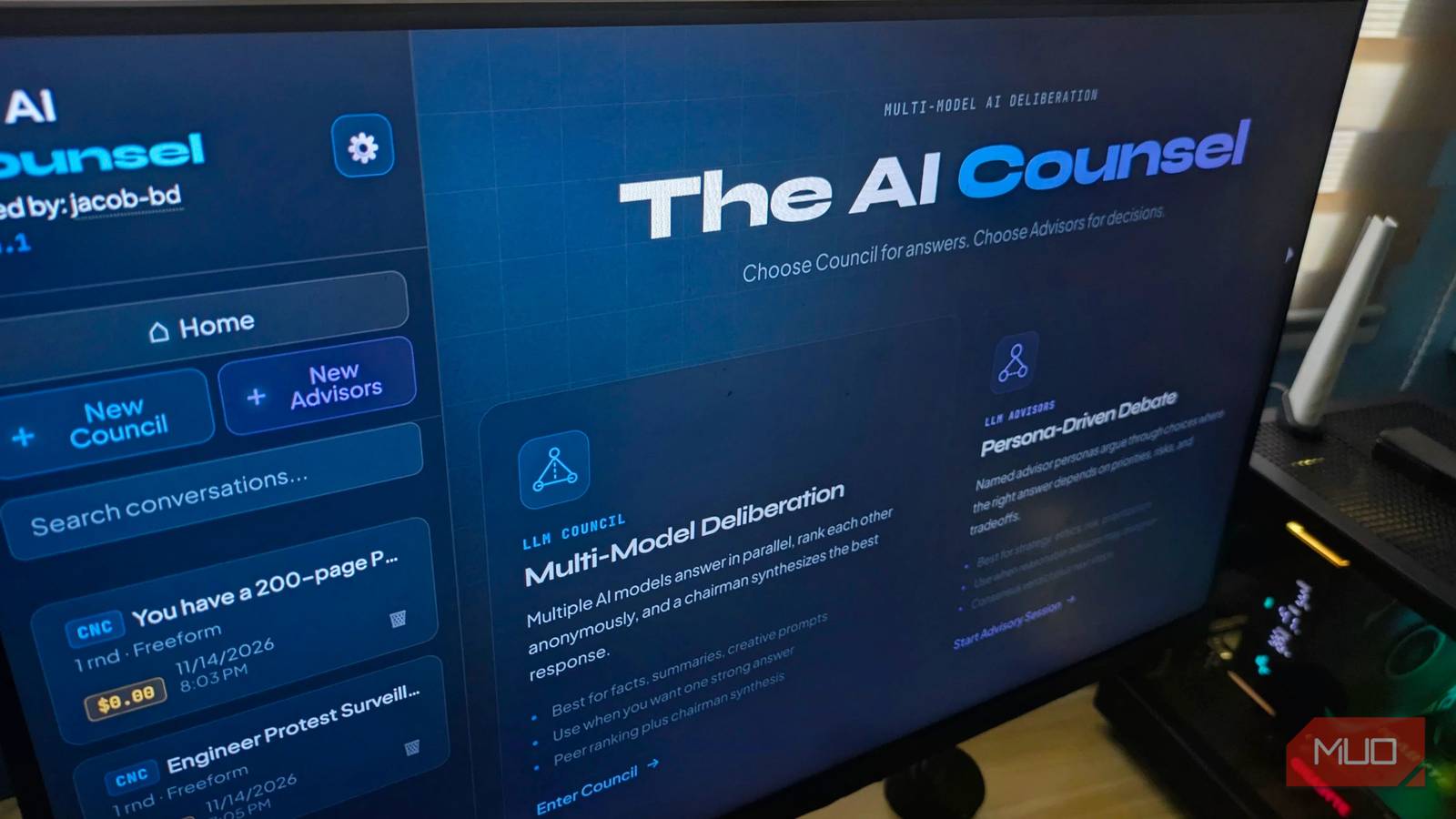
Karpathy’s original was never meant to be a polished product. Luckily, people ran with the idea. The best current version we’ve tested is The AI Counsel by Jacob Ben David. It adds a proper web interface, model pickers, persona debates, and connections to multiple providers.
Here’s what you need before starting:
- A computer with Git, Node.js, and uv installed (all free)
- About ten minutes
- An OpenRouter API key, which you can grab at OpenRouter
The setup steps are short. Open a terminal in the folder where you want the project, clone the repo, and run the install commands from its README. Ignore the scary-looking npm funding warnings; they’re about dev tools, not your security. Once the terminal shows a local address, open it in your browser, paste your API key into the app settings, and you’re in.
Free models on OpenRouter worked fine in testing, so you can run a real council before paying anyone anything. If you’d rather compare models manually first, the guide Which Claude model should you use? (2026 guide) breaks down what each tier is good at.
What an AI council looks like in practice
A tester recently threw a genuinely hard ethics question at a four-model AI council: whether to add a surveillance flag to a transit safety system when the law was ambiguous. Three models answered, then reviewed each other blind, and a fourth acted as chairman.
The split was immediate. Two models said no, arguing that legal gray areas aren’t permission and that an 80% match rate would flag plenty of innocent people. The third leaned yes because of a public-safety deadline, which gave the debate an actual opposing view instead of three copies of one opinion.
The chairman’s final answer was nuanced: decline the flag, document the reasoning, escalate to oversight. It connected things no single answer had, like how a tool built for crowd safety could quietly become individual surveillance.
That’s the whole value in one example. The council surfaced a dissent, tested it, and folded the best parts into the verdict.
Single chat vs council: the honest comparison
| Aspect | Single chatbot | AI council |
|---|---|---|
| Speed | Seconds | Minutes |
| Token cost per question | Low | Roughly 350k+ tokens |
| Blind spots caught | Few | Many |
| Fun for hard questions | Meh | Genuinely interesting |
| Right for daily questions | Yes | No |
That token number isn’t a typo. Two council questions in one real test burned about 710,000 tokens. Every model reads every other model’s work, and switching models keeps breaking prompt caching, so the system re-pays context costs again and again.
No tools? Run a manual AI council instead
You don’t need Git or a terminal to borrow this idea. Open two chatbots side by side in separate browser tabs. Ask your real question to the first one. Then paste both your question and its answer into the second chatbot with one instruction: “find the flaws and weak assumptions in this answer.”
Now you have a critique. Take the original answer and that critique back to the first chatbot, or to a third model if you have one, and ask it to judge the debate and write a final recommendation.
It’s slower than the automated setup, and easier to mess up, since you’ll be tempted to defend the first answer instead of judging fairly. Still, for a one-off big decision, a manual AI council costs nothing and runs on the free tiers you already have. Try it before installing anything.
The catches you should know first
Speed is the obvious one. An AI council takes minutes, not seconds, because the peer-review stage is where the real work happens.
Cost comes second. This is not your daily-driver tool for “write me a caption.” It’s for decisions where being wrong is expensive: contracts, security choices, architecture tradeoffs, gray-area judgment calls.
Model sameness is the sneaky third catch. Pick three similar models and you’ll mostly get three versions of the same answer. Diversity is the entire point. Mix families: a Claude, a Gemini, a GPT, or grab free tiers from different providers through OpenRouter. The comparison in Best Local LLMs to Run on Your Computer This Weekend (4 Models Tested) shows how differently models think even at small sizes, which is exactly the variation a council needs.
One more thing. This setup makes sense with frontier models, not tiny local ones. Weak models produce weak deliberation, and the whole point is strong arguments colliding.
When an AI council is actually worth it
Use it for the questions where a wrong answer costs real money or real reputation. Should I sign this contract clause? Is this API design safe? Which of these two business approaches has the flaw I’m not seeing?
Skip it for everything else. Your recipe of asking one good model with a good prompt is still the right move for 95% of stuff. An AI council burns tokens and time, so save it for decisions that deserve a debate. The head-to-head in Gemini 4 Argon vs GPT-6: which one deserves your money? is the better read when you’re picking one model to pay for.
Honestly, even if you never run the tool, borrowing the mental model helps. Next time an AI hands you a perfect-sounding answer, ask a second model to critique it, then a third to judge the debate. The habit costs nothing and catches more errors than any prompt trick I know.
The takeaway
The AI council setup turns AI from a single oracle into a panel that argues before it answers. Try it once this week on a decision you actually care about: watch the models disagree, read the dissent, and see if the final verdict survives the pressure. That habit alone will make you a much better AI user.