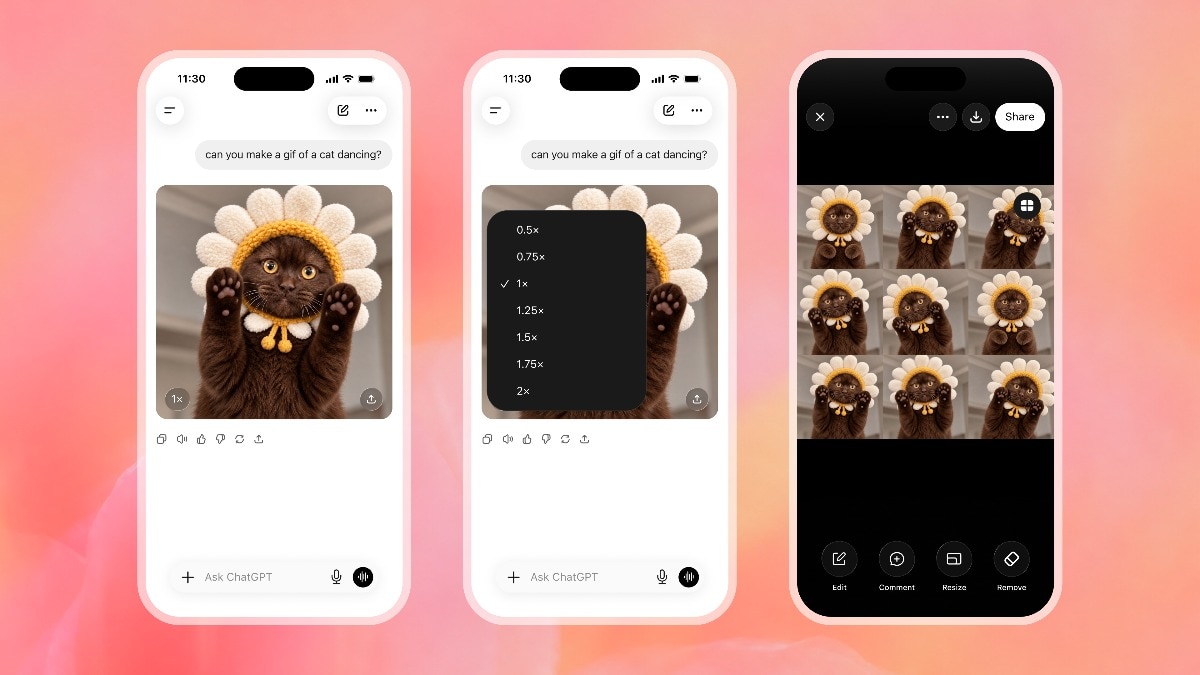

Making a decent GIF used to mean screen recordings, frame cutting, and a converter site covered in ads. As of November 4, ChatGPT GIFs are a one-sentence job: you describe the loop, and the app builds it. Free accounts included.
Why ChatGPT GIFs blew up this week
OpenAI shipped Images 2.6 on November 4, and the headline feature is animation. You can ask for a looping GIF straight from a text prompt, or upload a photo and have ChatGPT animate it. The same update made image generation about 50% faster, so the whole thing feels snappier, not just newer.
The timing helps too. OpenAI says people now generate more than 4 billion images a week across ChatGPT and its API, up from around 3 billion eight weeks earlier. Animation was the obvious next ask, because a static image only goes so far in a social feed.
One honest caveat before you get excited: the GIF feature is rolling out gradually. Reporters at Decrypt and heise found it missing on some accounts days after the announcement. So if you don’t see it yet, wait a few days instead of reinstalling anything.
What you can actually make
ChatGPT GIFs come in three flavors:
- Prompt to GIF: describe a short looping scene, like a corgi catching a treat over and over
- Photo to GIF: upload a picture of your dog and ask it to wave at the camera
- Sketch to animation: snap your doodle and have the character blink or nod
Once the GIF exists, you’re not stuck with take-it-or-leave-it. Playback speed adjusts from 0.5x to 2x, and you can open individual frames to fix whatever looks off. Need the tail wagging faster? Just say so in the chat.
How to make your first ChatGPT GIF
Total time: about a minute. Here’s the flow:
- Open ChatGPT on web, desktop, or mobile and start a fresh chat.
- Type what you want animated, or attach a photo first. Keep it to one clear action, like “make a looping GIF of this dog sneezing.”
- Wait for the render. It should land noticeably faster than older image generations because of the 2.6 speed bump.
- Adjust playback speed if the loop feels sluggish, then check individual frames if something looks wrong.
- Download and share it. The GIF saves like a normal image and drops straight into Slack, Discord, or your editor of choice.
If the first result misses, don’t rewrite the whole prompt. Give one fix: faster, sillier, fewer details. Iteration beats starting over almost every time.
Prompt formulas that actually work
Vague prompts give you mushy loops. These three shapes keep things tight:
- One subject, one action: “a corgi catching a treat, looping GIF, playful style”
- Photo plus motion: “animate this photo, my dog waves at the camera, 2 second loop”
- Character from a sketch: “bring this drawing to life, the robot blinks and nods, cartoon style”
Notice the pattern: subject, action, loop instruction. When your ChatGPT GIFs come out chaotic, you probably asked for three actions at once. Cut back to one and try again.
Length matters more than people expect. A GIF that loops in two to four seconds feels snappy; stretch it past ten seconds and viewers scroll past. If you want a storyboard, generate three separate short ChatGPT GIFs instead of one long, busy animation. Three tight loops beat one muddy scene every time.
The fine print worth knowing
A few limits that the launch posts gloss over:
- You can’t upload an existing GIF and edit it. The feature makes new animations; it doesn’t rework old ones.
- Saved reference images arrived with the same update. You can store a photo of your pet or mascot, then reuse it in later chats without re-uploading. Handy if you’re building a recurring character.
- Developers get two new API models: GPT-Image-2.6 Flare for speed (as quick as six seconds at low quality) and Sunburst for higher quality. Most beginners will never touch these, but it explains why third-party tools built on OpenAI will suddenly feel faster too.
- GIFs are landing in ChatGPT and Codex across all subscription tiers, free included, on web, desktop, and mobile.
The old way vs the new way
| The old workflow | ChatGPT GIFs | |
|---|---|---|
| Time per GIF | 15-30 minutes of recording and cutting | About a minute |
| Cost | Free converter sites, covered in ads | Included in your plan |
| Skill needed | Frame editing basics | None, plain English |
| Revisions | Re-record and re-cut | One sentence |
| From your photos | Manual masking, frame by frame | Upload and ask |
That table is the whole pitch, honestly. Nothing else in Images 2.6 matters to a beginner as much as the time collapse.
Ways people are putting GIFs to work
Custom social reactions are the obvious one. A personalized loop beats a stale reaction GIF from 2014, and yours carries no watermarks. Small shops are trying animated versions of their mascots, product shots that subtly move, and storyboard frames for ads. Greeting animations took off fast too, since the update landed right before the Diwali season and the holiday stretch.
If you sell anything online, try a GIF of your product doing its one trick. It’s cheaper than video, loops forever, and autoplays on most platforms.
One more angle worth testing: email. Plenty of newsletters embed small animated images, and a subtle ChatGPT GIF of your product often lifts clicks more than another static banner. Keep the file small, keep the loop gentle, and never animate the unsubscribe button, obviously.
Already using ChatGPT images? Start here
If you’ve played with image generation before, animation slots right into what you know. The ChatGPT Sketch guide covers turning doodles into still images, which pairs nicely with animating them afterward. And if you’re picking between image models for stills, the Images 2.5 vs Nano Banana 2 comparison breaks down where each one wins.
The takeaway
Try one ChatGPT GIF today: pick a photo on your phone, describe a single silly action, and see how close it lands. If the feature hasn’t reached your account yet, check back in a few days, because the rollout is still spreading. Once you make your first loop, the old converter-site workflow feels like faxing.
Sources: OpenAI release notes, India Today