
Google just taught Chrome to read your inbox so it can fill out your forms. The new Chrome AI autofill pulls flight confirmations, order numbers, and addresses straight from your Gmail. Sounds convenient. It is. But you should know exactly what you’re signing up for before you flip the switch.
What Chrome’s AI autofill actually does
Let’s start with what changed. Chrome has always had basic autofill, the thing that remembers your name, address, and card number so you don’t retype them on every checkout page. That’s old news.
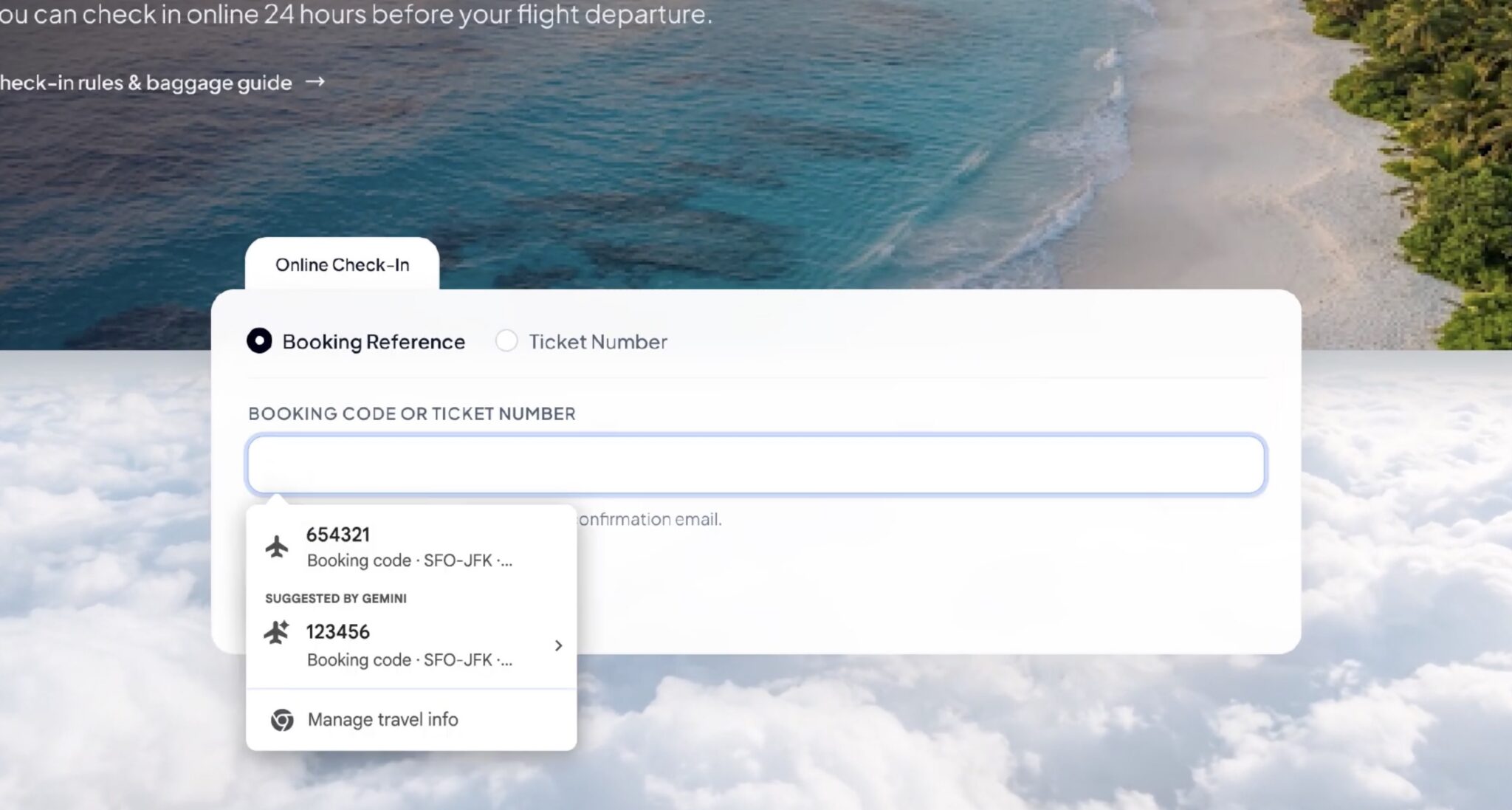
The new version is different. Chrome AI autofill can look at your Gmail and pull out details you never bothered to save. Your flight confirmation number from that airline email. The membership ID from your gym. The tracking number buried in a shipping notification. An order number from three weeks ago that you’d never find again without searching your inbox.
Google announced this on October 28 as part of its Personal Intelligence push, the same program that connects Gemini to your Google apps so the AI can answer questions using your own data. We covered the other side of that program, the part where Google uses your Gmail for ads and how to opt out. This new feature is the helpful cousin of that one.
Think of it like the feature Apple shipped years ago, where a verification code sent by text floats above your keyboard and you tap it once instead of switching apps. Google’s version works on form fields instead of codes, and it reads email instead of text messages.
Right now it’s rolling out to US users on desktop Chrome, plus the Gemini in Chrome apps on iOS and Android. Everyone else waits.
How to turn Chrome AI autofill on
Here’s the part you came for. The feature is opt-in, which means Google won’t quietly flip it on for you.
- Open Chrome on your desktop and click the three dots in the top right corner.
- Go to Settings, then find the Autofill and passwords section.
- Look for the Chrome AI autofill toggle under the autofill options. You can also jump straight there by typing chrome://settings/autofill into your address bar.
- Turn the toggle on and sign in with your Google account if it asks.
- Open the Gemini in Chrome app on your phone if you want the same behavior on mobile, and enable it there too.
That’s it. From then on, when you land on a form asking for a confirmation number or a shipping address, Chrome will offer suggestions it found in your Gmail. You’ll see the suggestion pop up like a regular autofill entry, and you click to accept it.
One thing worth checking: the older enhanced autofill settings already let you save stuff like passport numbers, driver’s license numbers, and vehicle details. The new Gmail-backed suggestions show up alongside those. If you saved data there before, you’ll notice the suggestions get smarter almost immediately.
What it fills (and what it won’t)
So what can you actually expect it to grab? Based on Google’s announcement, these are the main categories:
- Flight confirmation numbers from airline emails
- Membership and loyalty IDs
- Package tracking numbers
- Order numbers from shopping confirmations
- Addresses and phone numbers
- Credit card details
Notice what’s missing. This thing won’t write your essay. It won’t fill out your tax forms either. And it won’t touch anything that isn’t sitting in your Gmail already. If a receipt never arrived by email, Chrome has nothing to pull from.
There’s a real speed difference here for the right kind of task. Returning a package, checking in for a flight, claiming a warranty, those forms always ask for a number you’d otherwise dig out of your inbox manually. Search Gmail, find the email, squint at the order number, switch tabs, type it wrong, try again. With Chrome AI autofill, the browser does that scavenger hunt for you and puts the answer in the field.
For a simple comparison, here’s what the two autofill generations handle:
| What you’re filling in | Regular autofill | Chrome AI autofill |
|---|---|---|
| Name, address, phone | Yes | Yes |
| Saved card numbers | Yes | Yes |
| Flight confirmation numbers | No | Yes, from Gmail |
| Order and tracking numbers | No | Yes, from Gmail |
| Membership IDs | No | Yes, from Gmail |
| Anything not in your email | No | Still no |
The privacy trade-off nobody mentions
Here’s the thing no one tells you in the announcement posts. For this to work, your browser needs permission to read your email. Not all of it, Google says, and the sensitive parts get encrypted in transit. But you’re still connecting two of the most data-rich parts of your life: where you browse and what you receive.
Google’s track record here is mixed. The company launched a program this month that connects Gemini to your Gmail, and it was also feeding inbox data into ad targeting until the backlash hit. Google’s privacy defaults are worth auditing in general, and honestly, the pattern is consistent: convenience ships first, the privacy control ships later, and Google hopes you don’t find either setting.
Does that make Chrome AI autofill dangerous? Not exactly. The data stays within Google’s own ecosystem, it’s encrypted, and you opt in manually. If you already live in Gmail and Chrome, the marginal exposure is small. Google isn’t shipping your inbox to a stranger, it’s connecting two services you already gave the same company.
There are people who shouldn’t turn this on, though. If you share a computer with family members or coworkers, autofill suggestions can leak information between users. Shared work laptop? Skip it. If you’re a journalist, activist, or anyone whose email contents could put you at risk, the convenience isn’t worth expanding the blast radius. And if you simply don’t trust Google with more surface area than it already has, that’s a legitimate position, and the feature works fine without it.
You can always try it and change your mind. The same toggle that turns it on turns it off, and disabling it stops the Gmail lookups. It’s reversible, which puts it way ahead of some of Google’s other defaults.
Who should skip this feature
Quick honesty check, because not every feature deserves your adoption.
If your forms are mostly name, address, and card number, regular autofill already handles them and the AI version adds nothing. If you only check your email on your phone but fill forms on your laptop, the two halves don’t connect yet, so the benefit shrinks. And if you’re the kind of person who keeps a spreadsheet of order numbers (we see you, and we salute you), you’ve solved this problem your own way.
On the other hand, if you buy things online regularly, travel even a few times a year, or deal with returns and warranties more than twice a month, this feature will genuinely save you time. It’s one of those small quality-of-life upgrades that adds up. Two minutes saved per form, a dozen forms a month, that’s half an hour you get back for flipping one switch.
One more tip: pair it with Chrome’s new scam detection alerts, so the sketchy forms out there get flagged while the legit ones fill themselves.
Takeaway
Chrome AI autofill is live for US users and worth five minutes of setup if you fill out a lot of forms. Open chrome://settings/autofill, enable the enhanced option, and let it start pulling confirmation numbers from Gmail. Just keep the privacy trade-off in mind, especially on shared computers, and remember the toggle cuts both ways if you change your mind later.