
Your team just spent 45 minutes arguing about a launch timeline. Now someone has to write the notes, chase the action items, and build the actual plan. Claude Meetings wants to do all of that while everyone is still on the call.
What Claude Meetings actually is
Anthropic shipped this on November 10, and it changes what a meeting participant can be. Instead of a human scribe, Claude joins your Google Meet call as a visible participant, listens to the discussion, and starts producing real work in real time. Draft plans, timelines, answers in the chat, all while people are still talking. For anyone who loses an hour after every call to “let me write this up”, that’s a big deal.
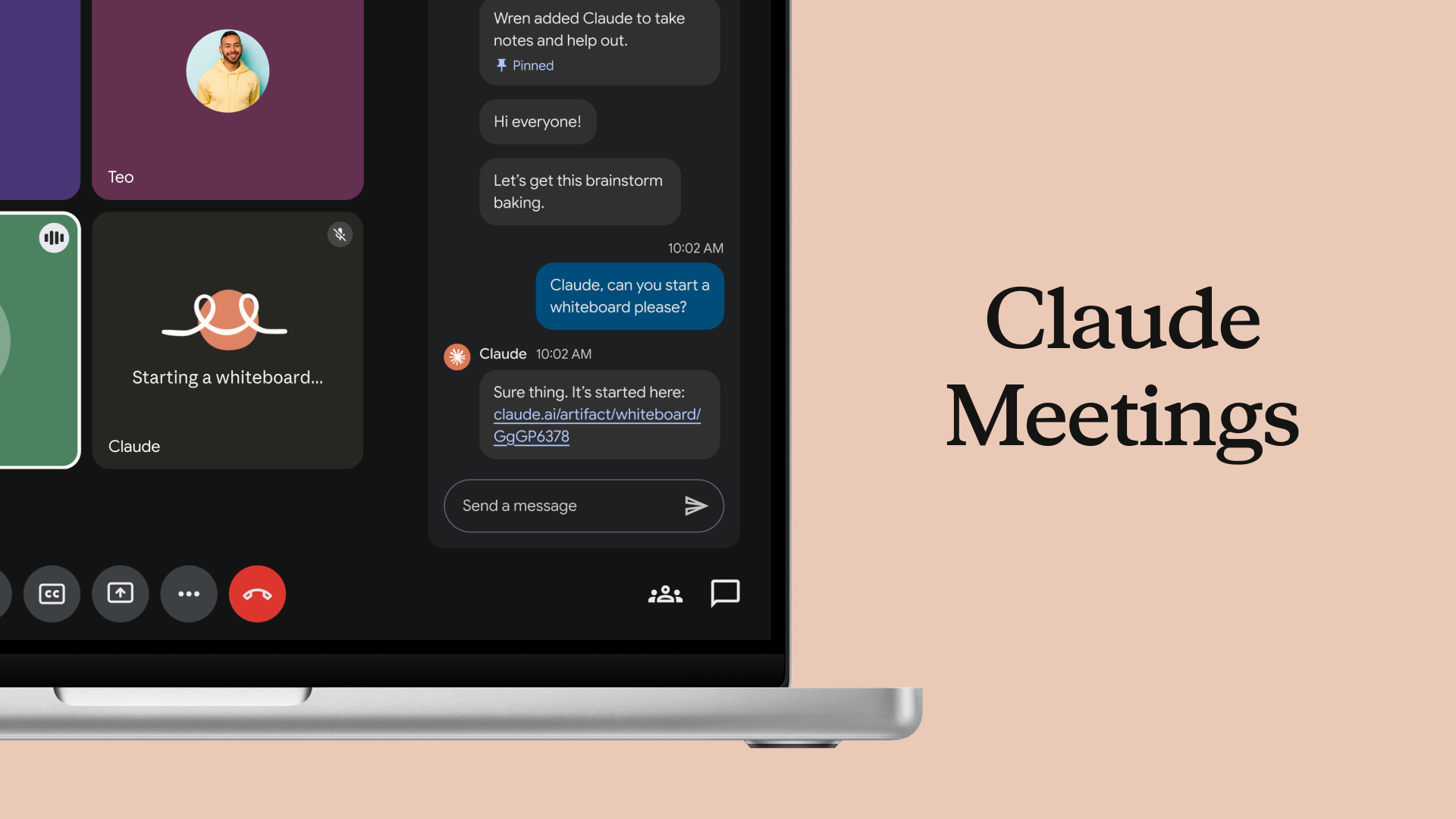
Claude Meetings is a beta feature for Anthropic’s workplace plans that drops Claude into your video calls. It’s not a silent recorder. It shows up as a participant, announces itself, and follows the conversation as it happens.
While your team talks, Claude can draft the plan being discussed, map out a timeline on a whiteboard, and answer questions in the meeting chat. It can also pull information from connected work apps, so if someone asks “what did we budget for this last year”, Claude can go find that number instead of someone tabbing out to dig through spreadsheets.
Then the call ends. Here’s where most meeting AI tools stop, and honestly, that’s where the old workflow gets painful. With Claude Meetings, the notes, the action items, and everything else Claude built during the call are waiting for you in claude.ai. No transcript archaeology. No “wait, who was supposed to handle the vendor email?”
Anthropic’s argument is simple: the work that comes out of a meeting usually starts after everyone hangs up. They want it to happen during the meeting instead. As someone who has lost entire afternoons to post-call cleanup, I think they’re aiming at the right problem.
How it works inside a call
The flow is deliberately boring, in a good way. Nothing to install on every laptop, no browser extension circus.
- A team member adds Claude to the video call as a participant.
- Claude posts a notice in the meeting chat, so everyone knows it’s there. No spy behavior.
- People talk like normal. Claude follows along and starts building: a draft plan in the chat, a timeline on a whiteboard, answers to questions people type.
- Need a number from a connected app? Claude fetches it mid-call.
- When the call ends, everything Claude made is collected in claude.ai, ready to edit or share.
At launch, this works with Google Meet. Anthropic says support for other platforms is coming, but they haven’t given dates. So if your company lives in Zoom or Teams, you’re on the waiting list for now.
Who can use it today
This is the part that will annoy some readers. Claude Meetings is in beta, and it’s only available on Team and Enterprise plans. If you’re on the free tier or a Pro subscription, you can’t add Claude to a call yet.
Anthropic has been turning Claude into a workspace assistant for a while now. Its proactive agent Claude Duet already handles background tasks between your conversations, so a meeting feature fits the pattern.
Meanwhile, the rest of the workplace stack Anthropic announced ships wider:
- Claude Whiteboards: a shared brainstorming board Claude turns into an organized workspace with timelines. Beta on all paid plans.
- Claude Sheets: collaborative spreadsheets where Claude builds the tracker and edits cells alongside your team. Beta on all paid plans.
- Claude Data: connects Claude to your data warehouse or CRM, now generally available, returning dashboards or written summaries.
- Interactive connectors: full versions of apps like Adobe, Atlassian, and HubSpot open inside Claude.
So the entry price matters. Team plans are built for small groups, and Enterprise is the big-company tier. A freelancer or a two-person shop probably can’t justify either just for one feature. But if your team already pays for one of those plans, the cost of trying Meetings is basically zero, and it’s already switched on for beta participants.
The guardrails are better than expected
Meeting AI gets creepy fast, so the privacy details here are worth reading.
Claude identifies itself as a participant. It posts a notice in the meeting chat when it joins, so nobody is surprised. More interesting: it won’t join calls that include external guests unless an admin explicitly authorizes it. And if an external guest joins a call Claude is already on, Claude leaves automatically.
That second rule is the smartest part of the whole launch. The classic fear with AI meeting tools is sensitive conversation leaking outside the company. An automatic exit removes most of that risk without anyone having to remember a setting.
The catch, and there’s always a catch: meetings discuss people, not just projects. Salaries, performance complaints, that awkward client situation. Even with guardrails, teams should decide what kinds of calls Claude is allowed to sit in on. We’ve already covered what your boss can actually see in Claude, and that same instinct applies here: write the policy down before the first awkward moment, not after.
Whiteboards and Sheets arrived at the same time
Meetings is the headline, but it’s really one piece of a three-part push to make claude.ai feel like an office suite. Here’s how the pieces compare:
| Feature | What it does | Availability | Works with Meetings? |
|---|---|---|---|
| Claude Meetings | Joins Google Meet calls, drafts plans and action items live | Beta, Team and Enterprise plans | It is the meeting feature |
| Claude Whiteboards | Turns team brainstorming into an organized board with timelines, then exports to docs or slide decks | Beta, all paid plans (web, desktop, mobile) | Yes, boards build while people talk |
| Claude Sheets | Creates collaborative spreadsheets with tabs, formulas, and dropdowns; edits cells and explains each change | Beta, all paid plans (web, desktop, mobile) | Indirectly, trackers can start in a call |
The Whiteboards pitch is the one I find most interesting. Plenty of people already brainstorm with Claude, but the result usually dies in a chat window because sharing it means copy-pasting into something else. A shared board the whole team can work on during the call, which then becomes a doc or a deck, fixes that last-mile problem.
Sheets is more practical than glamorous. Ask for a campaign tracker or a hiring budget and Claude builds a working spreadsheet, then keeps refining it with the team. Every edit Claude makes is outlined, so you can see what it touched. For anyone who has been burned by an AI silently mangling a spreadsheet, that change log is the difference between trusting it and not.
Is it actually useful, or just demo sugar?
Here’s my honest take after going through the announcement and the coverage: the demo case is strong, and the real-world case depends entirely on your meetings.
Meetings that work well for this are the structured kind. Sprint planning, project kickoffs, budget reviews. There’s a plan hiding in the conversation, and Claude’s job is to catch it. If your calls are more like unstructured therapy sessions for the project, the draft plan Claude produces will be a mess, and cleaning it up might take as long as writing notes yourself.
Free alternatives exist if you can’t wait. Google’s own offline meeting notes tool for Mac handles transcription without a subscription, though it won’t draft the plan for you.
The other variable is Google Meet. Since that’s the only supported platform at launch, the practical audience is Team and Enterprise customers who meet in Meet already. For them, this is a genuine time saver, probably 30 to 60 minutes per week per person based on how long post-call writeups usually take. For everyone else, it’s a “watch this space” feature.
Also worth noting: Anthropic is racing OpenAI and Meta here. OpenAI shipped its own workplace tools a few weeks earlier, and Meta is pushing an agent called Muse that builds mini-apps during tasks. Competition is good for buyers. Prices and bundles in this space are going to move over the next few months, so don’t lock into an annual plan just to get one meeting feature.
Should you bother?
If your team runs on Claude Team or Enterprise and meets in Google Meet: yes, try it this week. Pick one recurring structured meeting, add Claude, and compare the output to your normal notes. You’ll know within two sessions whether it earns its seat.
If you’re on a cheaper plan: the Whiteboards and Sheets betas are worth a look since they cover all paid tiers, and they solve a real workflow gap on their own. And if none of this applies to you yet, keep an eye on the platform list. The moment Meetings lands on Zoom or Teams, the pool of people who can actually use it gets a lot bigger. You can check Anthropic’s announcements page for the latest rollout details, or read the full launch coverage to see the feature in action.
The takeaway: meetings produce decisions, and decisions die in bad notes. Claude Meetings attacks that gap directly. Test it on one call, judge it by the action items it catches, and let it earn the rest.