
You write a blog post. Then you spend 45 minutes finding related articles, editing each one to link back, checking categories, fixing formatting, hitting publish. The writing took 20 minutes. The “everything else” took twice as long. An AI agent CMS solves this.
Jon Radoff got tired of that loop. So he built a CMS where AI agents do the admin work. He hasn’t opened the admin UI in weeks.
The Problem: CMS Admin Work Is a Time Sink
The Traditional Workflow (Half a Day for One Page)
Radoff knows content systems. He was CTO of Eprise, took it public with 200+ people and 60 engineers. He’s spent 25 years in this space. He built this AI agent CMS from that experience.
In a normal CMS, adding a concept page means:
1. Open admin
2. Find the right template
3. Fill out the form
4. Write the content
5. Search for every related page
6. Edit each one to add a cross-link
7. Save, publish, refresh
One page. Half a day. Most of it clicking.
Cross-Linking Is the Real Killer
The content graph decays because cross-linking is manual. You write a new article on “context engineering.” You should update the pages on prompt engineering, RAG, agent harnesses, tool use — but you won’t. It’s too much work. So the graph stays disconnected.
Enter LightCMS: An AI Agent CMS Built for Agents
What Makes It Different
LightCMS isn’t a CMS with AI features bolted on. It’s built for agents from the ground up.
- 47,000 lines of Go (70K with tests) — one person, not a 60-engineer team
- 114 MCP tools exposed to agents across 9 categories
- MCP (Model Context Protocol) — the standard interface agents use to interact with software
- Runs metavert.io (Radoff’s live publication) right now
114 MCP Tools, 9 Categories
| Category | What Agents Can Do |
|---|---|
| Content | Create, read, update, delete pages |
| Templates | Manage page templates |
| Snippets | Reusable content blocks |
| Assets | Upload, organize images/files |
| Search | Hybrid (Voyage embeddings + full-text) |
| Settings | Configure the site |
| Forks | Version control for content |
| Comments | Manage discussions |
| Approvals | Content review workflows |
Agents don’t click buttons. They call functions. create_page, search_content, update_cross_links, publish.
Built by a CMS Veteran (25 Years, IPO Experience)
This isn’t a weekend project. Radoff wrote the original Eprise codebase in C++. He knows what a CMS is. LightCMS is what’s left when you strip away everything that isn’t specifically a CMS — storage, search, auth, asset pipeline all exist as services now. What remains is the publishing model, the template system, the version history with merge semantics, the agent control surface.
How It Works: One Paragraph In, Published Page Out
Step 1: Give the Agent Intent
Radoff wanted a page defining “context engineering” — the discipline between prompt engineering and harness engineering. He told his Cowork agent (Claude-powered):
“Create a concept page defining context engineering. Link it to related concepts.”
That’s it. One paragraph.
Step 2: Agent Researches and Writes
The agent:
1. Searched existing pages for related concepts (found 8: Prompt Engineering, Harness Engineering, Agent Harness, RAG, Tool Use, Context Windows, Agentic Memory…)
2. Pulled recent articles from Anthropic, Manus, Phil Schmid, Martin Fowler
3. Synthesized a definition
4. Published the page
Step 3: Agent Cross-Links Everything (The Magic)
Here’s the part that matters: the agent updated 7 existing pages to add reciprocal cross-links. It converted inline mentions of “context engineering” into actual hyperlinks where the prose already used the phrase.
The graph stays connected because the agent is fast enough to make connectivity part of the same operation.
Step 4: Published in Minutes
Total time: a few minutes. Total tool calls: ~25. Total typing: one paragraph.
Real Results: From Half-Day to Five Minutes
The Context Engineering Page Example
The new page: https://metavert.io/context-engineering
It didn’t just appear. It arrived connected. Seven existing pages now point to it. It points to them. The knowledge graph grew a new node and all its edges in one operation.
7 Existing Pages Auto-Updated
In a traditional CMS, those 7 pages would sit stale. Maybe someone remembers to update them next month. Maybe not. In LightCMS, it’s atomic: the page and its relationships are one transaction.
25 Tool Calls, Zero Human Clicks
The agent called search_content (multiple), create_page, update_page (7 times for cross-links), publish. No admin UI opened. No forms filled. No “save draft” clicked. This AI agent CMS workflow is atomic.
The Architecture Behind the Magic
Go + MongoDB + MCP Protocol
- Go for the backend — fast, compiled, simple deployment
- MongoDB for storage — flexible schema for content blocks
- MCP for agent interface — 114 tools, standardized
Hybrid Search (Voyage + Full-Text)
Search isn’t just keywords. Voyage embeddings catch semantic matches. Full-text catches exact phrases. Reciprocal rank fusion merges them. Agents search well.
Forks, Approvals, Scheduled Publishing
This is a real CMS. Content forks (branches) for experimentation. Approval workflows for teams. Scheduled publishing for editorial calendars. ISR (Incremental Static Regeneration) with edge cache headers. Analytics dashboard. Webhooks with HMAC signatures.
Every feature shipped because Radoff needed it while running the system — not because a roadmap said so.
What This Means for You (Even If You Don’t Use LightCMS)
Look for MCP/API Access in Your Tools
LightCMS works because it exposes structured interfaces. Your tools need the same. Notion API. Linear API. GitHub API. The agent ecosystem runs on APIs, not GUIs. This AI agent CMS approach requires API-first design.
Agents Need Structured Interfaces, Not GUIs
GUIs are for humans. Agents need function calls with schemas. If your tool only has a web UI, agents can’t use it well. MCP is becoming the standard. Demand it from your vendors.
The Future Is Agent-Native, Not AI-Enhanced
“AI-enhanced” means a chatbot in the corner. “Agent-native” means the system is the interface. The admin UI becomes optional. The API becomes primary.
Radoff: “Two of my projects talk to each other through agents and produce more useful pages than I could write by hand.”
The Bottom Line
The work stops looking like content work. It starts looking like intent.
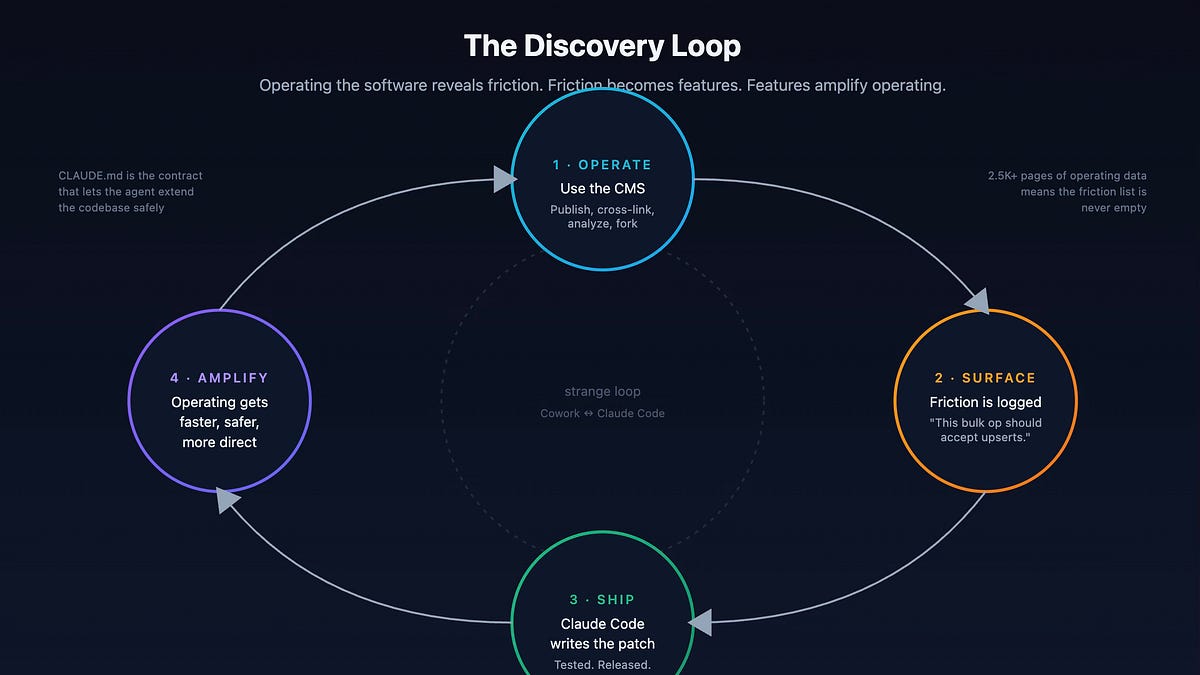
You describe what you want. Agents handle the mechanics. The graph stays connected. The system improves itself by being used this way.
LightCMS is open source (MIT). You can run it today if you know Go and Docker. But the real takeaway isn’t the software — it’s the pattern.
Stop building for humans to click. Start building for agents to call.
Your future self (and your AI teammates) will thank you.