
For forty years, you opened Word and the assistant lived inside it. This week Microsoft flipped that upside down, and Nadella said it out loud on stage: Copilot is the new OS for work. Word, Excel, and PowerPoint now run inside the chat. Your muscle memory is officially outdated.
What Microsoft actually changed at Ignite
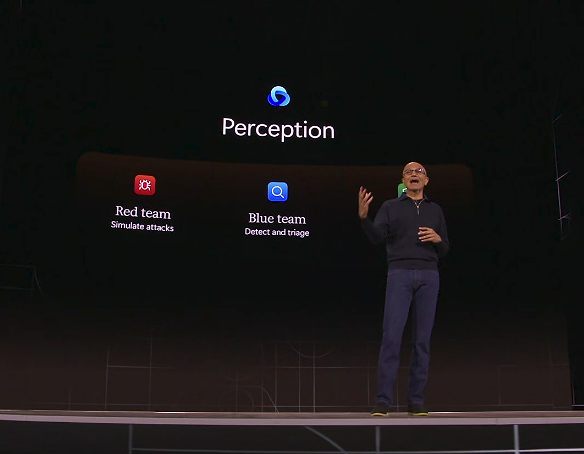
At its Ignite conference on November 17, Microsoft made Word, Excel, and PowerPoint generally available inside the Copilot app. Not “coming soon.” Available now, for existing Copilot license holders. (The announcement was first reported by Ars Technica from the keynote floor.)
Before this, the flow was familiar: open the app, click the Copilot sidebar, ask for help. Now the flow inverts. You open Copilot, describe what you need, and the document gets created right there. The file still lands in Word or Excel afterward, fully editable, with all the normal permissions and sensitivity labels attached. So nothing about where your files live actually changes. What changes is where the work starts.
| Before | Now | |
|---|---|---|
| Starting point | Word, Excel, PowerPoint | Copilot |
| The assistant | Sidebar inside each app | The main surface |
| Creating a deck | You build slides, AI helps | You describe it, Copilot builds |
| Where files live | Same as always | Same as always |
Microsoft’s own blog calls this “Office in Copilot,” and it’s part of a bigger rollout. Copilot Home, which combines Chat and Cowork in one place, is generally available too. The company also announced Copilot Autopilot, an always-on agent, which we’ll get to in a second.
Why “Copilot is the new OS for work” isn’t just a tagline
Sounds like keynote theater, right? I thought so too, at first. But there’s a real architectural idea underneath it.
Nadella’s argument is that an operating system is whatever layer you actually work in, with everything else running on top of it. For most knowledge workers, that layer used to be Office apps. The bet here is that it becomes the assistant, and the apps turn into components the assistant calls when it needs them. Microsoft even showed business apps like Salesforce running the same way, as plugins inside the Copilot interface.
Honestly, the rollout numbers explain why Microsoft wants this. If “Copilot is the new OS for work” sounds ambitious, consider what’s already sitting in Microsoft’s servers: more than 19.5 exabytes of data, with 90 billion emails and 10 billion new files added every week. If Copilot sits at the center with a context layer (Microsoft calls it Work IQ) reading across all of that, the assistant knows your meetings, your emails, and your project files at once. No single Office app can do that. That’s the whole pitch.
How to use Office in Copilot today
If your organization already has a Copilot license, there’s nothing to install. Here’s the quick version:
- Open the Copilot app (copilot.microsoft.com on the web, or the desktop and mobile apps).
- Start from Home, which shows your recent work and past chats.
- Describe what you want: “Draft a one-page proposal for the Henderson renewal” or “Build a spreadsheet tracking Q4 expenses by category.”
- Copilot creates the document in the chat. Open it, edit it, coauthor with teammates, and it saves to your normal OneDrive or SharePoint with the usual permissions.
- If you’d rather work in classic Word or Excel, just open the file there. It’s the same file either way.
One genuinely useful detail: files created inside Copilot inherit your Microsoft 365 permissions and compliance labels from the start. So no leaking a draft to the wrong person because you forgot to set sharing rules.
What about the free Copilot? The consumer app keeps its usual capabilities, but the full Office-in-Copilot experience is part of the licensed Microsoft 365 Copilot offering. If your company pays for it, you’ll see it. If not, the sidebar-in-Office flow you already know is still there.
Autopilot: the agent that takes responsibilities, not tasks
This is the part I’d actually keep an eye on.
Copilot Autopilot is Microsoft’s new persistent agent. The distinction Microsoft keeps drawing: you delegate tasks to most AI features, but you delegate responsibilities to Autopilot. Not “summarize this email.” More like “own my inbox triage and flag anything from key clients.” It works across email and calendar, it runs in the cloud while you’re offline, and it’s generally available as of Ignite.
Pricing for it is not finalized. Autopilot will bill through Copilot Credits, a usage-based system, and Microsoft hasn’t published the final numbers yet. So if your boss asks what this will cost, the honest answer is “not announced yet.”
Compare this with what other agents can do right now: Google’s computer use on Mac clicks through your desktop apps, and Zapier’s MCP setup connects ChatGPT or Claude to your other tools. Microsoft’s version is more locked-down, but the Work IQ context gives it something the others can’t easily match: deep knowledge of your company’s actual work.
What it costs (and what’s actually free)
Two different things are happening here, and Microsoft’s messaging blurs them.
Creating documents, spreadsheets, and decks inside Copilot costs nothing extra. Microsoft’s blog is explicit: it’s already included in your Copilot subscription license, with no meter running while Copilot builds your PowerPoint. That’s a big deal if you’ve watched AI features nickel-and-dime per prompt elsewhere.
Autopilot is the opposite: usage-based Copilot Credits, final pricing pending. Expect your company to gate that one behind IT approval anyway, because an agent with standing access to email and calendar is exactly the kind of thing admins review first.
The trust question Microsoft finally answered
Here’s the bit that surprised me. Nadella stood in front of thousands of customers and admitted the quiet part: AI models can’t fully be trusted to govern themselves. His exact framing was that trust in the models themselves is, by definition, not achievable right now. So instead Microsoft is building controls around them.
Every Autopilot agent gets a unique ID. Admins can restrict its permissions or block it entirely. Every action it takes is logged for human review, and it can be required to ask a person before doing anything sensitive. If your last AI scare involved an agent doing something nobody authorized, this ID-plus-logs approach is the enterprise answer to it.
Microsoft also announced Agent 365, a control plane for managing AI agents across a company, with analytics that tie token spend to business outcomes. Essentially an ERP for AI usage. Meanwhile the model layer itself stays outside the trust boundary. Slightly humbling for an industry that sells confidence for a living, and kind of refreshing to hear said plainly.
Should you actually change how you work
Not overnight. If you have a Copilot license, try starting your next document from the chat instead of from Word, and see if the draft gets you 70% of the way there. That’s the real test of whether Copilot is the new OS for work in your specific job, not Nadella’s keynote.
Also worth doing this week: poke through Copilot Home. It’s the single starting point Microsoft wants everything to live in, and it’s genuinely better for resuming half-finished work than digging through recent files.
If you don’t have a license, nothing changes yet. Keep your sidebar workflow. And if your workplace depends on Microsoft 365, it’s worth having a backup plan for the days when the platform wobbles, which, after last week’s global outage, is not a hypothetical.
The takeaway
Copilot is the new OS for work is both a slogan and, as of November 17, a product you can log into: Office apps now run inside the chat, and the Autopilot agent takes on standing responsibilities with admin controls around it. Try starting one real document from Copilot this week. If the draft comes back 70% usable, Microsoft’s bet just paid off for you.