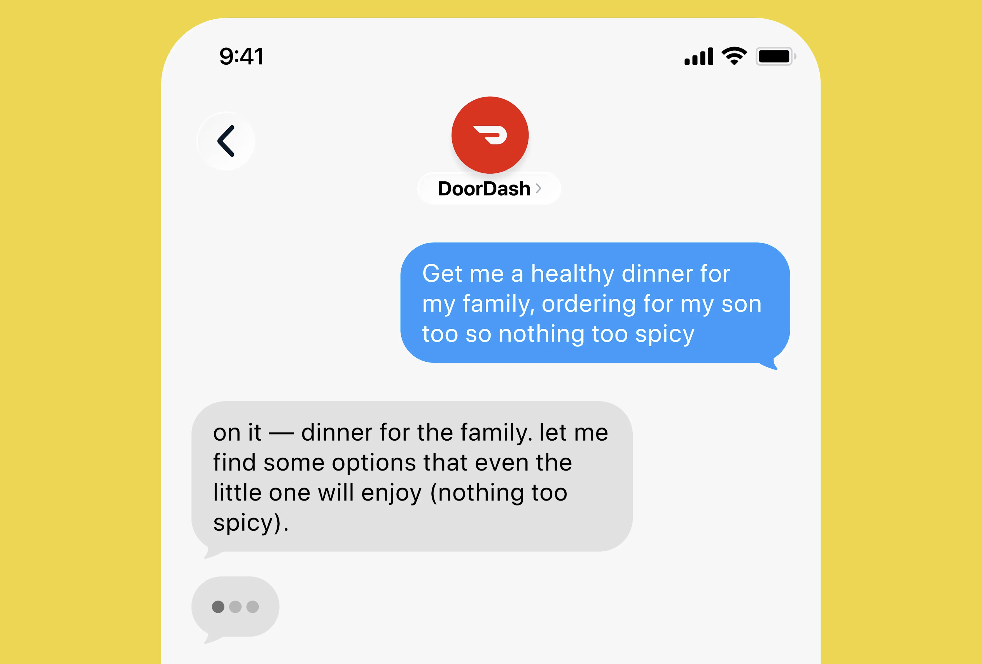

Ordering dinner usually means opening an app, scrolling past 40 promos, and rebuilding your cart from memory. DoorDash just turned that chore into a text conversation. The new DoorDash AI agent lives in Apple Messages, and it places your order when you type “order my usual.”
No app opening. No menu digging. You text, it orders.
What the DoorDash AI agent actually does
DoorDash announced the feature on September 30, and it works exactly the way it sounds: an AI agent that takes your order over text. You message it like a friend who knows your habits. Say “order my usual,” and it understands you mean that Friday night order you repeat every week.
The DoorDash AI agent goes beyond repeating past orders, though. Ask for a specific dish and it finds spots near you that make it well. Ask for a local recommendation and it builds a cart around what you said. It even texts photos of the food it’s recommending, so you see the goods before you confirm.
Group orders are where it gets interesting. The agent handles mixed dietary preferences and different quantities inside one order. Your vegan friend’s tempeh bowl and your cousin’s triple-meat pizza can share a cart without you juggling five phones.
How ordering by text works
The whole thing runs inside Apple Messages, so there’s nothing new to download on an iPhone. The flow looks like this:
- Join the waitlist and get access (steps below).
- Open Apple Messages and start a chat with DoorDash’s agent.
- Text what you want in plain words. “My usual from the taco place” is enough.
- The agent replies with a cart, photos included.
- Confirm, and your food heads out.
That’s the entire ritual. No app switching mid-craving, no losing your place in a menu. If you’ve ever texted a spouse “grab me the usual,” you already know how to use this.
Prompts that should work well
DoorDash says the agent understands plain language, so forget filter menus and just describe the situation. Based on the launch examples, prompts like these are the sweet spot:
- Order my usual from the taco place.
- Find me butter chicken under $20 nearby.
- Feed four people, one is vegetarian.
- Reorder last Friday’s order, but double the naan.
The trick is describing the outcome instead of hunting through categories. “Something warm for a rainy movie night” gives the agent more to work with than tapping “Pizza.” Worst case, it texts you photos and you course-correct before confirming. That back-and-forth is the whole point.
Where it beats the apps
Delivery apps are engineered to keep you scrolling. Every screen has upsells, pop-ups, and “you might also like” carousels designed to add six dollars to your total. It’s exhausting, and honestly, it works on most of us more than we’d admit.
A text conversation has none of that. You say what you want, the agent builds it, done. An order that takes eight minutes of tapping takes one message.
There’s a multitasking angle too. Ordering while watching TV, riding the bus, or pretending to work usually means app-switching chaos. With text, ordering fits inside whatever you were already doing. That’s the real promise here: the agent meets you where you are instead of dragging you into another app.
How the DoorDash AI agent compares
DoorDash isn’t the only one wiring AI into food delivery. Uber Eats launched Cart Assistant earlier this year to build grocery carts from text or photos, and Amazon’s Alexa+ already orders from Uber Eats and Grubhub. The approaches differ in ways that actually matter, though.
| DoorDash AI agent | Uber Eats Cart Assistant | Alexa+ ordering | |
|---|---|---|---|
| Where it lives | Apple Messages (text) | Inside the Uber Eats app | Alexa devices and app |
| How you order | Plain text, like texting a friend | Chat prompts in the app | Voice or app commands |
| Knows your past orders | Yes (“order my usual”) | Yes, builds carts from history | Yes, through linked accounts |
| Sends food photos | Yes | No | No |
| Group orders, mixed diets | Yes | Not the focus | Not the focus |
| Availability | Waitlist (US) | Beta in app | Rolling out |
Here’s the core difference: Uber’s assistant helps you build a cart faster inside its app. The DoorDash AI agent replaces the app with a conversation. One is a shortcut, the other skips the building entirely, and that’s why this launch feels bigger than a routine feature update.
If you like the idea of texting an AI like a person, we already covered Instinct AI, the agent you text like a person. Food is just the first place this pattern goes mainstream.
Why every food app is suddenly an AI company
This didn’t come out of nowhere. Instacart wired ChatGPT into its search back in 2023, and DoorDash itself tested a chatbot called DashAI that same year. Alexa+ added food ordering from Uber Eats and Grubhub in March. Google, meanwhile, is having Gemini call businesses for you, so the restaurant reservation is covered too.
The pattern is simple: whoever handles the conversation owns the order. If you ask an agent for dinner and it picks DoorDash, the Uber Eats app never even loads. That’s the stakes behind a little text bot.
How to join the waitlist
DoorDash opened a US waitlist, and getting in line takes about two minutes:
- Open the DoorDash app or the DoorDash website.
- Look for the text-to-order announcement, which is front and center right now.
- Enter your phone number and confirm.
There’s no confirmed rollout date, so treat any timeline you see online as a guess. DoorDash also started testing delivery drones with select restaurants in Northern California. Separate project, same direction: fewer taps between hunger and food.
Already booking dinners by chat? Our guide to the OpenTable AI concierge covers restaurant reservations, which pairs nicely with a text-ordered meal.
Should you trust an AI with dinner?
Fair question. Handing over your “usual” means trusting a bot with the restaurant, the items, and the extras.
Here’s the practical read: the agent shows you the cart and photos before anything gets charged. You’re not blind-signing your card to a robot. The confirm step stays yours, and that’s what keeps this useful instead of scary.
One caution from someone who has ordered the wrong salsa six times: agents learn from your order history, so garbage in, garbage out. Clean up messy special instructions before you let an agent read them. And double-check group orders early on, because mixed dietary needs are exactly where mistakes hurt the most.
The takeaway
If you order delivery more than once a week, join the DoorDash waitlist today while early access is rolling out. The DoorDash AI agent won’t replace the app for everyone, but for your usual orders it’s about to be the fastest way to eat. If it works, expect every delivery app to copy it within a year.