
Someone rebuilt Photoshop with AI and is giving it away for free. It’s called PhotoCraft, and it looks so much like the real thing that early testers say their muscle memory just worked. Somewhere, an Adobe lawyer just felt a disturbance.
What PhotoCraft actually is
PhotoCraft is a full image editor, written in the Rust programming language, created by a software engineer named Brandon Thomas. He didn’t draw the menus himself or hand-code every button. Instead, he leaned on Anthropic’s Claude Opus 5.5 to help rebuild Photoshop’s behavior from scratch, then released the result as an open-source project anyone can download at no cost.
And he didn’t stop at one app. The project, called ArtCraft, now covers Photoshop’s whole neighborhood: VectorCraft for Illustrator, FilmCraft for Premiere, LightCraft for Lightroom, PdfCraft for Acrobat, plus takes on After Effects and InDesign. Office-style apps are reportedly next. Every single one is free.
Why would a skilled engineer give away thousands of hours of work? Thomas has been pretty blunt about it. He told people he got burned by subscription cancellation fees one too many times, and in one comment he declared, “Software is over.” His argument: AI now makes it possible to build clean, 1:1 functional equivalents of expensive apps, so the old pricing model is on borrowed time.
The internet agrees something big is happening. The PhotoCraft repository landed on GitHub in late September and picked up more than 32,000 stars in about two weeks. That’s not curiosity traffic. That’s people actually installing it.
How do you clone a 35-year-old app without copying a single line of its code? Thomas has hinted the process was what people call vibe coding: pointing an AI model at how Photoshop behaves and having it rebuild similar behavior from scratch. Watch what the original does. Recreate what the user sees. Skip what’s under the hood. Whether that approach holds up legally is one of the open questions we’ll get to.
How PhotoCraft compares to Photoshop
Before you try anything, you want the honest side-by-side. Here’s where things stand with version 0.7.0, the current release:
| PhotoCraft (v0.7.0) | Adobe Photoshop | |
|---|---|---|
| Price | Free, open source | From about $23/month |
| Platforms | Windows, macOS, Linux, web | Windows, macOS, iPad, web |
| PSD files | Reads and writes them (307 of 309 test files match) | Native format |
| Layers and masks | Groups, clipping masks, smart objects, 27 blend modes | Full set, the industry reference |
| Generative AI tools | None yet | Generative Fill with Firefly credits |
| Plug-ins | Not supported | Huge third-party ecosystem |
| Maturity | Early alpha | Standard since 1990 |
That PSD row is the headline. Opening and re-saving Photoshop’s own file format was supposed to be the moat, and a free clone already crosses it in almost every tested case.
Getting started with PhotoCraft
Setup takes about five minutes. Here’s the path:
- Go to the official page at getartcraft.com/apps/photocraft and pick your platform. Windows users get an MSI installer, Mac users a disk image, and Linux users an AppImage or Flatpak.
- Install it like any normal app. No account, no email, no license server.
- Launch it and open an old PSD file you already have. This is the fastest way to see whether it handles your actual work.
- If you like it, grab the ArtCraft Launcher. It manages the whole family of Crafting apps and keeps them updated.
Don’t want to install anything yet? There’s also a browser version built on WebAssembly. You can open a canvas and start editing straight from the project’s site, which makes trying PhotoCraft a zero-commitment experiment.
Worried about installing an alpha from a stranger? Fair. The Windows installers are code-signed, every release publishes a SHA256 checksum file so you can verify what you downloaded, and the whole thing builds in public on GitHub. That’s more transparency than most free software gives you.
There’s also a full copy of the source code on GitHub, if that’s your thing. The license is permissive (MIT or Apache 2.0), so you can even poke around inside it.
Where PhotoCraft shines
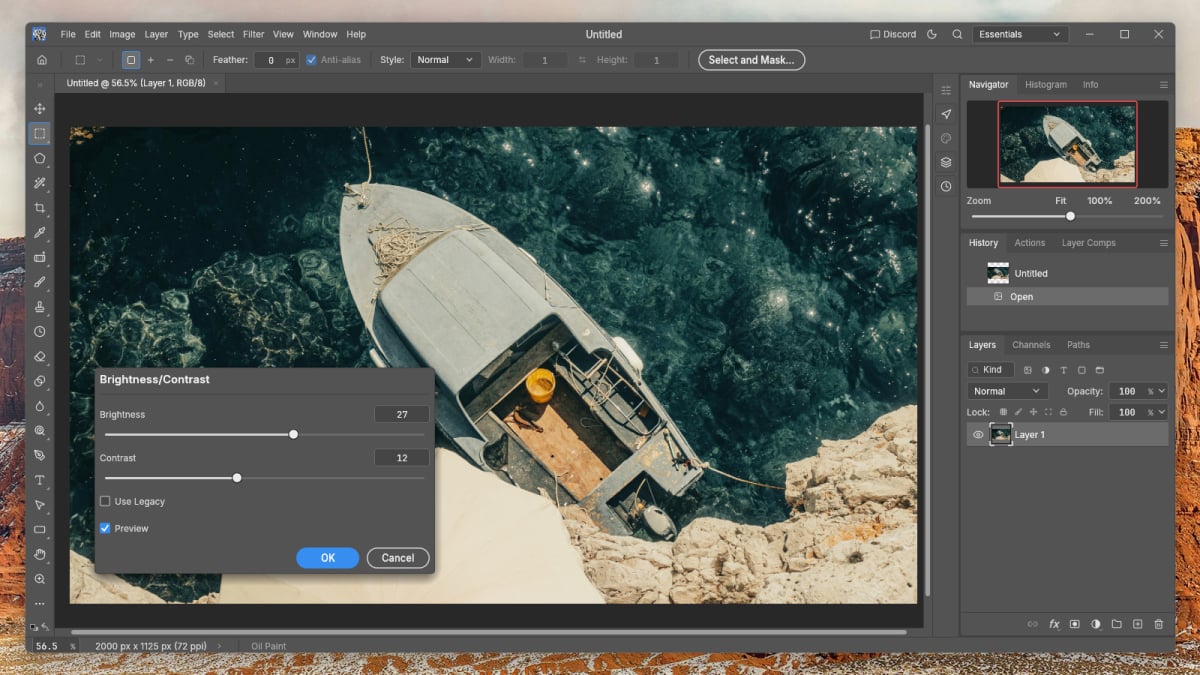
The interface is the shock. According to David Nield’s hands-on review at Lifehacker, the color scheme, the panel layout, the menus, the order of the menus, even the keyboard shortcuts match Photoshop. He moved his real workflow, cropping, combining images, color adjustments, over to the clone pretty much wholesale. The clone stamp, the magic wand, the adjustment dialogs: all there, all in the same spots.
Speed is the second surprise. Because it’s pure Rust with GPU-accelerated rendering and no Electron browser shell hiding underneath, it starts fast and stays responsive on ordinary laptops. It works fully offline too, which Photoshop can’t promise without periodic license check-ins.
Then there’s the obvious one. Zero dollars. If you’ve ever let a Creative Cloud subscription quietly renew for a year you didn’t need, you know exactly why 32,000 people starred a repository.
Where PhotoCraft stumbles
Let’s not oversell it. The developers label this “early alpha,” and that label matters. Nield hit clunky snapping and selection behavior in his testing, and power users digging deeper have found plenty of issues under the hood. Advanced layer tricks and heavy compositing are where AI-copied behavior tends to crack first.
Missing features matter too. There’s no generative fill, no Photoshop plug-in support, and a shallower toolbox overall. Thomas says 99% feature parity should arrive in “months, not years,” but that’s a promise, not a release note.
There’s also a legal cloud hanging over the whole project. As Ars Technica has pointed out, reverse engineering is usually tolerated as long as no code gets copied directly. But when a clone matches the look and feel of the original this closely, the answer stops being clear. Nobody knows yet how that fight ends, and Adobe is almost certainly paying attention.
Should you ditch Photoshop for PhotoCraft?
Short answer: not yet, but definitely try it.
If you’re a beginner, a student, or someone who just edits photos occasionally, PhotoCraft is honestly a no-brainer. It’s free, it’s familiar-looking, and it handles everyday edits like cropping, layers, and color work. Download it today and cancel nothing.
If you make your living in Adobe’s ecosystem, keep your subscription and keep an eye on this project instead. Test your trickiest files once a month. When version 1.0 lands, you’ll know whether the switch is real, and you’ll be months ahead of everyone else.
And if you like free tools in general, the pattern is spreading. LightCraft gives Lightroom the same treatment, and we’ve covered Rembrandt, a free Lightroom alternative, before if you want a second opinion on that side of the house.
The bottom line
PhotoCraft proves the free Photoshop clone is no longer a rumor. It’s a real app with real layers, real PSD support, and a price of exactly nothing. Try it with one of your own files this week, because the fastest way to judge an editor is on your work, not someone else’s screenshots.
For more on how AI is reshaping the software you use daily, see our guide on which Claude model to use, the engine that helped build this thing. And for the other side of the open-source debate, read why LibreOffice says no to AI on purpose, a very different philosophy from Thomas’s “there is no reason to save broken software.”