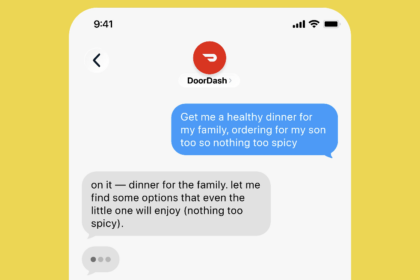

Picture this: you need to book a flight, compare prices across five hotel sites, and make a restaurant reservation — all for a trip you haven’t planned yet. Instead of opening twelve browser tabs and typing the same details into each form, you tell an AI “book me a weekend trip to Austin, $400 budget, prefer Saturday departure” and it handles everything. That’s what AI browser agents promise. Some are getting close to delivering on it.
A new wave of AI tools called browser agents can navigate websites, fill out forms, click buttons, and complete tasks online — essentially doing the web browsing that you’d normally do yourself. The technology is still early, but it’s moving fast. Here’s what AI browser agents can actually do today and which ones are worth trying.
What is an AI browser agent
An AI browser agent is exactly what it sounds like: an AI system that controls a web browser. Instead of predicting the next word in a sentence (like ChatGPT), it predicts the next action — click this button, type in this field, scroll down, select this option. It sees the webpage the way you do, understands what’s on it, and decides what to interact with.
This is different from traditional automation tools like Zapier or Make. Those connect to APIs — predefined ways for apps to talk to each other. Browser agents don’t need APIs. They work with any website that a human can use, including sites that have no automation support at all.
The technology behind this combines large language models (the same ones that power ChatGPT and Claude) with computer vision (to “see” the webpage) and action planning (to decide what to click or type). It’s one of the most actively funded areas in AI right now, with billions of dollars flowing into startups building these tools.
What AI browser agents can actually do
The capabilities are expanding rapidly, but here’s what works reasonably well right now.
Shopping and price comparison
Give a browser agent a product you want and your budget, and it can search across multiple retailers, compare prices, check availability, and even add items to your cart. Some can complete the purchase if you give them payment details (which raises obvious security questions we’ll get to).
The practical value here is time savings. If you’re trying to find the best deal on a specific laptop model across Amazon, Best Buy, Newegg, and B&H Photo, a browser agent can do in two minutes what would take you twenty.
Booking and reservations
Restaurant reservations, hotel bookings, flight searches — browser agents handle these well because the workflows are relatively standardized. Fill in dates, select options, submit. A startup called Hark recently demonstrated its agent building a custom flower bouquet from a florist’s website by interpreting natural language like “some of the florist’s choice” alongside specific requests.
The challenge is that booking sites often have CAPTCHAs, two-factor authentication, and other security measures that trip up AI agents. Hotels.com and OpenTable are easier targets than airline booking systems with their multi-step verification flows.
Research and data gathering
This is where browser agents shine for productivity. Tell one to “research the top 10 project management tools and create a comparison table with pricing, features, and user ratings” and it will visit review sites, read pricing pages, compile data, and structure the results. It’s like having a research assistant who works at browser speed.
For professionals who spend hours gathering competitive intelligence, market data, or vendor comparisons, this alone can justify the learning curve.
The top AI browser agents right now
The landscape is crowded and changing weekly. Here’s where things stand as of mid-2026.
Hark Handoff
Hark raised $700 million in Series A funding in May 2026, which tells you how seriously investors are taking this space. Their Handoff agent can navigate sites like Target, Walmart, OpenTable, and LinkedIn — all without APIs. The demo showed it ordering custom flower bouquets, making restaurant reservations, and shopping for specific products.
The company claims its model is faster and cheaper than competitors like GPT 5.5 and Opus 4.8, though independent verification is limited since the product is still in waitlist. Release is planned for late summer 2026. If Hark delivers on its promises, it could be the most user-friendly option for non-technical users.
Browser Use (open source)
Browser Use is an open-source Python library that lets you build your own browser automation with AI. It’s free, flexible, and requires some technical knowledge to set up. If you’re a developer or tinkerer who wants to customize your browser agent, this is the way to go.
The tradeoff: it’s not a polished product. You’ll spend time configuring it, handling errors, and maintaining your setup. But it’s genuinely free and has an active community contributing improvements.
OpenAI Operator
OpenAI’s browser capabilities are built into ChatGPT’s agent mode and its Codex product. In ChatGPT Work, the browser feature lets the AI research topics by visiting real websites. It’s integrated into a larger assistant rather than being a standalone browser agent.
The advantage is convenience — it’s already inside the world’s most popular AI chatbot. The limitation is that it’s not designed specifically for browser-heavy tasks like shopping or booking. It’s a general-purpose browser capability bolted onto a chat assistant.
Anthropic Claude computer use
Claude’s computer use feature lets the model interact with your computer, including web browsers. It can navigate websites, fill forms, and complete multi-step tasks. Like OpenAI’s approach, it’s integrated into Claude rather than being a standalone product.
Claude’s computer use tends to be more methodical than OpenAI’s — it follows instructions step by step rather than improvising. This makes it more reliable for structured tasks but sometimes slower for open-ended browsing.
If you’re exploring AI agents beyond just browser automation, our guide on connecting AI agents to your apps covers the broader ecosystem.
How to get started with one
The easiest starting point depends on your technical comfort level:
- Non-technical users: Get on Hark’s waitlist. When it launches, it should be the most accessible option with a clean interface and no setup required.
- ChatGPT users: Start using the browser feature in ChatGPT Work. You already have access if you’re on a paid plan. Ask it to research something and watch how it browses.
- Claude users: Enable computer use in Claude Desktop. Give it a specific web task like “go to this URL, find the pricing table, and summarize it.”
- Developers: Set up Browser Use with Python. It’s free, customizable, and gives you full control over the automation.
Don’t expect perfection on day one. These tools are improving rapidly but they still make mistakes — clicking the wrong button, getting stuck on CAPTCHAs, or misunderstanding page layouts. The best approach is to start with simple tasks and gradually increase complexity as you learn what your chosen tool handles well.
What they still struggle with
Let’s be honest about where the technology falls short. First: security. Giving an AI access to your browser means giving it access to your accounts, your payment methods, and your personal data. Most browser agents offer safeguards, but the risk is real. Never let a browser agent complete a purchase on your first test run.
Second: reliability. Browser agents fail regularly. They get confused by complex page layouts, stuck on unexpected pop-ups, and blocked by anti-bot protections. A task that works perfectly one day might fail the next because a website updated its design.
Third: speed. AI browser agents are slower than humans for simple tasks. Clicking through a three-page checkout flow might take you 45 seconds but could take an AI 2-3 minutes as it “reads” each page, decides what to do, and executes the action.
These limitations are shrinking as the technology improves, but they’re real enough that you shouldn’t depend on browser agents for mission-critical tasks yet.
Are AI browser agents ready for daily use
Not entirely, but getting closer. For research tasks and simple web interactions, some of these tools are genuinely useful today. For complex, multi-step workflows involving payments or sensitive data, it’s still early.
The best mindset: treat AI browser agents as a productivity boost for specific tasks, not a replacement for your own judgment. Use them for research, price comparison, form-filling, and booking. Stay in the loop for anything involving money or personal information.
If you’re building automation workflows beyond browser tasks, check out our comparison of the best Zapier alternatives for more structured automation options.
The space is moving fast enough that the tools available today will look primitive compared to what’s coming in six months. But waiting isn’t the answer either. Start experimenting now with simple tasks and you’ll be ready to use these tools productively when they mature.