
For years, buying an Amazon tablet meant settling for less in exchange for a low price. That deal is off the table. Amazon killed the Fire tablet line this week and launched three Amazon Alexa tablets that cost more, run proper Android, and finally include the Google Play Store.
Why Amazon quit the budget tablet business
Here’s the headline most people missed. Amazon didn’t refresh its tablets, it replaced them. Instead, the company confirmed the new Alexa tablets are an all-new product line with new hardware and a new operating system, not a Fire Tablet rebrand. Gone is the old Fire lineup, which started at $129 for the Fire HD 8.
The pricing tells the story. The Alexa Tablet 12 Pro starts at $499.99, which is more than double what Amazon’s old flagship tablets ever cost. CNBC even notes Amazon denied that memory shortages drove the price up, though the devices boss admitted the current memory crunch made building a premium tablet “quite tricky.”
So why would Amazon walk away from the budget corner it owned for a decade? Two reasons. First, the cheap tablet market is a race to the bottom it can’t win against $99 Android slates. Second, and more importantly, every one of these tablets ships with Alexa+ built in. Amazon wants its AI assistant in front of your face every day, and it’s willing to sell hardware near cost to get there.
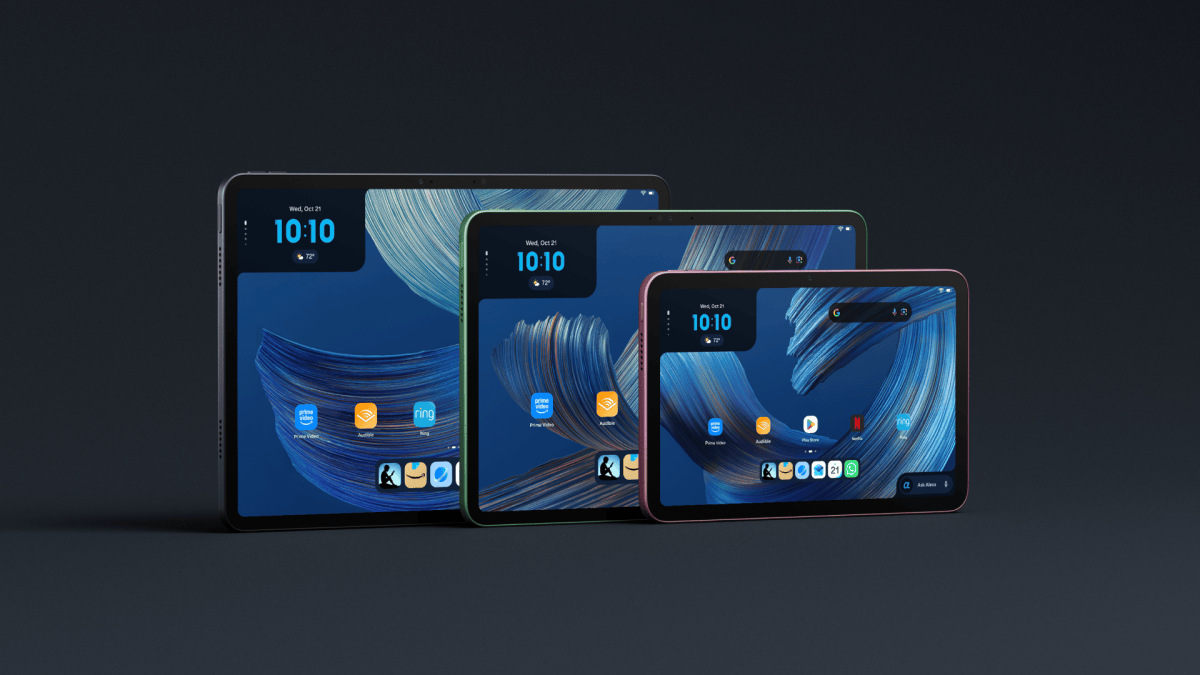
The three Amazon Alexa tablets side by side
All three models share the same DNA: aluminum unibody design, Android under the hood, and access to millions of Play Store apps at launch. Here’s how they compare:
| Alexa Tablet 12 Pro | Alexa Tablet 11 | Alexa Tablet 8 | |
|---|---|---|---|
| Starting price | $499.99 ($549.99 Nanomatte) | $329.99 | $229.99 |
| Display | 12-inch, 280 PPI, 120Hz | 11-inch, 2.5K, 276 PPI, 90Hz | 8.7-inch |
| Memory and storage | 8GB RAM (16GB max), 128GB | 8GB RAM, 64GB | 4GB RAM, 64GB |
| Battery (video playback) | 16 hours | 15 hours | Not stated |
| Standout extra | Pro Pen and keyboard support, Wi-Fi 6E | Dual Dolby Atmos speakers | 329g, one-handed use |
| Best for | Real work, note-taking | Streaming and reading | Reading on the go |
The 12 Pro is the one Amazon wants you to compare against the iPad and Samsung’s Galaxy Tab line. It’s 6.5mm thick, the screen refreshes at 120Hz, and Amazon claims nearly three times the processing power and nine times the graphics muscle of any tablet it has shipped before. Treat those numbers as marketing until the reviews land, because they always are.
One genuinely interesting option: the Nanomatte display, developed with Corning, cuts glare dramatically. If you’ve ever tried to read on a glossy tablet by a window, you know exactly why that matters. It adds $50 to the price.
What Alexa+ actually does on these tablets
Alexa+ is Amazon’s upgraded assistant, and it’s not just a voice button on a bezel here. Say “Alexa” or tap the Ask Alexa button to ask questions, control your smart home, and get things done.
The feature that makes sense on a tablet is On-Screen Intelligence. Alexa can look at whatever is displayed and answer questions about it. Browsing a list of hiking trails? Ask which one suits you. Reading a long article? Ask for the short version. The assistant sees what you see, which is something your phone’s assistant still can’t do well.
There’s a Kindle mode too. Open the Kindle app and the tablet silences notifications, dims blue light, and stretches battery life to a claimed 20 hours. Small thing. But it shows Amazon is thinking about reading, which has always been the one thing Fire tablets did well.
The Google Play Store twist
This is the biggest change, and honestly it’s overdue. Every Fire tablet before this one ran Fire OS and locked you into Amazon’s Appstore, which never had half the apps you actually wanted. Google’s own apps were famously absent.
The new Amazon Alexa tablets run Android and ship with full Play Store access at launch. YouTube, Netflix, Gmail, and millions of other apps install like they would on any Android device. No workarounds, no sideloading tutorials from 2019.
For anyone who returned a Fire tablet out of pure app frustration, this alone might be the reason to look again.
Should you actually buy one?
Quick honesty check first: these Amazon Alexa tablets go on sale October 14 in the US, Canada, and Mexico, so nobody has tested retail units yet. With that said, here’s who each model makes sense for.
Get the Alexa Tablet 8 if you mostly read and want the cheapest entry into Alexa+. At $229.99 it’s still not budget territory, yet it’s the closest heir to the old Fire HD.
Get the Alexa Tablet 11 if you stream shows, read, and browse. The 2.5K screen at $329.99 is the sweet spot of the lineup, and it’s the one I’d bet sells best.
Get the 12 Pro if you want to replace a laptop for light work. Add the Pro Pen at $89.99 and the magnetic keyboard at $149.99, and you’re at roughly $740 for the full setup, which is iPad territory with worse app polish but a friendlier assistant.
Meanwhile, if you already own a recent Fire tablet, don’t rush. Your apps still work, and waiting for reviews costs you nothing.
The catch
Preorders opened October 8, and shipping starts October 14, which means no reviews exist yet. Amazon’s performance claims are unverified, and first-batch Android tablets from a company new to the Play Store could ship with real software quirks. Also, Amazon’s track record with half-abandoned device experiments is long. Remember the Fire Phone? Exactly.
Prices outside the US land October 19 in the UK, Germany, France, Italy, and Spain, and international pricing may sting a bit more. Plus, Alexa+ features can vary by region, so check what’s actually enabled in your country before you commit.
What to do next
The Amazon Alexa tablets hit stores on October 14, then reviews land in the days after. Check them before spending $500 on the 12 Pro. If you just want the Alexa+ experience, the Tablet 8 gets you there for $229.99.
Want to see Alexa’s shopping brain in action first? We tested Amazon’s Alexa scam checker that spots fake messages, compared which devices get Siri AI features, and looked at why AI shopping recommendations can quietly cost you more money.