
Someone just dropped a song on Spotify under your name. Not you, not your label, just a stranger with an AI music generator and too much confidence. It happens thousands of times a day now, which is why Spotify Artist Profile Protection matters: the tool that kicks fake releases off your profile finally opened to every artist today.
What Spotify Artist Profile Protection actually does
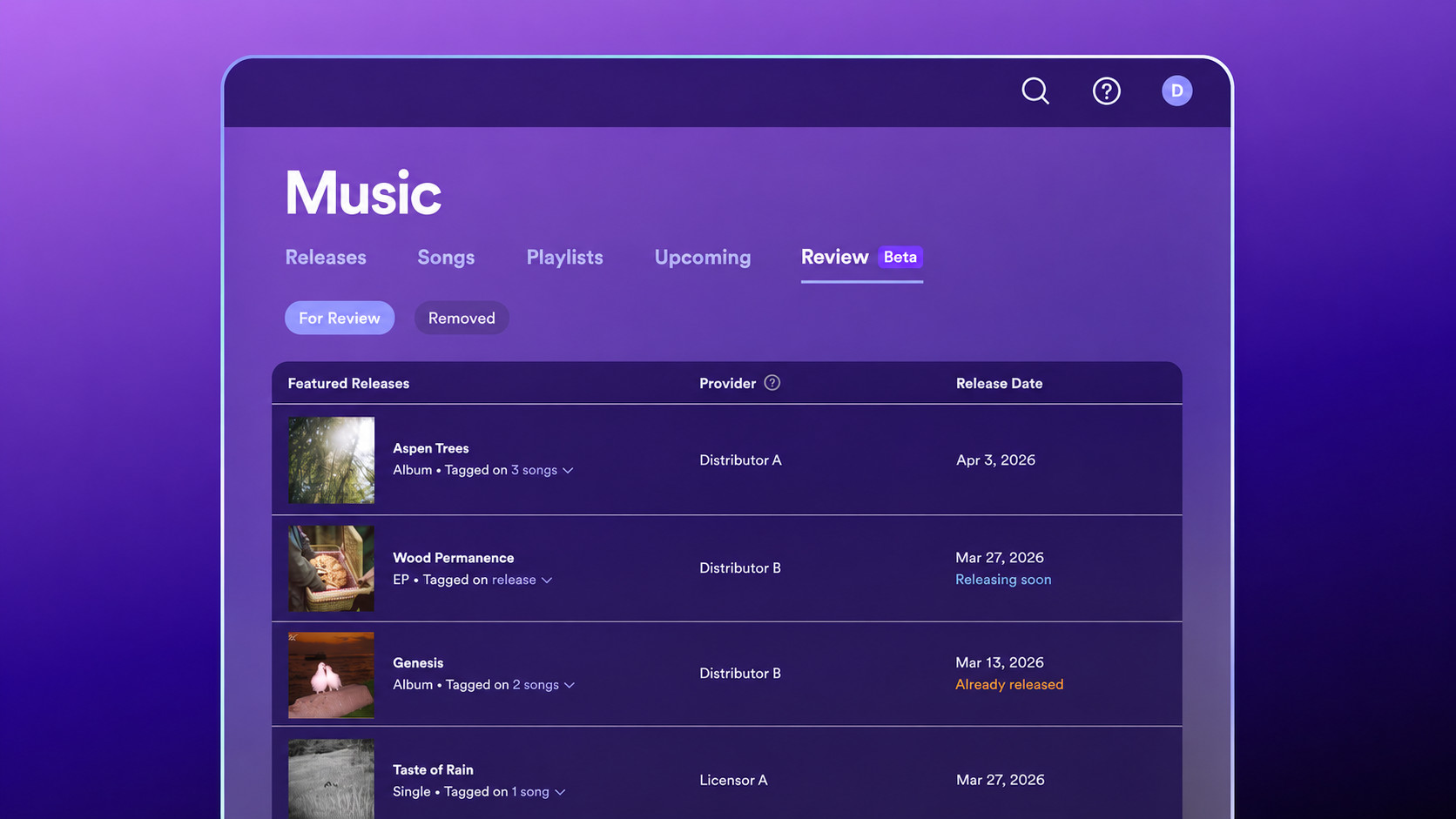
Spotify Artist Profile Protection watches your artist name, not the audio. When any distributor delivers a new release that lists you, the platform sends you an email. You get a look at the release before it stains your catalog. If it’s yours, do nothing. It goes live on schedule, exactly like before.
But if it isn’t yours? You remove the association, and the release vanishes from your profile, your stats, and your recommendation feeds. It won’t land in anyone’s Release Radar either. Your monthly listener count never takes the hit. You have 28 days after a release goes live to make that call, so there’s room to breathe.
“Artists should never have to find someone else’s music under their name,” said Sam Duboff, Spotify’s global head of marketing and policy, when the company announced the rollout. Spotify claims it’s the first streaming service with a real answer to what the industry calls content mismatch.
One thing to understand before you touch any settings: this tool controls attribution, not audio. It doesn’t judge whether a track was made with AI. Meanwhile, actual voice clones of your voice fall under Spotify’s separate impersonation policy, which works differently.
Coverage is broader than you’d expect, too. Review alerts track main artists and featured guests, remixers, and actors on tracks. Classical releases get protection as well, covering composers, orchestras, and conductors. So the session cellist who keeps getting miscredited finally has a switch of their own.
Why Spotify built this now
Because the flood got out of hand. Sony Music alone has asked platforms to remove more than 260,000 AI deepfake tracks that imitated its artists, including fakes of Harry Styles and Adele. That figure nearly doubled in six months, from 135,000 at the end of March to past 260,000 by the end of September, as TechCrunch reported.
Spotify’s own housekeeping tells the same story. The company says it pulled more than 50 million slop and spam tracks out of its recommendations this year. On top of that, over 75 million spammy tracks got removed from the platform entirely for serious rule violations.
Impersonation isn’t the only problem, either. Metadata errors put songs on the wrong profile all the time, and plenty of artists share the same name. A cover band in Ohio and a producer in Berlin can collide in search results, and both get blamed for the mess.
The feature isn’t brand new, by the way. Spotify beta tested it from March with thousands of artists, including Samia, Diplo, Searows, and Dave East. As a result of that testing, the default behavior changed: in the beta, releases you ignored got blocked automatically. Now music goes live on schedule unless you step in.
How to turn on Spotify Artist Profile Protection
Setup takes about five minutes. Here’s the whole thing:
- Claim your profile. Sign up at Spotify for Artists if you haven’t. Most independent artists already have access through their distributor, and verification adds the badge that more than 300,000 creators now carry.
- Open your settings. On desktop, head to the artist settings menu. On the mobile app, tap the music tab instead.
- Switch on Artist Profile Protection. Team admins and editors can manage it too. Plus, your whole crew stays covered when you’re on tour or asleep.
- Watch your inbox. Every new release delivered under your name now triggers an email alert.
- Act when something looks wrong. Open the alert, check the release, and remove the association if it isn’t yours. You get 28 days, and music stays live on schedule until you step in.
One heads-up on timing: in the stricter mode, approvals can take up to 24 hours to process. So don’t schedule a release two hours before a marketing push and expect the system to keep pace.
Review releases vs Block releases
You get two levels of control, and picking wrong has real consequences. Here’s how they compare:
| Setting | What happens to new releases | Best for |
|---|---|---|
| Review releases (default) | Go live on schedule unless you remove yourself | Most artists |
| Block releases (advanced) | Stay off your profile until you approve them | Common names, repeated mix-ups |
Block releases is still rolling out to a limited group. When you get access, you can generate an artist key and hand it to trusted distributors so legitimate deliveries skip the approval queue. Guard that key like a password, because anyone holding it can attach releases to your name. For example, if your distributor gets breached, the key is the leak. And be honest about your workflow: if nobody on your team approves releases in time, Block mode will stall your real music.
The limits nobody mentions
This is where the press releases get quiet, so let’s be straight about what this tool doesn’t do.
It only covers Spotify. A release you reject today can still pop up under your name on other services tomorrow. Spotify says so itself and suggests telling your label or distributor, so they can flag the same release at other platforms. Deezer has an AI music filter toggle, and YouTube Music slaps AI labels on tracks for listeners, but neither gives you this much control over your own profile.
It removes your name, not the song. Declining a release means it no longer lists you. The track itself stays live somewhere, and a real takedown is a slower fight through separate reporting channels.
And it can’t spot voice clones. That’s a different policy with its own claim process. Spotify Artist Profile Protection won’t catch an impersonation of your voice, though Spotify will remove those tracks after you file a report.
A few provider quirks are worth knowing before launch day. Releases from some distributors may be ineligible for review, which means they slip past your queue entirely. Spotify has also been testing AI Persona badges for fully AI-generated acts since August, and it keeps those out of your recommendations by default. Your protection tools and their slop filters are separate systems, so don’t assume one covers the other.
Your 5-minute action plan
Turn Spotify Artist Profile Protection on today, even if your catalog has never been touched by fakes. The default Review releases setting costs you nothing and takes one switch. Got a common artist name or past mix-ups? Wait for Block releases access and use an artist key with your distributor.
Then do the part automation can’t: check your profiles on other streaming services by hand, and keep screenshots of anything fishy. Meanwhile, if you want the wider picture, we’ve covered how to detect AI music across platforms and what Suno v6 means for licensed AI songs.
Five minutes now beats 28 days of cleanup later.