
Your Discord messages in Google search used to be impossible. Not anymore: starting next month, Discord is putting content from big public servers on the open web, and if you’re in the US, you’re included by default. There’s one switch that keeps you out, and flipping it takes about ten seconds.
What Discord is actually changing
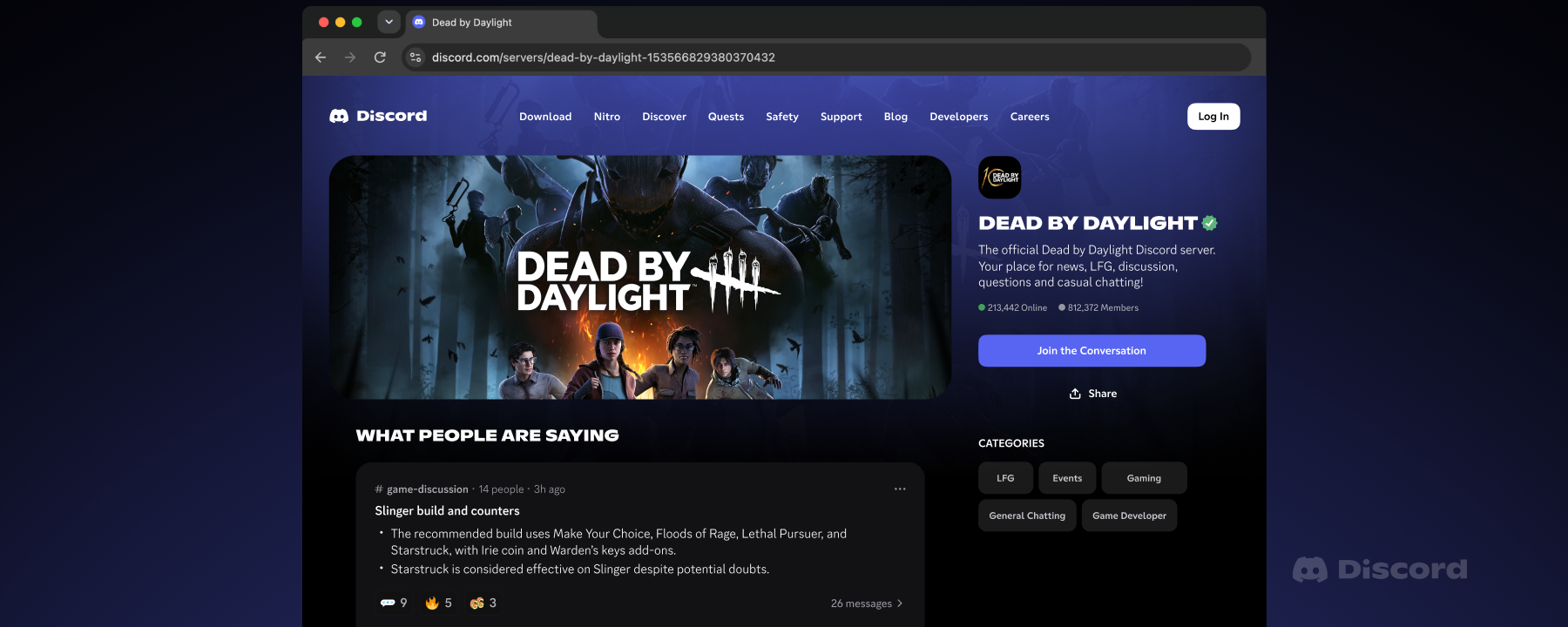
Here’s the short version. On November 16, every “Discoverable Server” on Discord gets its own public web page. That page describes the server and can include summaries of chats from public channels. Then, from mid-December, individual messages from those channels can start appearing on the pages and in web results. Google isn’t even the only destination: Discord’s own help docs say eligible messages may be displayed by search engines, “including, but not limited to Google.”
Before you panic, check what kind of server you’re in. This only covers public channels in Discoverable Servers, which are the big communities Discord lists in its Server Discovery directory. Private servers, DMs, and group DMs stay private. Your 12-person gaming group is not getting crawled.
But if you’ve ever asked a question in a 50,000-member server about your job, your health, your relationship, or your money problems, that question could end up on a public web page in your exact wording. Usernames and avatars won’t appear next to it. Your words still will.
The dates that matter
Two dates worth writing down:
- November 16, 2026: server web pages go live for all Discoverable Servers, and channel summaries start rolling out around then.
- Mid-December 2026: individual messages start appearing, with a rollout Discord says will take several weeks.
Discord messages in Google search won’t show up overnight either. The company is staggering this over weeks, which means the exact day your words become searchable depends on your server. Do you want to gamble on that, or flip one setting and be done with it?
There’s also a catch buried in the timing. You can opt out at any point, but the opt-out only protects messages sent after you flip the switch. Anything you post while the setting is still on can end up public, even if you turn it off a day later. So the smart move is doing this in early November, not after you spot your own message on Google.
What your messages will look like online
Discord tested the feature with game communities like NBA 2K, Rust, and Dead by Daylight. During that pilot, every published post came from admins and moderators. That sounds reassuring, until you remember the full rollout includes everyone in the channel, not just the mods.
Messages appear in the poster’s own words, with a label showing which channel they came from. Nothing sent before mid-December is eligible. So yes, that dumb joke you posted in 2023 stays buried. Everything you type after the rollout starts is fair game.
Stop Discord messages in Google search before December
This is the part to actually do. It takes under a minute.
- Open Discord (app or browser, same steps).
- Click the gear icon near your username to open User Settings.
- Go to Data & Privacy.
- Find the setting called “Show my message content from Discoverable channels on web pages.”
- Toggle it off.
Done. One switch covers every Discoverable Server you’re in, so there’s no per-server hunt. That’s what keeps Discord messages in Google search from ever including you in the first place.
If you don’t see the option yet, don’t stress. Discord started rolling out the related controls on October 27, and they’re still spreading across accounts. Check again in a few days, and flip it the moment it shows up.
Teen accounts are excluded from all of this automatically, by the way. Meanwhile, if you’re in the EU, UK, Canada, Brazil, Australia, or South Korea, Discord flipped the default for you: your messages stay off the web unless you actively opt in. The US gets no such protection. You have to do it yourself.
While you’re in a settings mood, it’s a good moment to lock down your other chat apps too.
If you run a Discord server
Admins got their own set of controls, and they’re worth a look even if you think your community is harmless. Under Server Settings > Web Presence, you can choose which channels are allowed on the web page, opt every channel out, or kill the page entirely by leaving the Discoverable program.
Here’s the annoying part, though. Those channel summaries that show up on server web pages? Regular members can’t turn them off. Only admins can. If you’re a member of a server whose admin doesn’t care, your personal toggle is the only thing protecting you.
Quick comparison, so you don’t have to dig through Discord’s docs:
| Control | Regular user | Server admin |
|---|---|---|
| Keep individual messages off web pages | Yes, via the Data & Privacy toggle | Yes, by excluding channels in Web Presence |
| Turn off channel summaries | No | Yes |
| Remove the server’s web page entirely | No | Yes, by leaving Discoverable status |
| Remove an already-published message | Yes, delete it in Discord | Yes, same way |
If you run a server and want zero web presence, the all-channels opt-out is the move. Discord confirmed admins could do this from October 27, weeks before anything goes live on November 16. Your members keep chatting like normal; nothing leaves the server.
What opting out does not fix
Honest section, because this is where most coverage stops short.
Opting out stops future Discord messages in Google search. It does not delete anything. Messages you already sent while the setting was on stay eligible unless you delete them yourself. And even then, Discord warns that search engines may keep cached copies around for a while. So if you posted something regrettable in a public server last week, delete it now, before December.
You also can’t opt out of the summaries. If your admin leaves them on, the general topics of your channels stay public even when your individual messages don’t.
And there’s a bigger question nobody at Discord has answered: can AI companies scrape these pages and train on them? When the news broke, users asked exactly that. The company hasn’t said no. Search indexing and AI training are different pipelines, and opting out of one says nothing about the other.
Why Discord is doing this
Discord’s official argument goes like this: communities moved from forums to Discord, forums were searchable, and Discord wasn’t. All that accumulated knowledge, game guides, troubleshooting threads, build advice, is invisible to the open web. Server web pages are the fix.
That’s a fair point for game guides. It’s a much weaker one for everything else people actually talk about in public servers. “Public channel” on Discord has always meant public to the server, not public to the planet. A lot of people are about to learn the difference the hard way, unless they flip the switch first.
If you want the company’s own words, the announcement lives on the Discord blog, and the support article covers every privacy control in detail.
What to do today
Open User Settings > Data & Privacy and turn the toggle off. Ten seconds now beats finding your Discord messages in Google search later. Server admins should review Web Presence while they’re at it.
This is part of a bigger pattern, too. Platforms quietly widen who can see your stuff, then hand you the off switch and call it control. Same story with Google verifying your phone number, ChatGPT digging through your prompts for ad targeting, and AI chats you thought were private. Check your defaults. They’re rarely set in your favor.