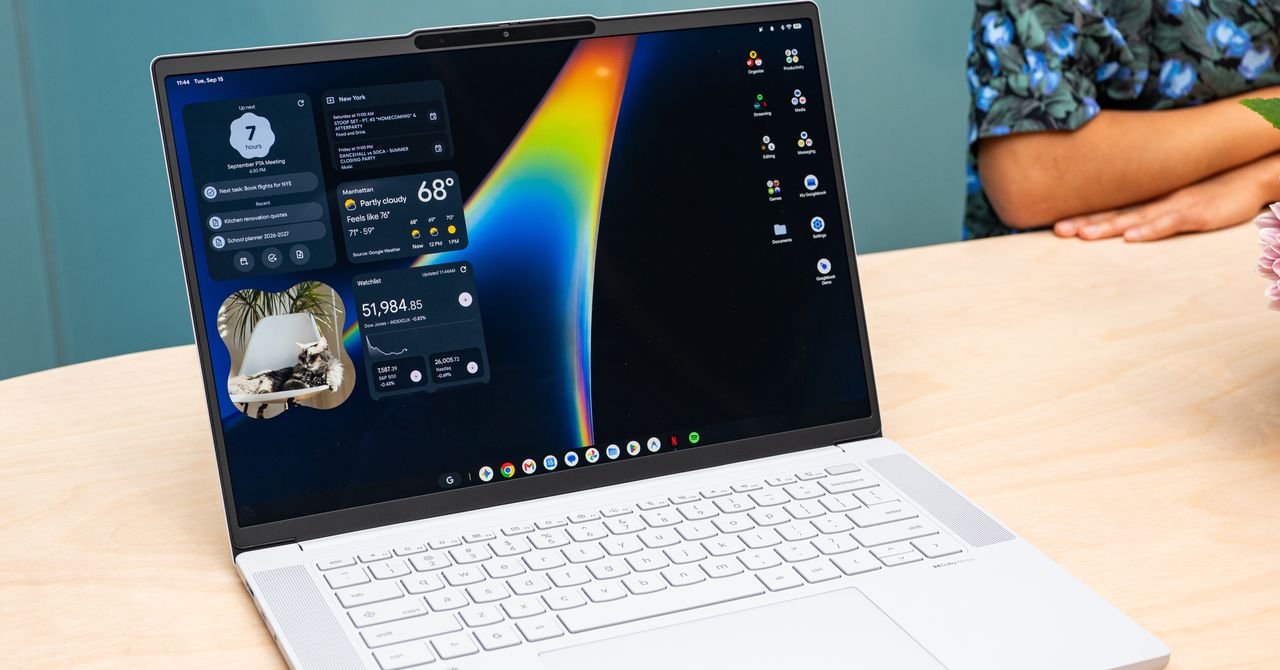

Google just put its name on a laptop, and if you’re shopping this fall, the Googlebook laptops deserve a spot on your list. Five models from Acer, Asus, Dell, HP, and Lenovo went up for preorder this week starting at $899. Here’s what you actually get and who should wait.
What a Googlebook actually is
Googlebook laptops are a new category of machine that merges Android with ChromeOS into one operating system. Think of it as Android grown up: the interface feels like a big phone screen, but it’s a distinct OS built for laptop chips from Intel and Qualcomm.
Google isn’t building these itself. It sets the rules, and hardware makers build to them. Acer, Asus, Dell, HP, and Lenovo are the first five, and every machine has to hit Google’s bar: at least 16 GB of RAM, 256 GB of storage, a touchscreen, a backlit keyboard, a haptic trackpad, Dolby Atmos speakers, noise-canceling mics, and 14 hours of battery life. Ten years of software updates are promised, which beats most Windows laptops by years.
There’s also a required light strip on the outside of every model called the Glowbar. It lights up when Gemini is listening, and developers can program it for app notifications. Cheesy? A little. Useful? Also a little.
Preorders opened September 21, and the machines hit US shelves on October 4. Every purchase includes a year of Google AI Pro with 5 TB of storage, which is a genuinely good bundle if you were going to pay for it anyway.
The five Googlebook laptops at launch
Here’s the full lineup of Googlebook laptops with prices. One note on the Dell: Wired listed the XPS Googlebook at $999, but three other outlets (Android Authority, Android Headlines, and The Tech Portal) put it at $1,199, so that’s the number I’d trust.
| Model | Starting price | Display | Chip | Standout feature |
|---|---|---|---|---|
| Acer Googlebook 14 | $899 | 14-inch 2.8K OLED, convertible 2-in-1 | Intel Core Ultra | Cheapest, only 2-in-1, folds into a tablet |
| Dell XPS Googlebook | $1,199 | 13.4-inch 2.5K | Snapdragon X Elite | Prettiest design, thinnest at 12.5mm |
| HP Googlebook 14 | $1,299 | 14-inch 2.8K OLED | Snapdragon X Elite | OLED screen with the Google AI Pro bundle |
| Asus Googlebook 14 | $1,299 | 14-inch 2.8K OLED | Intel Core Ultra | Lightest of the group at about 1 kg |
| Lenovo Googlebook 15 | $1,299 | 15.3-inch 2.8K OLED | Intel Core Ultra | Biggest screen for spreadsheets and split view |
Quick read on the lineup: the Acer is the obvious entry point, the Dell is the style pick, and the Lenovo is the desk workhorse. Since all five hit the same minimum specs, you’re mostly choosing screen size, chip, and design.
Gemini is built into the hardware
This is the part that separates a Googlebook from a cheap Chromebook. Gemini isn’t just an app you could install anyway. It’s wired into the machine at several levels.
The keyboard has a dedicated Gemini key where you’d find Ctrl on some layouts. The Glowbar pulses when Gemini is active. Point your cursor at anything on screen and Magic Pointer lets you ask Gemini about it: summarize that PDF, translate that paragraph, explain that error message. There’s also Rambler for voice dictation that turns messy spoken notes into clean text, and Create My Widget, which builds desktop widgets from a plain-English description. Need a battery tracker by Friday? Describe it and it exists.
The strangest and most interesting one is Gemini Spark. It runs in the background after you close the lid, finishing tasks while the laptop is shut. Tell it to organize your files before tomorrow, close the lid, and let it work. We covered Gemini Spark’s recent price drop, and bundling it here makes the AI angle real rather than marketing fluff.
For beginners, this matters more than specs. You don’t have to learn where AI “lives” on the machine. It shows up where your cursor is.
Your Android phone and laptop finally talk
Apple users have had this for years. Text from your laptop, copy on one device and paste on the other, photos flowing back and forth. Android owners got third-party workarounds, and now they get the real thing. It’s the same pairing idea as running ChatGPT or Claude right from Siri, but built into the whole computer.
Sign in on a Googlebook with your phone’s account and the setup data flows over automatically: Wi-Fi passwords, settings, contacts, photos, and messages. You can text from the laptop keyboard. Cast My Apps projects any phone app into a desktop window without installing it, so your banking app (the kind that hates laptops) still works on the big screen.
Not every app makes the jump automatically. Google sorts apps into three buckets: Made for Desktop (rebuilt for big screens), Optimized for Desktop (better layouts), and Better on the Website (stays on the web). Only about 20 apps are desktop-grade so far, including CapCut, Adobe Photoshop, Notability, and Fantastical. That number will grow, but at launch the app library is the youngest part of the platform.
Googlebook vs MacBook vs Copilot Plus PC
Let’s put the three big laptop platforms side by side, since those are your real options at these prices.
| Googlebook | MacBook Air | Copilot Plus PC | |
|---|---|---|---|
| Starting price | $899 | $999 | About $700 to $1,200 |
| Ecosystem | Android + Google | Apple only | Windows, everything |
| AI features | Gemini in hardware | Apple Intelligence | Copilot in Windows |
| Phone sync | Deep Android sync | iPhone only | Phone Link (mixed results) |
| AAA gaming | No, streaming only | Limited | Yes, with a GPU |
| Update promise | 10 years | About 7 to 8 years | Varies by maker |
If you carry an Android phone, the Googlebook is the first laptop designed around that pairing instead of treating it as an afterthought. If you’re on iPhone, a MacBook still fits better. Windows makes sense if you need specific software or serious gaming.
Gaming needs one honest paragraph. You can’t install big AAA games on these machines, at least not yet, because there’s no discrete GPU option. Google’s answer is a year of Nvidia GeForce Now streaming included with purchase, which works well if your internet is solid. The platform’s NPUs deliver 45+ TOPS, which is plenty for on-device AI tricks but not for shader-heavy modern titles. Casual and cloud gaming: fine. Competitive gaming: look elsewhere.
Who should actually buy one
Buy one of the Googlebook laptops if you check at least two of these boxes:
- You carry an Android phone and hate the laptop-phone friction.
- Gemini assistance without a learning curve, since it sits right in the cursor and keyboard.
- Long-term ownership, because that 10-year update promise beats most Windows laptops.
- A year of Google AI Pro and 5 TB of storage bundled in.
- A browser-and-docs workload rather than heavy creative or dev tools.
Skip it if you’re deep in Apple’s world, you need Windows-only software for work, or you’re a serious gamer. None of those are permanent blockers, but they’re real reasons to wait a generation or two.
The catch (because there’s always one)
First-generation platforms carry first-generation risks. The app library is thin, around 20 desktop-grade apps at launch. Nobody knows how well third-party manufacturers will handle updates and quality control. And you’re trusting Google to stick with this platform for the full 10 years, which is exactly the kind of promise tech companies have abandoned before (RIP Stadia, Google+).
My take: wait for the first reviews on October 4 unless one of the five models fits your needs perfectly. The platform looks genuinely promising, but your $899 will spend more wisely a week later.
The takeaway
The Googlebook laptops launch October 4 from $899 to $1,299, with preorders open now at the official Googlebook site, the Google Store, and Best Buy. Android users who live in Google apps should take a hard look, especially at the Acer. Everyone else can wait a few weeks for reviews before jumping. If you already run the Gemini app on Windows, this is what that experience feels like when the whole machine is built for it.