
Ever returned a jacket because it looked nothing like the photo? The new ChatGPT try on feature puts any outfit on your actual body before you spend a dime, using just a selfie. It’s free, it’s live right now, and most people have no idea it exists.
What the ChatGPT try on feature actually does
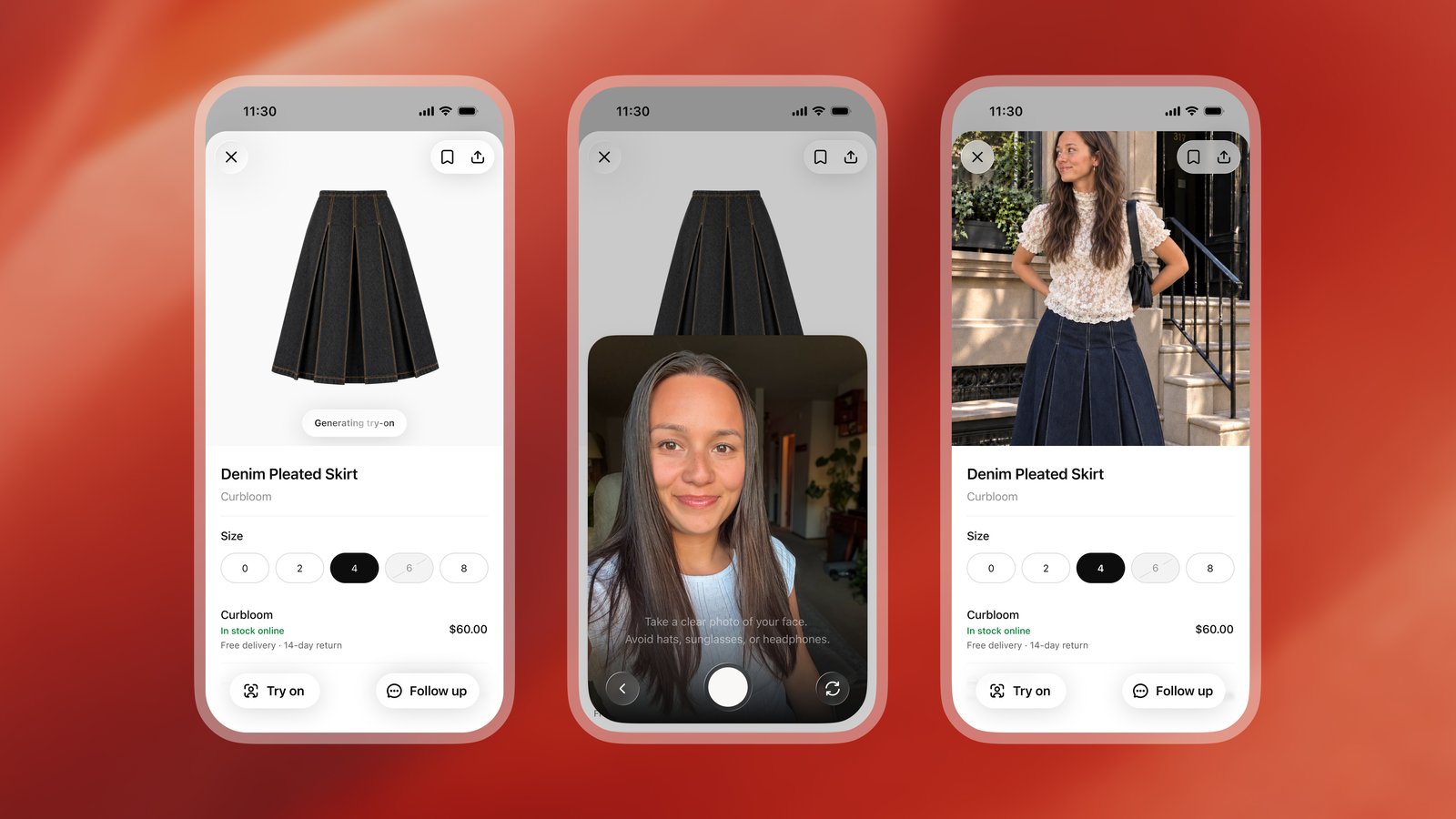
The idea is simple. Upload a selfie and a full-body photo, and ChatGPT shows you wearing the item. Shirts, dresses, sunglasses, watches, whatever you’re shopping for.
The feature is powered by ChatGPT Images 2.5, the image model OpenAI released in late September. According to OpenAI, that version produces more natural lighting, richer textures, and preserves what you actually look like better than before. That last part matters most. Nobody cares how a jacket looks on a random model. They care how it drapes on their shoulders.
The ChatGPT try on tool works in two directions, too. Found a product in a ChatGPT shopping result? There’s a “Try on” button right on the listing. Got a screenshot of a jacket from some random website? Upload it and ask ChatGPT to try it on for you. The item doesn’t need to come from ChatGPT’s own shopping results at all.
WWD noted this lands in front of ChatGPT’s roughly 1.2 billion weekly users. For context, Google launched its own try on tool back in 2025, and it’s available on billions of products from big retailers. ChatGPT is late to the party. But it’s showing up with the biggest user base in consumer software.
How to use ChatGPT try on (step by step)
Total time: about two minutes. Here’s the exact flow.
- Open ChatGPT and ask for shopping help. Something like “affordable rain jackets for hiking.” You’ll see product listings appear as cards in the chat.
- Tap the item you like. A “Try on” button shows up on clothing and accessory listings.
- Take or upload a selfie when prompted. Then add a full-body photo. The full-body shot is optional, but it helps the tool show fit and how the fabric hangs.
- Wait a few seconds. ChatGPT generates an image of you wearing the item.
- Your reference photo gets saved for future try-ons. Change or delete it anytime under Settings, then Personalization, then Reference photos.
There’s a second path worth knowing. You can upload any photo of an outfit, a celebrity look, or a screenshot, then ask ChatGPT to find similar items you can actually buy. This is the part that should worry Pinterest. TechCrunch pointed out that “shop the look” has been Google’s and Pinterest’s turf for years. ChatGPT just walked into it.
The favorites system fills the other half of the shopping loop. Save products to your Library as you browse, organize them into folders, and come back later. Saved items and try-on images live together, so your little dressing room stays in one place.
What it’s good at (and where it flops)
After playing with this for a while, here’s my honest split.
The wins:
- Quick gut checks. Does this color work for me? You get an answer in seconds instead of ordering and returning.
- Gifting. Upload a photo of a friend (with permission, please) and test whether that scarf suits them before buying it.
- Style exploration. Describe a vibe (“minimalist winter layers”) and ask ChatGPT to build the whole outfit, then try on the pieces.
The misses:
- No buying inside the chat. There’s no cart and no checkout. You click through to the retailer to actually purchase. That’s fine, but don’t expect Amazon-style convenience.
- Fit is still a guess. The image shows style and drape. It won’t tell you the medium runs small. Check the size chart anyway.
- It’s an image, not magic. Weird poses, unusual fabrics, or heavily patterned items sometimes come out looking off. Regenerating usually fixes it.
Also worth knowing: OpenAI tried instant checkout last year and quietly backed off after it didn’t perform well. Shopping features at OpenAI are very much experiments that ship first and get refined later. That cuts both ways. You get early access to genuinely useful stuff, and occasionally features vanish.
The privacy catch nobody mentions
Here’s the part that deserves more attention than it’s getting. By default, images you upload to ChatGPT from a personal account can be used to train OpenAI’s models. That includes your selfie from a ChatGPT try on session.
Android Authority flagged this in their coverage, and it’s real. Your face becomes training data unless you opt out. OpenAI does let you turn this off: go to Settings, open Data controls, and switch off “Improve the model for everyone.” Do it before your first try-on, not after. If you want the official rundown, OpenAI’s own help center covers how shopping and your data work.
Your reference photos also stick around so future try-ons work without re-uploading. You can delete them under Settings, then Personalization, then Reference photos. If you try this once for fun and move on, clean up after yourself. Takes ten seconds.
Is this a dealbreaker? Honestly, no. It’s the same trade every free AI tool makes. But people treat photos of their faces differently than they treat text prompts, and OpenAI isn’t exactly shouting about the default. Now you know.
How it compares to Google’s version
Since both exist now, here’s the quick layout.
| Feature | ChatGPT try on | Google try on |
|---|---|---|
| Launched | October 2026 | 2025 (wide rollout by July) |
| Where it lives | ChatGPT app and web | Google Search, Shopping, Images |
| Catalog size | Products surfaced in ChatGPT shopping | Billions of listings from major retailers |
| Also works with | Any screenshot or outfit photo you upload | Product listings with try-on enabled |
| Powered by | ChatGPT Images 2.5 | Custom Google fashion image model |
| Price | Free | Free |
My take after using both: Google wins on raw catalog depth. Macy’s, Kohl’s, Walmart, Nordstrom, the big inventory is there. ChatGPT wins on flexibility, because the screenshot path means almost anything can be tried on, and the conversation around it (build me an outfit, find a cheaper version) is simply better. If you already live in ChatGPT, its version will feel more natural. Serious shoppers should keep both in the toolbox.
We’ve covered this image model before in our ChatGPT Images 2.5 vs Nano Banana 2 comparison, and the improvements are exactly why try-on got good enough to ship.
Who should actually use this
Skip it if you enjoy shopping the old way and don’t mind returns. Genuinely, some people like the fitting room.
Use it if any of these sound like you:
- You buy clothes online weekly and returns eat your time
- You’re shopping for someone else and second-guessing every choice
- You see outfits on social media and can never find them in stores
- You want a second opinion on a bold purchase before committing
It also changes the math on cheap experiment: trying an unusual style costs nothing now. Want to know if wide-leg pants work on your build? Thirty seconds and a selfie. No cart, no regret.
If you’ve been exploring AI shopping tools already, we compared a different angle of this trend in our Daydream AI shopping review, and Target’s app has its own photo search worth a look. The pattern is clear: shopping is becoming a conversation, and try-on is the first feature that actually feels useful rather than gimmicky.
Your next step
Open ChatGPT, snap a full-body photo in decent light, and use ChatGPT try on for one item you’d actually buy this month. Turn off training on your images first; it’s two taps in Data controls. Then decide for yourself whether this replaces the fitting room. For most of us, it won’t. But it’ll kill a lot of unnecessary returns, and that alone makes it worth two minutes.