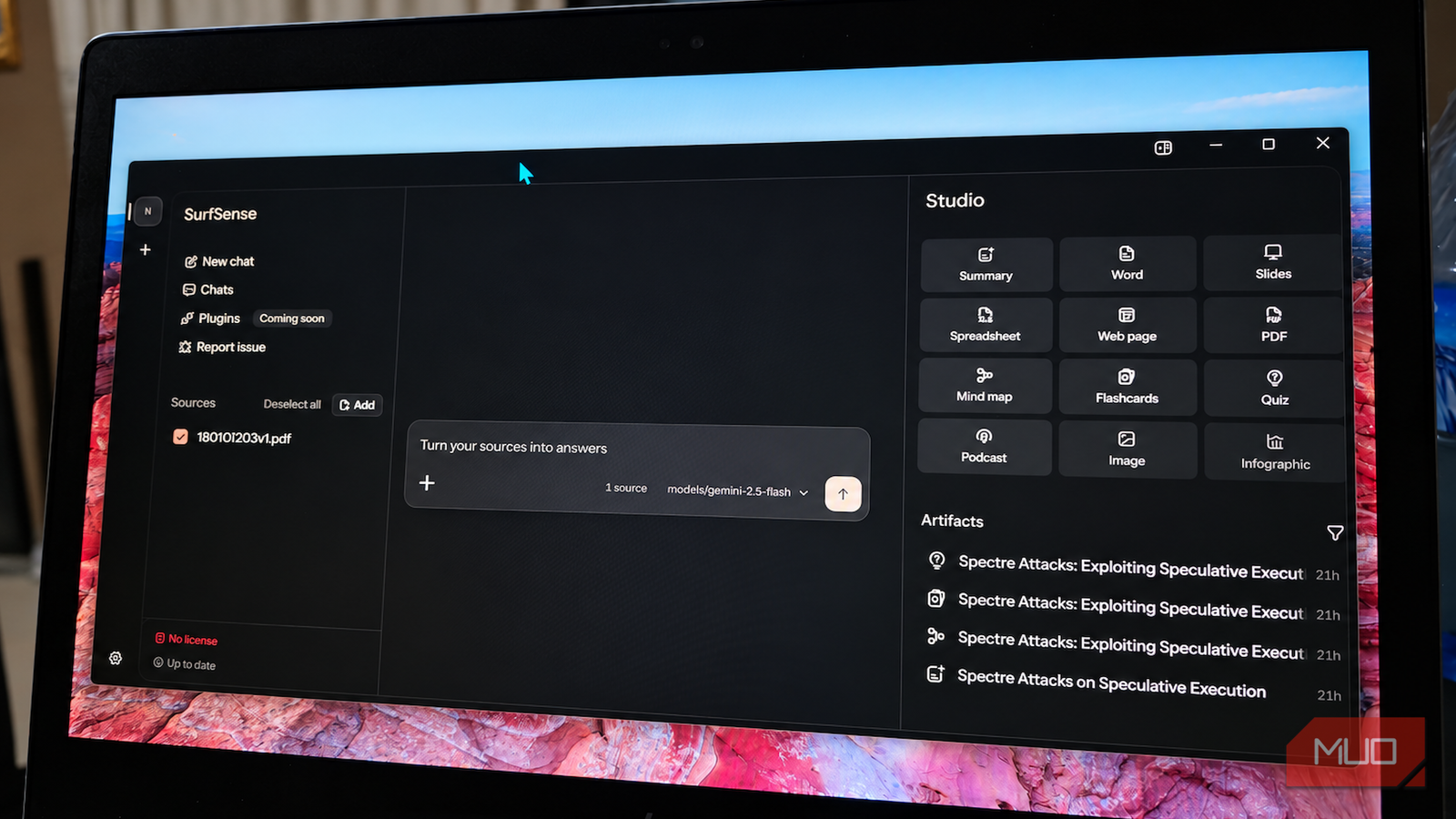

NotebookLM is great until you read the fine print: your documents live on Google’s servers, the model is whatever Google says it is, and the free tier has limits you discover at the worst time. SurfSense takes the opposite deal. It’s a free, open-source NotebookLM alternative that runs on your own machine, with your files never leaving your disk.
I spent time with it this week after a review over at MakeUseOf flagged it as the tool that finally pulled someone away from Google’s research assistant. Verdict up front: it’s the real deal for privacy-focused research, with a couple of rough edges you should know about before committing an afternoon.
What SurfSense actually is
SurfSense is an open-source research workspace built for the “chat with your documents” workflow NotebookLM made famous. Drop in PDFs, links, notes, whatever you’re working with. Ask questions. Get answers that cite their sources so you can verify instead of trusting a confident hallucination.
The project’s pitch is blunt about the differences: no account, no uploads. The search index sits on your disk, you pick the model, and the app claims it uploads nothing. For anyone who’s ever hesitated before dropping a contract, a medical PDF, or a client folder into a cloud tool, that’s the whole sales pitch right there.
It’s also become the most-recommended NotebookLM alternative on Reddit and Hacker News over the past few months. Community buzz doesn’t guarantee quality. It does mean bugs get found and fixed faster than in your average weekend-project clone.
What you get:
- Cited Q&A across everything you’ve indexed, so every answer shows its work
- Mind maps generated from your sources for a visual overview
- Studio outputs: turn sources into a briefing, slide deck, report, study guide, or a two-host podcast voiced entirely offline
- Web research connectors: pull live data from Reddit, YouTube, TikTok, Google Search, and more
- API and MCP server so your own agents can query the same knowledge base
That last bullet matters more than it looks. If you’ve followed the agent wave, tools that expose an MCP server plug straight into the workflows people are building. SurfSense doubles as infrastructure, not just an app.
How it compares to the Google original
No table dodge here. Why hunt for a NotebookLM alternative in the first place? Control, mostly. The differences come down to convenience versus ownership:
| Feature | SurfSense | NotebookLM |
|---|---|---|
| Price | Free, open source | Free tier + paid upgrades |
| Where files live | Your machine | Google’s cloud |
| Model choice | Any (local or API keys) | Google models only |
| Privacy | Nothing leaves your disk | Governed by Google’s terms |
| Setup effort | Moderate (install required) | Zero (it’s a website) |
| Podcast output | Offline, two-host audio | Yes, cloud-based |
If that setup-effort row made you wince, fair. NotebookLM wins on friction, full stop. You’re trading twenty minutes of installation for permanent control of your data. Only you know if that trade’s worth it. Our guide to Gemini Notebook uses covers what Google’s version does well, and honestly, for quick public research it’s still excellent.
Getting SurfSense running on your machine
Two install paths exist, and the right one depends on your patience level.
Path 1: the desktop app (easiest). The project offers a downloadable desktop app for macOS from its website. Install it, drop in documents, start asking questions. This is the route for anyone who wants the NotebookLM experience without touching a terminal.
Path 2: self-host via Docker (most control). The GitHub repo includes a Docker setup that runs the full stack: a Postgres database with the pgvector extension for embeddings, Redis, and the backend. If you already run Docker, it’s a matter of cloning the SurfSense repository, copying the example environment file, adding your API keys (or local model config), and starting the containers. Twenty minutes if things go smoothly; budget an hour if you’ve never pointed pgvector at a database before.
Choosing a model is where it gets interesting. SurfSense works with cloud APIs, and it also pairs nicely with local models. If you’ve been curious about running models on your own hardware, our local LLM on your phone guide covers the offline mindset, and the same logic scales up to a desktop with a decent GPU. A fully offline research assistant is a genuinely achievable setup in 2026.
What the first hour looks like
- Install via your chosen path and open the app
- Create a workspace (think: one per project)
- Upload sources: PDFs, web links, pasted text
- Ask a question and check the citations; this is where you decide if the answers meet your bar
- Try a Studio output, the podcast generator is the party trick that sells people
Step 4 is the honest test. Retrieval quality depends on your documents and your model choice, so run your own real questions, not demo ones.
Where SurfSense falls short
Time for the not-so-great parts, because the weaknesses are real.
The mind map feature works, but the full view gets cramped fast. MakeUseOf’s reviewer nailed it: you end up zooming and panning around a diagram that deserves a bigger window, and the divider doesn’t drag far enough to give it room. Annoying rather than dealbreaking, but it’s the kind of friction that adds up.
Setup is still setup. The Docker path assumes comfort with terminals and environment files. Non-technical users should stick to the desktop app or wait for the installers to mature. And as with any open-source project riding a wave of attention, expect rough version transitions; read the repo’s release notes before updating mid-project.
One more thing worth saying: an open-source NotebookLM alternative is only as good as its community. SurfSense has momentum (an active Discord, regular commits, a hosted option that funds development), which matters more than any single feature. Projects like this die from neglect, not bugs, and this one shows no signs of that.
Who should (and shouldn’t) switch
A self-hosted NotebookLM alternative makes sense for a specific kind of person: you handle sensitive documents, hate subscription sprawl, want your research index to plug into AI agents, or simply like owning your tools. The best AI mind mapping tools landscape has plenty of options, but few combine docs, web research, and self-hosting in one package.
Stay on NotebookLM if you want zero setup, live primarily on mobile, or your sources are mostly public web content anyway. Privacy was never your problem to solve there.
For the privacy-minded, pairing SurfSense with the habits from our local AI security fixes guide turns your machine into a research setup no cloud provider can peek at. That combination is the strongest argument for making the switch.
Grab the desktop app, feed it twenty documents from a real project, and put it through your hardest questions this week. The official SurfSense site links the download and the Discord if you get stuck.