


Google Gemini Spark Review: Is It Worth Using in 2026? (Revised)
📝 Full Review — Updated for 2026 | We spent weeks testing Gemini Spark to give you an honest verdict. Here’s whether it’s worth your time.
Imagine having a personal assistant who works around the clock — not just when you remember to ask, but all the time. An AI that scans your inbox while you sleep, finds coupons while you’re at work, and plans your weekend before you even think about it. That’s exactly what Google promises with Gemini Spark, their new 24/7 agentic AI assistant.
But here’s the thing: we’ve heard “AI assistant” promises before, and most of them end up being glorified chatbots that need constant hand-holding. Therefore, we decided to cut through the hype and figure out what Gemini Spark actually does for regular people. In addition, we tested it for a full week with real everyday tasks to see how it holds up. As a result, our honest takeaway is this: it’s more useful than you’d expect — but it’s not perfect by a long shot.
What Is Gemini Spark?
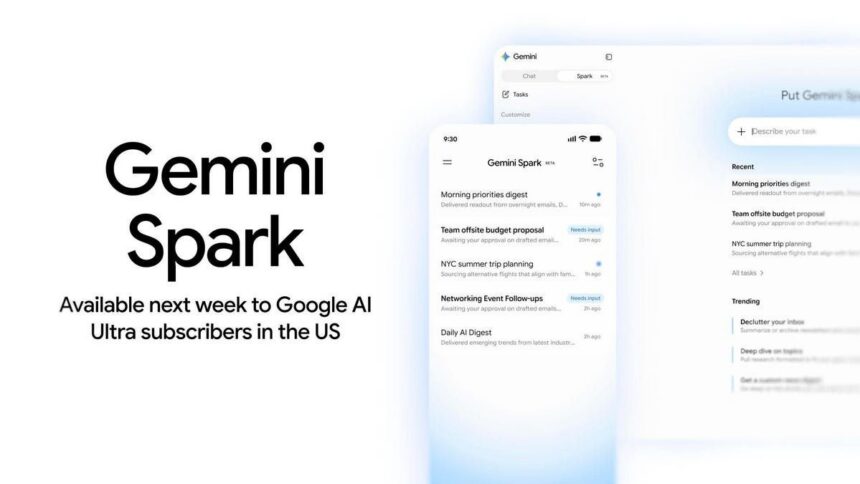
Google announced Gemini Spark at Google I/O 2026, and it’s a fundamentally different kind of AI assistant. Specifically, instead of waiting for you to type a prompt, Spark runs on dedicated cloud virtual machines that operate continuously. As a result, it keeps working even when your laptop is closed and your phone is in your pocket.
The assistant uses Gemini 3.5 Flash alongside Google’s Antigravity agentic framework to complete multi-step tasks across Google Workspace. Moreover, you interact with it through the Gemini app or by emailing a dedicated Gmail address directly. On mobile, Spark tracks its progress through Android’s Halo system.
Furthermore, three core interaction modes power everything Spark does:
- Tasks handle one-off requests like “Find summer internships in New Orleans” or “Book a haircut for next Thursday”
- Schedules automate recurring work like “Every Monday at 9 AM, send me a recap of my inbox”
- Skills let you teach Spark custom behaviors, like analyzing your last 50 emails to create a personal writing style guide
In addition, Google built Spark with native integrations for Gmail, Calendar, Drive, Docs, Sheets, Slides, YouTube, and Google Maps. However, all integrations start turned off by default, so you choose what Spark can access.
Currently, Gemini Spark is rolling out to Google AI Ultra subscribers in the US (ages 18+). Moreover, broader availability is expected in the coming weeks.
Who Is Gemini Spark For? (And Who Should Wait)
Best for:
- Gmail power users who spend hours managing their inbox and want automated summaries, priority sorting, and draft replies
- Small business owners who need lead tracking, client follow-ups, and file organization without hiring help
- Google Workspace users who already live in Calendar, Docs, and Sheets and want seamless AI assistance
- Anyone who forgets recurring tasks and needs a reliable system that runs without reminders
On the other hand, skip it if:
- You primarily use apps outside Google’s ecosystem (Outlook, Notion, Apple Calendar, etc.)
- You need real-time alerts for flash sales and deals — Spark’s default tracking interval is every two weeks
- You rely on Google Keep for quick notes, because Spark surprisingly cannot access it
- You’re on a tight budget and don’t want to pay for the AI Ultra subscription
Getting Started — How to Set Up Gemini Spark
Setting up Gemini Spark takes about five minutes and requires zero technical skills. Here’s the quick walkthrough:
- Open the Gemini app at gemini.google and look for the “Switch to Spark” toggle
- Connect your Google services in Settings — Gmail, Calendar, Drive, and whichever apps you want Spark to access
- Start with a simple task — try something like “Summarize my unread emails from this week” to see how Spark works
- Explore Schedules for recurring tasks, or create a custom Skill that matches your workflow
For a detailed step-by-step setup walkthrough, check out our complete Gemini Spark beginner guide.
The whole experience feels conversational rather than technical. For example, you type what you want, Spark figures out how to do it, and you can watch it work or just check back later. Furthermore, for calendar additions and similar actions, you simply reply to confirm via a button click.
5 Real-World Things Gemini Spark Can Actually Do
We tested Gemini Spark with everyday tasks that regular people actually care about throughout a full week of daily use. Consequently, here’s what worked, what didn’t, and what surprised us.
1. Automated Inbox Summaries and Weekly Recaps
If your inbox is a disaster zone, Spark genuinely helps. Specifically, we set up a weekly Friday digest that scans newsletters and returns the top articles with context and links.
The results were solid — Spark identified relevant articles we would have missed and organized them by topic. However, we noticed two issues: links came back as Google.com redirects that required extra clicks, and Spark returned four articles instead of the five we requested. Nevertheless, for anyone drowning in newsletter subscriptions, this recurring summary feature alone could save 30 minutes per week.
2. Finding Deals and Coupons Automatically
Next, we asked Spark to find products on sale at a local drugstore and suggest matching coupons. Impressively, Spark identified discounted items and recommended specific coupons to clip in the Walgreens app. In addition, it even suggested stacking online promo codes for pickup orders.
On the downside, one promo code was invalid despite meeting the stated requirements. Still, the BOGO deals and rewards points suggestions more than made up for the single miss. As a result, if you shop at chain stores regularly, this kind of automated deal-hunting could add up to real savings over time.
3. Event Planning and Trip Organization
For a day trip, we asked Spark to check the weather, gather event details, and suggest what to bring. The packing list it generated was genuinely excellent — lawn chairs, sunscreen, reusable shopping bags, and even a reminder that dogs weren’t allowed at the outdoor event.
The catch? Spark cannot use Google Keep, which is a bizarre limitation for a Google product. Instead, it offered to create a Google Doc or draft an email with the list. Consequently, a Keep integration would have been far more practical for quick reference on the go.
4. Weekend Activity Suggestions Based on Your Calendar
This is where Spark showed its creativity. For instance, we set up a Friday compilation of weekend activities near our location, and Spark combined web searches with Gmail data from local newsletters and event listings.
As a result, the results included events we never would have found on our own — including a local Annual Beaver Queen Pageant that sounded oddly entertaining. To add events to your calendar, simply reply to Spark and confirm through the button prompt.
However, one thing to note: Spark sometimes skips practical details like costs and event dates, so you may need to follow up with a quick question or two.
5. Lead Tracking for Small Businesses
Finally, small business owners will appreciate this one. Spark can automatically extract client names and requested dates from inquiry emails, log leads in a Google Sheet, and even create a Google Drive folder for each client.
Furthermore, for freelancers or small agencies managing multiple leads, this kind of automated CRM-lite functionality eliminates manual data entry and ensures nothing falls through the cracks.
Gemini Spark vs ChatGPT Agent vs Claude Cowork
If you’re comparing AI assistants, here’s how Gemini Spark stacks up against the competition:
| Runs 24/7 | ✅ Yes | ❌ No | Varies |
| Native Google Apps | ✅ Gmail, Calendar, Docs, Sheets | ❌ Third-party only | ❌ Third-party only |
| Recurring Tasks | ✅ Built-in | ❌ No | Varies |
| Custom Skills | ✅ Yes | ❌ No | ❌ No |
| Direct Email | ✅ Dedicated address | ❌ No | ❌ No |
| Web Browsing | ✅ Chrome | ✅ Visual browser | ✅ Varies |
| Price | ~$24.99/mo (AI Ultra) | $20–$200/mo | $20–$100/mo |
| Best For | Google ecosystem users | Broad web tasks | Development work |
For a deeper dive into switching between AI assistants, check out our guide on canceling ChatGPT and Perplexity to use Claude instead or our article on why we switched to Claude.
Bottom line: Gemini Spark wins for Google-heavy users who want true 24/7 automation. On the other hand, ChatGPT Agent works better if you need broader web interaction and don’t mind paying more. Similarly, Claude Cowork fits developers who want strong MCP protocol support and extended reasoning.
Honest Limitations — What Gemini Spark Can’t Do (Yet)
Every review needs to be honest about the rough edges, and Gemini Spark has several worth knowing about before you commit.
The Google Keep problem is the most frustrating limitation. For instance, Google’s own product page FAQ mentions Keep, but Spark simply cannot interact with it. Consequently, for anyone who relies on Keep for quick lists, notes, and reminders, this is a significant gap that feels like an oversight.
Moreover, we also ran into several bugs during our week of testing:
- Invalid promo codes that looked correct but didn’t work at checkout
- Broken link redirects in email summaries that required manual detours
- Incorrect item counts — asked for 5 articles, got 4
- Missing cost and date information in search results
- Overly infrequent rechecking intervals for price tracking (every 2 weeks)
Additionally, iPhone users should know that Spark can’t be programmed into the hardware Activity Button — you must open the Gemini app first. Furthermore, there’s also no texting capability, which would be a natural fit for a 24/7 assistant you want to contact quickly.
Similarly, the branding itself adds confusion too. Spark exists as a separate toggle within the Gemini app, creating unnecessary mental load for users who just want a straightforward AI assistant experience.
Is Gemini Spark Free? (Pricing Breakdown)
Gemini Spark is included with a Google AI Ultra subscription, which runs approximately $24.99 per month. There’s no separate charge for Spark itself — it comes as part of the AI Ultra package.
For context, that’s competitive with Claude Pro ($20/month) and significantly cheaper than ChatGPT Pro ($200/month). However, if you don’t already use Google One, this is a new subscription cost to factor in.
Moreover, Google is currently rolling out Spark to AI Ultra subscribers first, with broader availability expected in the coming weeks. Therefore, if you’re already paying for AI Ultra, there’s no reason not to give it a try.
Gemini Spark Review — Final Verdict
After testing Gemini Spark for a full week with real everyday tasks, here’s our honest take: it’s genuinely useful for the right person, and not worth the subscription for everyone else.
Our rating: 7.5/10
If you live in Google’s ecosystem — Gmail, Calendar, Docs, Sheets — and you want an AI assistant that genuinely works while you’re not looking, Gemini Spark delivers on its core promise. In fact, the recurring task automation alone saves real time for inbox-heavy users and small business owners.
However, the surprising Google Keep omission, early-stage bugs, and Google ecosystem lock-in mean this isn’t a universal recommendation. Consequently, if your digital life extends beyond Google, or if you need real-time alerts and broad third-party integrations, you’ll likely find ChatGPT Agent more capable despite the higher price tag.
What to do right now: If you already have Google AI Ultra, enable Gemini Spark today and start with a recurring inbox summary. On the other hand, if you don’t, wait a few weeks — Google is expanding access, and the bugs will likely get patched. In the meantime, check out our Gemini in Android Auto guide for other ways Google is putting AI to work across your devices.
Frequently Asked Questions
Q: What is Google Gemini Spark?
Gemini Spark is Google’s free 24/7 cloud-based AI assistant that runs on virtual machines, so it keeps working even when your devices are off. In addition, it integrates with Gmail, Calendar, Docs, Sheets, and Slides to automate everyday tasks.
Q: Is Gemini Spark free to use?
Gemini Spark is included free with a Google AI Ultra subscription. Specifically, it’s rolling out first to AI Ultra subscribers over 18 in the US, with broader access coming soon.
Q: How do I set up Gemini Spark?
Open gemini.google, navigate to the Spark section, connect your Gmail and Google Workspace accounts, and assign your first task. Furthermore, Spark runs in the cloud so no software installation is needed.
Q: What can Gemini Spark do?
Gemini Spark can summarize your inbox, find deals and coupons, plan events, track leads, organize files in Google Drive, create recurring automated tasks, and browse the web to research things for you.
Q: How is Gemini Spark different from ChatGPT?
Unlike ChatGPT which requires you to keep a conversation open, Gemini Spark runs 24/7 in the cloud. Moreover, it’s deeply integrated with Google apps like Gmail and Calendar out of the box, whereas ChatGPT Agent requires third-party connectors.
Q: Can Gemini Spark access my emails?
Yes, with your permission. Specifically, Spark connects to your Gmail to read and organize emails, create summaries, and draft responses. Furthermore, you control what it can access, and it checks with you before taking major actions.
Q: Is Gemini Spark better than Claude Cowork?
Gemini Spark excels at Google ecosystem tasks like Gmail and Calendar management. On the other hand, Claude Cowork from Anthropic is better suited for non-Google workflows and development tasks. For Gmail-heavy users, Spark has the edge.
Internal Links:
- Complete Gemini Spark Beginner Guide
- Cancel ChatGPT, Perplexity & Gemini — Use Claude Instead
- Why I Switched to Claude (And Dropped ChatGPT & Gemini)
- Gemini in Android Auto: Complete Beginner’s Guide
Sources:
- TechCrunch Announcement (May 19): https://techcrunch.com/2026/05/19/google-introduces-gemini-spark-a-24-7-agentic-assistant-with-gmail-integration/
- TechCrunch Hands-On Review (May 30): https://techcrunch.com/2026/05/30/i-put-googles-24-7-ai-assistant-gemini-spark-to-work-and-its-actually-pretty-useful/
- Google Product Page: https://gemini.google/overview/agent/spark/