


How to Add an AI Label on YouTube (2026 Step-by-Step Guide)
🔧 Step-by-Step Tutorial | Need to add an AI label to your YouTube video right now? Follow these exact steps.
YouTube now requires labels on AI-generated content, and if you’re wondering how to add AI label on YouTube, you’re not alone. In May 2026, the platform introduced a major update that every creator needs to understand — including automated detection that will label your video for you if you forget to disclose.
For creators using tools like Midjourney, Runway, Sora, or any AI that produces photorealistic content, this matters. Furthermore, YouTube’s automated detection system is only getting smarter, which means the stakes are quietly rising even though the platform hasn’t changed how it handles monetization or recommendations.
Here’s exactly what changed, what needs labeling, and how to add an AI label on YouTube step by step.
What Is YouTube’s AI Label and Why Does It Matter?
YouTube calls AI-generated or AI-altered content “altered or synthetic content.” The platform has required creators to disclose this kind of content since 2024. However, in May 2026, the rules received a significant overhaul that affects how labels appear and how YouTube enforces them.
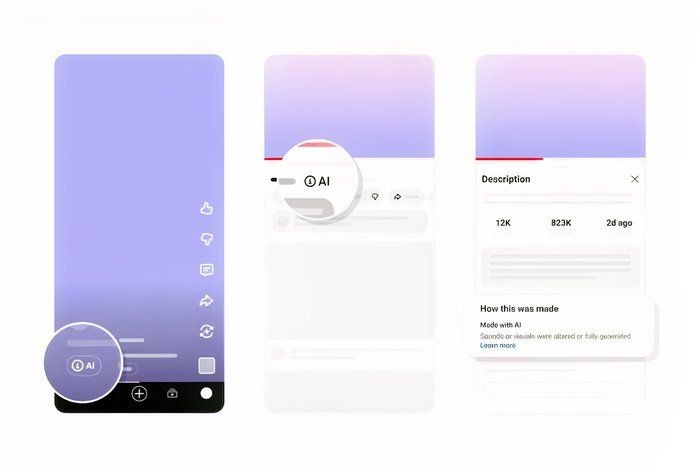
When you add an AI label, viewers see it in two prominent places depending on the video format:
- Long-form videos: The label appears directly below the video player, right above the description
- Shorts: The label shows as an overlay on the video itself
Previously, most AI labels were buried in the expanded description — meaning viewers rarely noticed them. As a result, YouTube decided to make labels impossible to miss. Their stated goal is straightforward: if it looks real but was made with AI, viewers should know immediately.
What YouTube Calls “Altered or Synthetic Content”
YouTube’s policy covers content that is photorealistic and meaningfully altered or generated using AI. For example, this includes:
- Realistic-looking AI-generated video clips
- AI-modified faces or voices that appear real
- Synthetic backgrounds or environments that could be mistaken for real footage
- AI-enhanced footage where the alterations fundamentally change what viewers see
On the other hand, content that’s clearly animated, unrealistic, or only slightly tweaked doesn’t require the prominent label treatment. Photorealistic content, however, gets the full visibility treatment regardless of topic.
Why YouTube Added Automated Detection
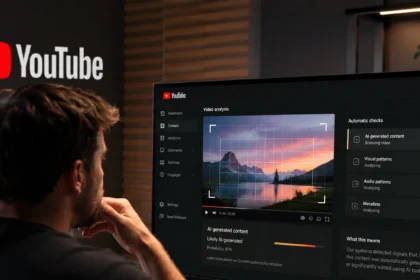
The biggest update in May 2026 isn’t just about label placement. In addition, YouTube is now rolling out automated AI detection — new internal signals that can identify AI-generated content even when the creator doesn’t disclose it.
Consequently, if YouTube’s system detects significant photorealistic AI use in your video and you haven’t added a disclosure label, the platform will automatically apply one for you. This represents a major shift from the honor-based system that existed before.
What Content Needs an AI Label?
Not everything made with AI requires a label, and YouTube has specific rules about what qualifies. Let’s break it down.
Content That MUST Be Labeled
You need to disclose AI use when your content includes any of the following:
- Photorealistic AI-generated footage — video clips, images, or scenes created entirely by AI tools
- AI-modified realistic content — real footage that has been meaningfully altered with AI (face swaps, voice cloning, background replacement)
- Synthetic voices — AI-generated narration that sounds like a real human voice
- AI-generated people or characters — realistic human-like figures that don’t exist
Content That Does NOT Need a Label
On the contrary, you don’t need to label content that falls into these categories:
- Obviously animated or illustrated content — cartoons, animations, stylized art
- Minor AI touches — small color corrections, basic AI-assisted editing
- AI used for productivity — AI helping write your script or generate ideas (the final output is still your own creation)
- Clearly artificial content — anything where viewers can tell it’s not meant to look real
For instance, using AI to brainstorm video ideas doesn’t require a label because the final creative output is yours — similar to how AI makes money as a side hustle through content creation tools.
Special Rules for YouTube Shorts
Similarly, Shorts follow the same disclosure requirements as long-form videos, but with one key difference in how labels are displayed. On Shorts, the AI label appears as an overlay directly on the video player, making it even more visible to viewers scrolling through the feed.
For this reason, if you’re creating Shorts with AI-generated footage, you should be especially careful to disclose at upload time. Otherwise, YouTube’s automated detection will flag these quickly, and an auto-applied label on a Short is hard to miss.
How to Add an AI Label on YouTube (Step by Step)
Adding an AI label is straightforward. Here’s the exact process:
Step 1: Open YouTube Studio
First, go to studio.youtube.com and sign in with your YouTube account. Also, if you’re uploading a new video, the disclosure option will appear during the upload flow itself.
Step 2: Go to Your Video Details
Next, for an existing video, navigate to the Content tab in YouTube Studio. Then click on the video you want to edit and scroll down to the details section.
Step 3: Check the AI Disclosure Box
In the video details area, look for the section labeled “Altered or synthetic content.” Then, check the box that says your video contains altered or synthetic content that could be mistaken for real footage, people, or events.
Step 4: Describe What Was AI-Generated
Next, YouTube will ask you to specify which parts of your video were created or altered using AI. Be specific — for example, select whether it’s the visuals, the audio, or both. As a result, the more accurate your disclosure, the less likely YouTube’s automated system will flag you incorrectly.
Step 5: Publish or Save Changes
Finally, once you’ve filled in the disclosure details, click Save or Publish depending on whether you’re editing an existing video or uploading a new one. The AI label will appear on your video once the changes go live.
YouTube’s New Automated AI Detection (2026 Update)
In May 2026, YouTube introduced a game-changer: automated AI detection. Here’s what you need to know about this new system.
How YouTube Detects AI Content Automatically
YouTube already scans every upload for copyright violations and safety issues. Now, however, the platform is using new internal signals to also scan for AI-generated content.
Specifically, if you upload a video that contains photorealistic AI-generated or AI-altered footage and you haven’t disclosed it, YouTube’s system can detect this and apply a label automatically. In addition, the technology behind this is evolving — YouTube says detection accuracy will improve over time.
What Happens When YouTube Labels Content for You
If YouTube’s system labels your video and you disagree, you can go into YouTube Studio and update your disclosure status to have the label removed — with two important exceptions:
- Content made with YouTube’s own AI tools (like Veo or Dream Screen) — the label stays permanently
- Content containing C2PA metadata that indicates fully generative AI origins — the label cannot be removed
For all other cases, you still have control. Nevertheless, as the detection technology improves, it’s reasonable to expect that overrides will become harder to justify. So, the best approach is to always disclose upfront and avoid the situation entirely.
What Happens If You Don’t Label AI Content?
This is where many creators get nervous. Here’s the honest breakdown.
Warning Strikes and Policy Enforcement
YouTube has stated that repeatedly failing to disclose AI content could result in policy enforcement action, including potential strikes on your channel. However, the platform has also clarified that the initial rollout will focus on education rather than punishment.
In practice, YouTube is more likely to auto-label your video and notify you than to issue strikes right away. Still, repeated violations after being warned could escalate — and nobody wants to deal with that.
Impact on Monetization and Recommendations
Here’s the good news: YouTube has explicitly confirmed that AI labels do not affect how videos are recommended and they do not impact monetization. As a result, a labeled video can still appear in search results, get suggested, and earn ad revenue just like any other video — keeping your AI-powered content strategy on track.
The labels are purely about transparency — giving viewers accurate context about what they’re watching. This is an important distinction that many creators miss. Ultimately, you won’t be penalized in the algorithm for being honest about using AI.
Frequently Asked Questions About YouTube AI Labels
Does YouTube automatically label AI content now?
Yes. In May 2026, YouTube rolled out an automated detection system that will apply labels to photorealistic AI content even when creators don’t disclose it.
What happens if I don’t disclose AI on YouTube?
YouTube’s system may label your video automatically. Moreover, repeated failures to disclose could lead to policy enforcement, though the initial focus is on education.
Do YouTube Shorts need AI labels?
Yes. Shorts with photorealistic AI-generated content require disclosure, and the label appears as an overlay on the Short itself.
Can AI-generated videos be monetized on YouTube?
Yes. YouTube has confirmed that AI labels do not affect monetization, so labeled videos can earn revenue normally.
Can I remove an incorrect AI label?
In most cases, yes — you can update your disclosure in YouTube Studio. However, labels on content made with YouTube’s AI tools (Veo, Dream Screen) or with C2PA metadata are permanent.
What AI tools trigger the labeling requirement?
Any tool that produces photorealistic content — for instance, Midjourney, Runway, Sora, DALL-E video generators, AI voice cloners, and similar tools.
—
Summary
Overall, YouTube’s AI labeling requirements are real, and the new automated detection system makes honesty more important than ever. Essentially, the platform is moving from a trust-based system to a verify-based one. The good news? Adding a label takes about 30 seconds during upload, and it won’t hurt your views or your revenue.
If you’re creating content with AI tools, make disclosure part of your standard upload workflow. Check the box, describe what’s AI-generated, and move on. As a result, you’ll build trust with your audience while staying on the right side of YouTube’s policies.
For a deeper dive into why YouTube made these changes and what they mean for the platform overall, check out our breakdown of the YouTube AI labeling update.
—