


GPT-5.5 Computer Use: What It Actually Does for Non-Technical Users (Real Examples)
You have probably heard the headlines: GPT-5.5 can now use your computer. But what does that actually mean for you if you don’t write code, don’t work in tech, and just want to get stuff done faster? In fact, GPT-5.5 computer use is already helping non-technical people automate tasks that used to take hours — from building spreadsheets to processing thousands of tax forms. In this article, we will walk through real examples of what it can do right now, how to get started, and what it still cannot do. For example, we will look at people who have saved entire workdays using just a single prompt. No jargon, no developer talk — just plain English.
What Is GPT-5.5 Computer Use? (The Simple Explanation)
How It Works Without Code
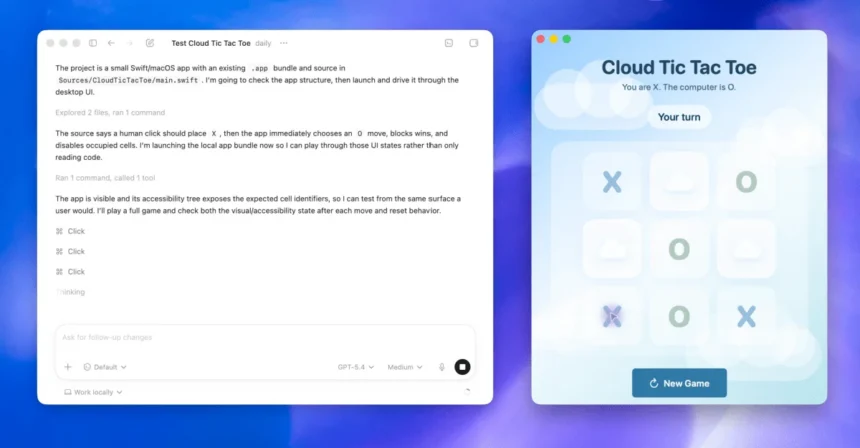
Here is the deal: when you use regular ChatGPT, you ask a question and it gives you a text answer. Computer use works differently. Instead of just talking about doing something, GPT-5.5 actually does it — it opens apps, clicks buttons, types text, reads what is on screen, and moves between different programs to finish a task. All you do is describe what you want in plain English.
For instance, think of it this way: normally, ChatGPT is like a really smart friend who gives great advice. GPT-5.5 computer use, on the other hand, is like that same friend sitting at your computer and actually doing the work for you.
The model can see your screen, navigate software interfaces, use the terminal (the command-line window that developers use), read files, and even check its own work when something goes wrong. Furthermore, it keeps going through multi-step tasks without you babysitting every move. Moreover, OpenAI launched this feature in April 2026, and it is available through ChatGPT Plus ($20/month), ChatGPT Pro ($200/month), and the API.
What Makes GPT-5.5 Computer Use Different from ChatGPT
This is the part that confuses most beginners, so let’s clear it up:
- Regular ChatGPT: You ask a question, it answers. Great for writing, brainstorming, and quick help.
- GPT-5.5 computer use (via Codex): You describe a task, and the model acts on your computer to complete it. It opens tools, runs commands, creates files, and manages workflows.
In practical terms, ChatGPT tells you how to make a spreadsheet. Computer use actually builds the spreadsheet for you. As a result, the difference is huge for anyone who wants to save time on repetitive tasks.
Real Examples of GPT-5.5 Computer Use for Everyday Tasks
Importantly, these are not hypothetical. Every example below comes from real users and companies who have shared their results publicly.
Automating Weekly Business Reports
An employee on OpenAI’s go-to-market team used GPT-5.5 computer use to automate their weekly business reports. Previously, this task took 5 to 10 hours every single week — pulling data from multiple sources, formatting everything, and putting it into a presentable report.
With computer use: They gave the model one prompt describing what the report needed. The model pulled the data, structured the report, and formatted it. Consequently, their entire weekly reporting process got automated, saving them a full workday every week.
For small business owners, this kind of automation means freeing up time for the work that actually grows your business — instead of spending Friday afternoons building slide decks nobody wants to make.
Processing Thousands of Tax Forms in Hours
Here is a bigger example. OpenAI’s finance team used GPT-5.5 to review 24,771 K-1 tax forms — over 71,000 pages total. The workflow automatically identified and excluded personal information, then processed the forms in a fraction of the time.
The result: They finished the task two weeks faster than the previous year. For non-technical accountants or small business owners dealing with tax season, this kind of automation could cut days off the most stressful time of the year.
Of course, this is a large-scale example. However, even if you are processing dozens of invoices or expense reports instead of thousands, the principle is the same: describe the task, and GPT-5.5 computer use handles the repetitive parts.
Creating Presentations and Spreadsheets from Scratch
One of the most practical uses for non-technical people is document creation. GPT-5.5 can build Excel spreadsheets, PowerPoint presentations, and Word documents — not just templates, but actual content-filled files with real data.
For example, you could tell it: “Create a quarterly sales report spreadsheet with columns for revenue, expenses, and profit margins, and fill it with sample data for Q1 through Q4.” The model would build the entire file — formulas included.
Similarly, generating a slide deck from a rough outline takes minutes instead of the usual back-and-forth in PowerPoint. This alone can save hours every week for anyone who regularly creates business documents.
Analyzing Large Datasets
Professor Derya Unutmaz at Jackson Laboratory used GPT-5.5 Pro to analyze a dataset with 62 samples and approximately 28,000 genes. The model produced a detailed research report summarizing key findings — work that would have taken his research team months.
You probably do not have gene expression data lying around. But if you have a large customer list, a product inventory spreadsheet, or survey results with hundreds of responses, GPT-5.5 computer use can sort through all of it and surface the insights that matter. The point is: you do not need to know data analysis to get value from your data.
Building Simple Apps and Web Pages
This one might surprise you. A professor in Poland built a working algebraic geometry app from a single prompt in just 11 minutes. Meanwhile, Dan Shipper showed GPT-5.5 a screenshot of a 3D rendering app, and the model built a fully interactive version from scratch — with real NASA data and realistic physics.
Admittedly, these examples are on the technical side. But the underlying capability matters for beginners too. Specifically, if you need a simple web page for your side business, a booking form for your service, or a calculator for your pricing — you can describe what you want, and GPT-5.5 computer use can build it. No HTML, no CSS, no developer needed.
How to Get Started with GPT-5.5 Computer Use (Step by Step)
Step 1 — Open the Codex App
First, GPT-5.5 computer use lives inside OpenAI’s Codex app, which you can access at chatgpt.com/codex. If you already have a ChatGPT account, you are almost there — just navigate to the Codex section.
Step 2 — Enable Everyday Work Mode
Next, inside Codex, you will see different modes. Look for “Everyday Work” mode — this is the one designed for non-developers. It handles tasks like document creation, web research, data analysis, and workflow automation. In contrast, the other modes (like Agentic Coding) are aimed at software engineers.
Step 3 — Choose Your Reasoning Level
Then, GPT-5.5 offers different reasoning levels that control how thoroughly the model thinks through your task. For everyday tasks like building a spreadsheet or organizing data, the standard reasoning level works great. Alternatively, for more complex, multi-step tasks (like automating a full workflow), bump it up to the higher level.
Step 4 — Write Your First Prompt
Finally, start simple. Here are a few beginner-friendly prompts to try:
- “Create a monthly budget spreadsheet with categories for rent, groceries, utilities, and entertainment. Include formulas for totals and a savings column.”
- “Research the top 5 project management tools for small teams and summarize the pricing, pros, and cons in a table.”
- “Take this list of 200 email addresses and organize them into a CSV file sorted by company name.”
The key is to be specific about what you want, but do not worry about technical details. GPT-5.5 computer use figures out the how — you just provide the what.
What Can’t GPT-5.5 Computer Use Do Yet?
Honesty matters, so here is what still needs work:
- It makes mistakes. While OpenAI reports 60% fewer hallucinations compared to the previous model, GPT-5.5 is not perfect. You should always review the output, especially for important tasks like financial documents or customer communications.
- Complex multi-app workflows can get stuck. If a task requires jumping between five different programs with specific settings, the model might lose track. Simpler, focused tasks work much better.
- It cannot access your personal accounts. Computer use works within the sandbox environment Codex provides. It does not log into your bank account or read your private emails unless you explicitly set that up.
- Pricing adds up. If you are using the API directly, costs scale with usage. The standard model runs $5 per million input tokens and $30 per million output tokens — reasonable for occasional use, but something to watch if you are running automated workflows daily.
Furthermore, some tasks still need human judgment. The model is a powerful assistant, not a replacement for common sense.
GPT-5.5 Computer Use: Pricing and Free Access
Here is the straightforward breakdown:
- ChatGPT Free: Limited access with 10 messages per five hours. Certainly, good enough to try computer use and see if it fits your workflow.
- ChatGPT Plus ($20/month): Full access to GPT-5.5 computer use in Codex with higher usage limits. As a result, this is the sweet spot for most individuals.
- ChatGPT Pro ($200/month): Access to GPT-5.5 Pro, the more powerful version, with even higher limits and priority access.
- API Access: Pay per token — $5/$30 per million tokens (standard) or $30/$180 per million tokens (Pro). Best for businesses building automated workflows.
In particular, for most non-technical users, ChatGPT Plus at $20/month is the right starting point. You get full access to computer use, and the monthly cost is less than what most people spend on a single productivity app subscription.
Final Thoughts: Is GPT-5.5 Computer Use Worth Trying?
If you spend more than a few hours a week on repetitive computer tasks — building reports, organizing data, creating documents, or doing web research — GPT-5.5 computer use is absolutely worth trying. Notably, the free tier gives you enough access to test it out with a real task, and the results can be surprisingly good even for complete beginners.
The biggest shift is not about what the technology can do in theory. Instead, it is about what it already does in practice: real people are saving hours every week on tasks they used to do manually. From tax form processing to spreadsheet creation, the examples are concrete and the results are measurable.
Above all, your next step is simple: Open chatgpt.com/codex, switch to Everyday Work mode, and try automating one task you do every week. You might be surprised by how much of your to-do list GPT-5.5 can handle on its own.