
You found the perfect open-source model on Hugging Face, scrolled down to download it, and hit a wall: one model, forty files, names like Q4_K_M.gguf, AWQ, and EXL2 staring back at you. That’s the GGUF vs GPTQ confusion in the wild, and picking wrong means either a model that won’t load or one that runs at half the speed your hardware could manage. Here’s what those names actually mean and which one you should grab.
Two different things hiding in one word
Most of the confusion around GGUF vs GPTQ comes from mixing up two separate ideas, so let’s untangle them first.
A container is how the model’s weights are stored on disk. Think of it as the filing cabinet. Common containers: safetensors, GGUF, and the old PyTorch .bin files.
A quantization method is how the weights get squeezed into fewer bits so they take less memory. Think of it as the compression technique. Common methods: GPTQ, AWQ, bitsandbytes, and llama.cpp’s K-quants.
A few names combine both at once. EXL2 and EXL3 are a quantization method plus a storage layout, and they only work with one inference library. That’s why the ecosystem feels messy: some labels describe the cabinet, some describe the compression, and some describe both.
What is a GGUF file?
GGUF is the file format used by llama.cpp, the most popular tool for running models locally on ordinary hardware. It was created by Georgi Gerganov (the “GG” in the name), and it replaced the older GGML format back in August 2023.
The one-line summary: GGUF packs everything into a single file. The weights, the tokenizer, the special tokens, even the chat template all live inside. Download one file, load it, chat. No configuration jigsaw.
It’s also extensible in a way the old format wasn’t. GGML files broke whenever someone added a new hyperparameter, because nothing in the file said which architecture it belonged to. GGUF stores typed metadata instead, so new fields can appear without breaking your existing downloads.
GGUF files also support mmap (memory mapping), which lets the system load pieces of the model from disk on demand. On a 16GB laptop, that’s the difference between running a model and watching a swap file churn.
Reading GGUF quant names like Q4_K_M
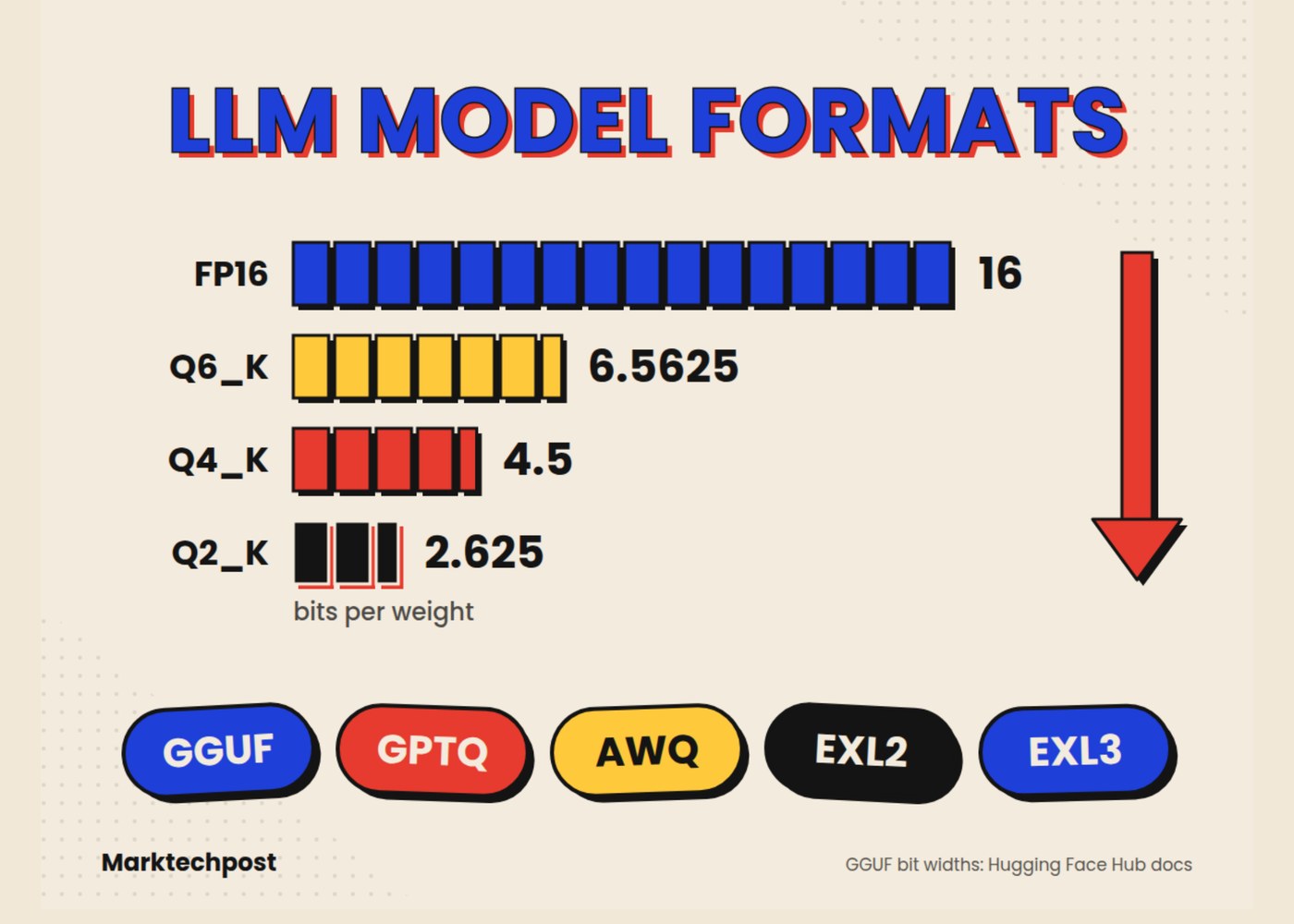
Those cryptic suffixes describe how many bits each weight gets. More bits, better quality, bigger file. The legacy names (Q4_0, Q4_1, Q8_0) use simple round-to-nearest blocks, while the K-quants and I-quants use smarter mixes.
Here’s real measured data for one model, from the format’s own documentation:
| Quant | Perplexity | Quality change | Size |
|---|---|---|---|
| FP16 | 5.9565 | baseline | 13.0 GB |
| Q8_0 | 5.9584 | +0.03% | 7.0 GB |
| Q6_K | 5.9642 | +0.13% | 5.5 GB |
| Q5_K_M | 5.9796 | +0.39% | 4.8 GB |
| Q4_K_M | 6.0565 | +1.68% | 4.1 GB |
Perplexity is a quality measure where lower is better. Look at what the numbers actually say: Q8_0 is virtually indistinguishable from the full-precision model at almost half the size. Even Q4_K_M, the popular choice, costs under 2% quality while shrinking the download to a third.
That’s why the standard advice for most people is Q4_K_M. It fits more hardware, and the quality loss is barely measurable. If you have the RAM to spare, Q5_K_M or Q6_K buys back most of that last sliver.
GPTQ and AWQ: the GPU workhorses
Now the other side of the GGUF vs GPTQ question. GPTQ is a 4-bit quantization method built for GPUs. It’s not a file format; GPTQ models are usually shipped inside safetensors containers, which is exactly the confusion from earlier.
The original GPTQ research reported end-to-end speedups of about 3.25x on an NVIDIA A100 and 4.5x on an A6000 compared to running the same model at full 16-bit precision. In practice, GPTQ models run through serving tools like vLLM and SGLang, where they deliver high throughput on datacenter and prosumer GPUs.
AWQ (Activation-aware Weight Quantization) is GPTQ’s friendlier cousin. The insight behind it: roughly 1% of a model’s weights matter far more than the rest, so AWQ protects those salient weights and compresses everything else harder. The result is a 4-bit model that tends to hold quality a bit better, especially on smaller models, and it’s well supported across inference engines.
So when do you pick these over GGUF? Pick them when your model lives on a big NVIDIA GPU and you care about serving speed. They’re also the right call when you’re running vLLM in any serious capacity. And grab one when the model you want has no GGUF build (rare these days, but it happens with fresh releases).
EXL2: the speed specialist
EXL2 belongs to the ExLlamaV2 inference library. It does something the others don’t: variable bits per weight inside the same layer. You tell it a target (say 4.5 bits average) and it spends more bits on important weights, fewer on the rest, mixing precision within a single matrix.
The payoff is speed. ExLlamaV2 is one of the fastest ways to run models on consumer NVIDIA cards, and EXL2 files let you dial size and quality between roughly 2 and 8 bits per weight instead of choosing fixed steps.
The cost is lock-in. EXL2 only runs in ExLlamaV2-based frontends. If your favorite chat app doesn’t support it, the file is a paperweight. That’s the trade compared to GGUF’s “runs everywhere” philosophy.
The 30-second decision guide
Honestly, the GGUF vs GPTQ choice comes down to one question: where does the model run?
- CPU only, Apple Silicon, or mixed CPU+GPU (most laptops): GGUF, and start with Q4_K_M. Use LM Studio, Ollama, or llama.cpp directly.
- Big NVIDIA GPU, serving many requests: GPTQ or AWQ through vLLM or SGLang. AWQ if the choice exists, GPTQ if it doesn’t.
- One fast NVIDIA GPU, single user, max speed: EXL2, if your frontend supports it.
- Just experimenting or fine-tuning on the fly: bitsandbytes (NF4) quantizes at load time, no pre-quantized file needed. It’s how people fine-tuned a 65B model on a single 48GB GPU.
One more warning before you download anything: avoid old .bin and .pt files when a safetensors version exists. Those legacy files use Python pickle, which can execute arbitrary code when loaded. Safetensors replaced that risk with a plain JSON header plus raw tensor data, and it’s now the default across Hugging Face. Untrusted checkpoint plus executable file format is a bad combination.
Why this matters more in 2026
Local models got good, fast. An 8B model at Q4 now runs comfortably on a 16GB laptop, and that covers a huge share of everyday AI tasks without sending your data anywhere. At its core, the GGUF vs GPTQ divide is really laptop-world versus GPU-server-world. Knowing your way around GGUF vs GPTQ vs AWQ vs EXL2 is the difference between a model that hums along and one that crawls or refuses to load.
If you’re picking hardware next, our local LLM hardware guide covers what to buy, and the Ornith 9B review shows what a near-35B-class model looks like on a 16GB machine in practice. For actually chatting with these models once downloaded, a customizable frontend like the SillyTavern setup guide gets you running in an afternoon.
Grab the Q4_K_M. That’s the answer for 90% of you. Everything else on this page is about the other 10%.