
That catchy track in your playlist might have zero humans on it. No singer. No guitarist. Since mid-October, YouTube Music AI labels are rolling out to tell you exactly that, right on the screen where you press play.
What YouTube actually announced
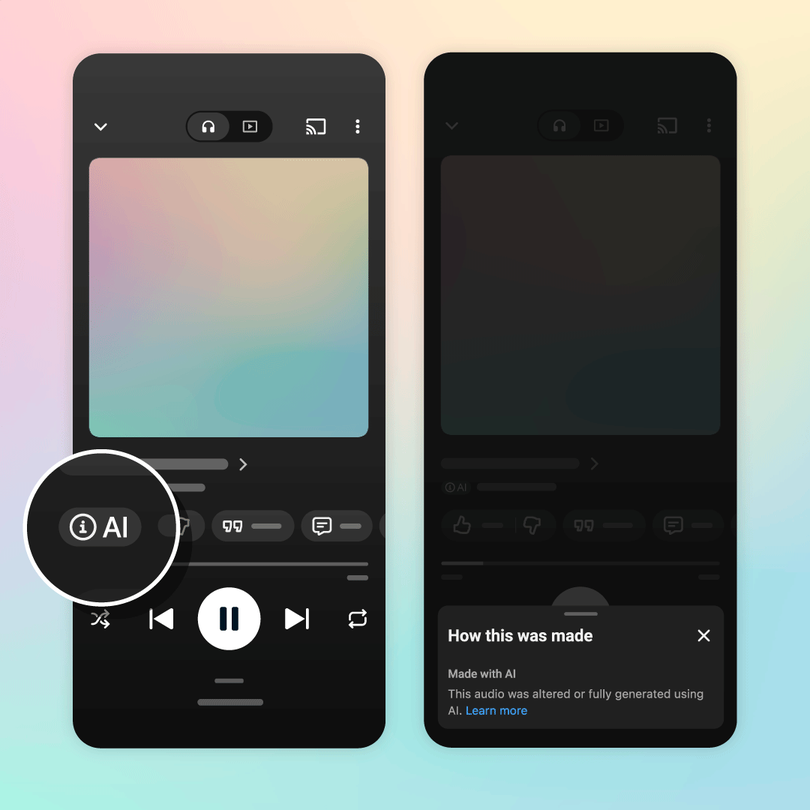
Google’s official blog post lays it out plainly: when a song was created primarily with generative AI, you’ll see a label on the player page. Tap it and a small menu explains what role AI played, whether that’s the composition, the vocals, or both.
The labels live in YouTube Music first, on both the app and the website, and the first wave of YouTube Music AI labels covers songs where a generative model handled the vocals or the writing. Google says they’ll expand to the main YouTube app too, so the same track will carry the same disclosure everywhere you stream it.
Here’s the part worth noticing: this isn’t optional self-reporting. YouTube combines disclosures from music partners with its own detection tools, and it’s applying the same labeling principles it already uses for AI videos.
How YouTube knows a song is AI-made
Two pipelines feed the label. The first is disclosure: labels and distributors tell YouTube when a release uses generative AI in vocals or composition. The second is detection, and this is where it gets interesting for anyone who follows this stuff.
Google built SynthID, a watermark that survives inside AI-generated audio and flags it as machine-made, even when nobody discloses it. Tracks made with Google’s own music tools carry it automatically. If you want to see the concept in action outside music, we tested the free SynthID Detector that checks images for the same invisible marks.
The result lands in three buckets: fully generative AI, partially generative AI, or no generative AI involved. A song where AI wrote the lyrics but a human sang it lands in a different place than one where a model did everything. That nuance matters if you care about who, or what, you’re supporting with your streams.
Where to find the label as a listener
Open any song in YouTube Music and look at the player page, the same screen with the scrubber and artwork. The YouTube Music AI labels sit there with the track info. One tap opens the details menu.
Two honest caveats from early coverage. First, you have to be looking: if the song plays in the background while you cook, nothing announces that it’s AI-made. Ars Technica made exactly this point, and it’s fair. Second, there’s currently no filter to hide labeled AI tracks from playlists and radio. You can see the disclosure, but you can’t block it yet.
Still, for a platform that hosts more AI slop than anywhere else, visible labeling beats nothing. Spotting machine-made music by ear is getting genuinely hard.
Why musicians should care more than listeners
If you only listen, this is a nice-to-know. If you release music, it’s business-critical, because the economics changed with the announcement.
Detected AI music gets pulled out of algorithmic recommendations and editorial playlists, per TechCrunch’s report on the rollout. YouTube also withholds royalties from streams it flags as fraudulent, a nod to the fake-band farms that have been polluting streaming platforms for years. Compare that with TIDAL, which goes further and blocks monetization entirely for fully AI-generated recordings. YouTube chose disclosure over bans, at least for now.
The practical read: if you make music with AI tools, disclosure is now the strategy that keeps you in the algorithm’s good graces. Hide it, and the detection side may catch you anyway, with your reach taking the hit.
Tools like Suno and Google’s own Lyria in Gemini aren’t going anywhere. Millions of people use them, and some of those songs are good. The artists who win under the new rules will be the ones who say the quiet part out loud in their release notes.
The three tiers, decoded
Understanding the tiers helps you read the label like a pro. YouTube sorts every track into one of three buckets, and each one tells you something different about what you’re hearing:
| Tier | What it means | Why it matters to you |
|---|---|---|
| Fully gen AI | Composition, vocals, and production all came from a model | No human performed or wrote anything; treat it as content, not art with an author |
| Partially gen AI | AI did real work, like a beat or synthetic vocals, but humans led | An artist made creative choices here; the label is context, not a warning |
| No gen AI | Recorded the traditional way, or AI played a trivial role | Standard streaming experience, nothing new to weigh |
Most of the debate online is really about the first bucket. The second is where interesting collaborations will live, and honestly, some of them will be great.
Simple checks before you share a track
Labels help, but you won’t always be staring at the screen. A few quick habits catch most machine-made music before it ends up in a group chat with your endorsement attached.
First, open the track’s credits. Human songs list writers, producers, and session players. A sparse credit block with no names behind the vocals is a hint. Second, check the artist page: a catalog of thirty songs released in one month across three genres is a farm, not a musician. Third, trust your ears on the tells, because they’re getting easier to spot once you know them: vocals with no breath, lyrics that rhyme but say nothing, and a mix so clean it sounds like a demo file.
And when in doubt, look for YouTube Music AI labels on the player before you add the song to a shared playlist. It takes two seconds, and your friends’ taste in music will thank you.
What happens to your playlists
Nothing breaks. Existing songs keep playing, playlists stay intact, and none of this affects tracks recorded by humans the old-fashioned way. The label is metadata, not a takedown.
Over time you might notice subtle shifts, though. If AI-heavy tracks get fewer algorithmic nudges, your auto-generated mixes will drift slightly more human-made. For most listeners that’s a feature, not a bug.
The bigger picture
Streaming was drowning in AI uploads long before labels arrived. Deezer started flagging fully AI tracks back in 2025, and the flood has only grown since. YouTube Music is the biggest platform to act, so treat these YouTube Music AI labels as the moment disclosure became the default instead of the experiment.
Expect other services to follow fast, because the alternative is losing listener trust during an election year full of AI everything. Spotify, Apple Music, and Amazon Music are all watching how this lands.
What to do right now
Open a song you love in YouTube Music today and check whether the label is there. That’s the whole homework. If you make music, add an honest AI disclosure to your next release before the detection side makes that decision for you. And if a track sounds a little too polished to be real, now you know where to look.