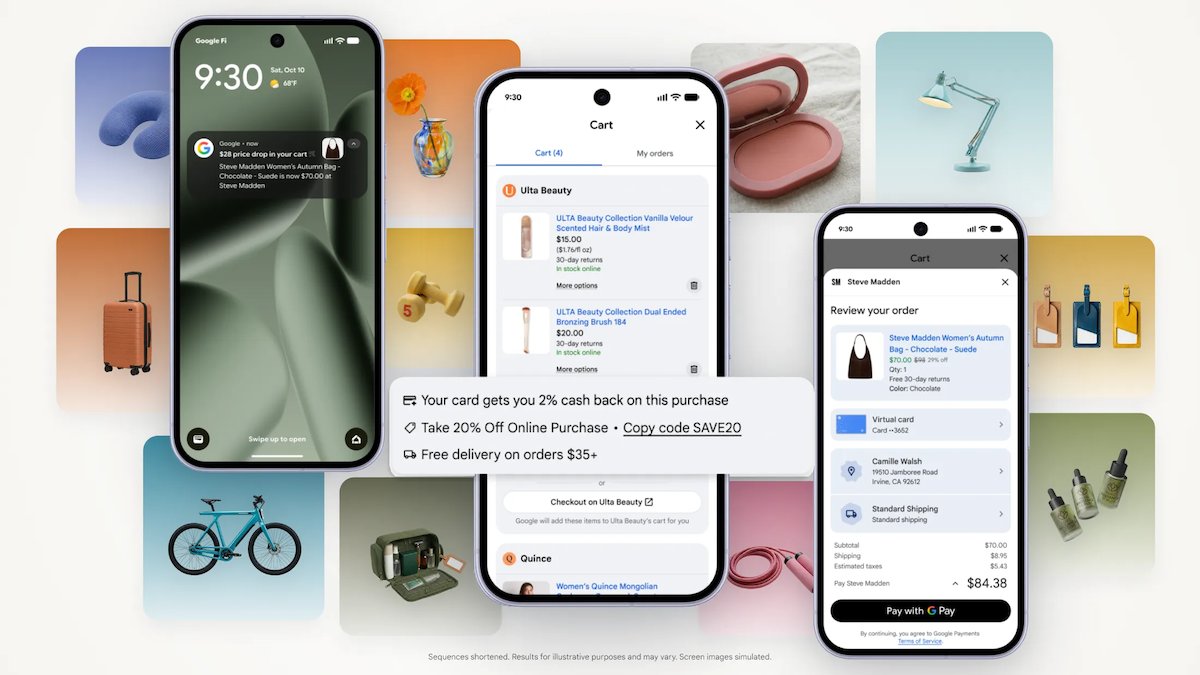

Black Friday is coming, and your browser currently has 14 tabs holding the gifts you half-remember saving. Google’s fix for that mess just launched in the US. It’s called Google Universal Cart, and it saves products from every store you browse on Google, then watches prices for you.
What Universal Cart actually is
Google Universal Cart rolled out on October 15 across Google Search and the Gemini app for US users. Google first previewed it at I/O back in May. The pitch is simple: instead of juggling screenshots and abandoned tabs, you save items into one cart that follows you across Google.
Spot a handbag in Search’s AI Mode? Save it. Later, you’re chatting with Gemini and find a sweater from Quince and lipgloss from Ulta. Save those too. When you come back tomorrow, all three sit in the same cart, exactly where you left them.
Under the hood, it runs on Google’s Shopping Graph, the product database with over 60 billion listings that refresh constantly. Gemini models power the deal hunting, which means the cart gets smarter as the models improve.
What it does while you shop
Saving items is the boring half. The interesting half is what happens after you save something:
- Price drop alerts. The cart watches your saved items and notifies you when the price falls.
- Stock alerts. Sold out? You’ll know when it’s back without refreshing the store’s page.
- Promo codes. Google surfaces relevant coupons next to your saved products.
- Price history insights. You can see whether today’s “deal” is actually a deal.
So the cart isn’t just storage. It’s a shopping agent that sits in the background and does the tedious parts for you. For anyone who’s ever bought something at full price only to watch it drop 30% the next week, this is the feature that pays for itself.
Google Universal Cart isn’t the first attempt at a cross-store cart, but it’s the first one with an AI model this big behind it. Older “universal wishlist” apps just saved links. This one understands the products, negotiates the timing, and hunts the discounts.
How to use it, step by step
There’s nothing to install. If you’re in the US and use Google, you already have it.
- Save your first item. Search for a product on Google (AI Mode makes this easy), and when the product card appears, hit save. The item lands in your Universal Cart.
- Save from Gemini too. Ask the Gemini app for product recommendations and save items from the chat. Everything funnels into the same cart.
- Open your cart. Tap the cart icon on Google to see everything you’ve saved across retailers, in one list.
- Let it watch prices. Leave the items there. When a price drops or stock returns, you get a notification. Promo codes show up alongside your items.
- Check the payment perks. The cart analyzes your saved cards and highlights which one gives you the most rewards or cash back for a specific purchase.
- Buy through Google Pay. Ready to purchase? Checkout runs on the Universal Commerce Protocol, a system Google built so merchants can sell inside Google. Payment goes through Google Wallet.
- Or jump to the retailer. Prefer buying direct? Transfer the item to the merchant’s own cart and check out on their site. Your confirmation and customer support still come from the retailer either way.
That last point matters. Google isn’t trying to replace the store you’re buying from. It’s the layer on top that finds the product, tracks it, and makes the final click easier.
Where it works today (and where it doesn’t)
Here’s the honest limitation list.
Google Universal Cart only tracks products you found through Google. If you save a jacket from a random boutique’s website, the cart never sees it. The tracking superpower only kicks in for items discovered inside Google’s own surfaces, and the rollout is US-only for now.
Here’s the current map:
| Surface | Status |
|---|---|
| Google Search (AI Mode) | Working now |
| Gemini app | Working now |
| YouTube | Coming, no date |
| Gmail | Coming, no date |
| Rest of the world | Not announced |
So the “watch everything you browse” version isn’t here yet, and the cart is not a browser extension. Google framed the Gmail and YouTube integrations as part of the plan when it announced the product, but so far that’s a promise with no ship date attached.
One more thing worth knowing: support and refunds stay with the retailer, not Google. If the sneakers arrive damaged, you’re dealing with the store you bought from. Google organizes the buying. It doesn’t stand behind it. As CNET put it in its hands-on, you’ll need to shop on Google first for any of the tracking to work.
Why Google is doing this now
Timing tells the story. Holiday shopping season is the biggest commerce window of the year, and Google watched OpenAI add shopping features to ChatGPT and Amazon push its own AI shopping tools. Shopping searches are hugely profitable for Google, so losing product discovery to a chatbot would hurt.
Universal Cart is Google’s answer: keep the discovery, the saving, and now the checkout inside Google’s walls. It joins a growing stack of AI shopping features, including conversational product search in AI Mode and the Let Google Call tool that phones nearby stores to check stock. We covered how Gemini can call businesses for you when that launched, and the strategy is the same: be the assistant that does the errand.
The pattern across all of these is consistent. Google Universal Cart handles the cart, Let Google Call handles the phone call, and AI Mode handles the asking. Each one moves a step of shopping from your to-do list onto Google’s servers. Meanwhile, OpenAI already showed the next move: ChatGPT can show clothes on your body before you buy. The race for the shopping assistant slot is very much on.
In Google’s own announcement, Suresh Ganapathy, a senior director of product management for consumer shopping, framed it as helping people “stay organized and shop more confidently this holiday season.” Confidently is doing some work in that sentence. A cart that knows when prices drop and which card earns the most points is a cart designed to make you feel good about spending.
And that’s worth remembering. A tool that saves you money on a price drop can also nudge you toward buying things you wouldn’t have otherwise. Our writeup on AI shopping recommendations found that algorithmic suggestions can cost you more, not less. Use the alerts for things you already planned to buy. Treat the rest as noise.
Quick tips before the holidays
- Save gifts early and let price tracking do its thing. October savings beat December panic.
- Compare the rewards suggestion against your card’s actual perks before trusting it. The model doesn’t know about that limited-time promo your bank is running.
- Use promo code surfacing as a starting point, then check the retailer’s own coupon page. Two minutes, occasionally real money.
- For big-ticket items, check the price history before a drop alert convinces you the sale is special.
The takeaway
Google Universal Cart is free, already live, and genuinely useful for holiday shopping. Save the gifts you’re tracking, let the price alerts run, and pay through Google Pay when a drop lands. Start with one item today and see if the alerts actually change how you buy.