
You’re starving, you’ve picked a spot, and now comes the worst part of eating out: calling the restaurant to ask how long the wait is. The new Yelp Check for Me feature sends an AI to make that call for you. You sit on the couch, your phone buzzes with the answer, and nobody has to talk to anybody.
What Yelp Check for Me actually does
The feature lives right on restaurant pages in the Yelp app. Instead of a menu button or a review, you get an option to have Yelp call for you.
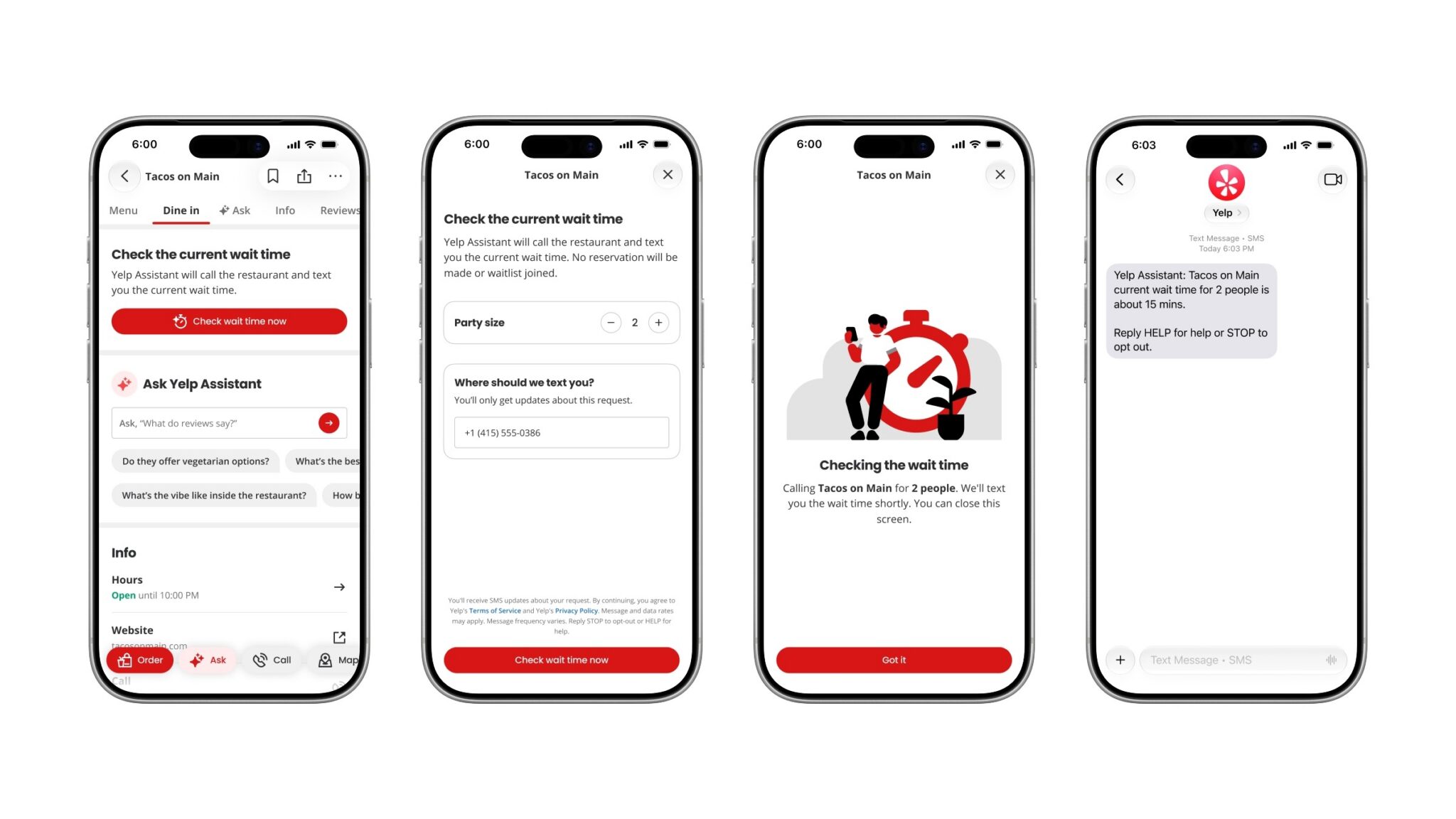
Here’s the flow. You tap it, enter your party size and your phone number, and Yelp’s AI voice agent dials the restaurant. It asks about the current wait for a table your size. When the call ends, Yelp texts you the answer. From there you decide whether to head over, book through the app, or pick somewhere else.
That’s the whole trick. No hold music, no “hi, I was wondering…”, no pretending you didn’t check the wait time twice before leaving your house. TechCrunch reported the launch alongside a batch of other Yelp AI updates, and honestly, this is the one that saves the most friction for regular people.
How to use it, step by step
The rollout is fresh, so you’ll need the latest version of the Yelp app. Once you have it, the whole thing takes under a minute.
- Open Yelp and find the restaurant you’re considering.
- Look for the Yelp Check for Me option on the restaurant’s page.
- Enter your party size so the AI asks about the right table.
- Add your phone number where the result should be texted.
- Let the agent make the call and wait for the SMS.
- Decide: go now, book ahead, or keep scrolling.
That last step is where Yelp quietly got better. The same update added an OpenTable integration, so if the wait looks ugly you can book a different time without leaving the app. Before, you’d bounce between apps, re-search the place, and lose the momentum that made you want tacos in the first place.
Why Yelp is doing this now
Voice agents calling businesses became one of this year’s real trends. Over the past few weeks, assistants like Instinct, Fo, and Muse have added the ability to call companies for support or bookings. Yelp is following the crowd, but with a head start most rivals don’t have.
Here’s the interesting part. Yelp already launched AI voice agents for restaurants and service businesses last year. Those answer calls, handle reservations, and deal with common questions on the business side. So when your Yelp Check for Me agent dials a restaurant, there’s a decent chance another AI picks up. Agent calls agent, wait time gets exchanged, everyone eats.
Will that always work? Probably not every time. TechCrunch flagged the risk that two agents might fumble the conversation. A human answering a ringing phone mid-dinner rush is also exactly the person most likely to say “uh, hold on” and put you on hold, which any AI has to handle gracefully. Treat the feature as a time-saver that’s usually right, not a guarantee.
The other Yelp AI updates worth knowing
Yelp Check for Me grabbed the headlines, but the assistant around it changed too, and the changes add up.
- OpenTable booking inside Yelp. The assistant can now complete a restaurant reservation without bouncing you to another app.
- Memory across chats. Tell the Yelp assistant once that you avoid seafood or love patio seating, and it remembers in future conversations. That’s a shift from starting every chat from zero.
- Chat history. You can pull up your past 30 days of conversations in the app, with full history promised later. Handy when you half-remember “that ramen place we looked at last week.”
Personalization is the quiet theme here. Recommendation engines have always guessed based on what strangers with similar tastes did. An assistant that remembers what you actually said is a different tool, and it saves the small but real tax of re-explaining yourself every time.
Does this actually save you time?
Depends on how you eat out, but for plenty of people, yes.
If you’re the type who calls two or three spots on a Friday night before choosing, that’s ten minutes of phone tag compressed into two text messages. If you hate phone calls on principle, this removes them entirely. Parents juggling kids in the car, people with phone anxiety, anyone coordinating a group dinner: the “wait, what’s the wait?” loop is exactly the kind of chore that AI handles well because it’s short, scripted, and low-stakes.
Where it helps less: walk-in-heavy neighborhoods where the host just posts the wait on a chalkboard, and small towns where everyone answers the phone anyway. Also worth noting, checking wait times only matters if you haven’t booked. Plenty of people will keep reserving tables and skip the question altogether.
The honest take: this is a small feature that removes a small annoyance. That’s not a knock. The best consumer AI of the last two years has been exactly this, tiny helpers that shave minutes off boring tasks. Put a few of them together and the hours add up.
Privacy and the fine print
You’re giving Yelp two things: your party size and your phone number. The agent uses the number to text you results, so keep that in mind if you share a phone plan with someone nosy.
Restaurants, for their part, get a call from an AI that identifies itself. Some owners will love it, since it keeps their line free for actual customers. Others will grumble that robots are now ordering them around. The market will sort that out, and it’ll be interesting to see whether restaurants start flagging AI callers the way websites flag AI crawlers.
Standard app permissions apply too. None of this requires access to your contacts, photos, or location beyond what Yelp already uses. If you’ve used the app before, the privacy delta here is small.
Alternatives if your city hasn’t got it yet
Feature rollouts like this land in stages, so you might not see Yelp Check for Me in your app today. A few stand-ins while you wait:
- Call the restaurant. I know. But it works everywhere, always.
- Google Maps often shows estimated wait times for popular spots, crowdsourced from people already there.
- OpenTable and Resy show real-time availability, which is the same question asked sideways.
- The restaurant’s own site or Instagram story frequently posts the evening’s wait.
None of these make the call for you, though. That’s the actual new thing here, and it’s why Yelp’s AI assistant push is worth watching even if you barely open the app today. Assistants that act in the world, calling places and booking things, are showing up everywhere. We covered how ChatGPT can now work inside your browser tabs, and it’s the same wave: AI that does the errand, not just the research.
The takeaway
Yelp Check for Me is live for restaurant wait times, and it costs nothing to try beyond having the app. Next time you’re torn between two dinner spots, let the AI make the awkward call, watch how the conversation goes, and see if the text arrives faster than you’d have gotten off hold. Small feature, yes. But it points straight at where all these assistants are heading.