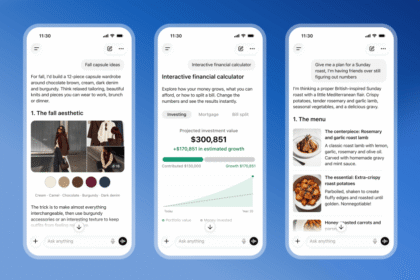

Facebook Your algorithm sounds almost too simple: tell the feed what you want, in plain English, and watch it change. After years of liking, hiding, and snoozing posts with mixed results, that’s a bold promise. So we dug into Meta’s announcement to see what this thing actually does.
What Facebook Your algorithm actually is
Meta rolled out the feature on October 13 with a fitting name. Your algorithm is a dedicated space where you can directly add and manage the topics you want to see in Feed and Reels. No guessing which posts to heart, no training periods. You type what you’re into, and the ranking systems adapt.
Finding it takes about ten seconds. Tap the three-dot menu on any Facebook post, and Your algorithm sits right there. Add topics you love, remove ones you’re done with, and your recommendations respond right away.
That last part matters. Older tools reshuffled your feed over days. This one updates in real time, at least according to Meta’s announcement.
How to set it up right now
The whole thing works from your phone in under two minutes.
First, open Facebook and find any post in your Feed. Tap the three-dot menu in the corner of that post. Select “Your algorithm” from the options. Then add topics you want more of. Cooking, Formula 1, local news, whatever you actually care about. Finally, delete topics you’re tired of. The list is yours to manage.
One tip from someone who’s reset too many feeds: be specific. “Food” gets you everything from restaurant reviews to weird cake videos. “Air fryer recipes” gets you dinner.
Five topic ideas that actually work
Staring at an empty topics box is weirdly hard. Steal these patterns instead.
Name a hobby plus a format: “sourdough baking tutorials” beats “baking.” Name a place plus an interest: “hiking trails in Colorado” filters out generic fitness noise. Name a show, team, or artist directly, because entities are easy for recommendation systems to serve. Name a task you’re working on, like “first apartment decorating,” and the feed becomes a research tool. And keep the list short: five focused topics steer harder than thirty vague ones.
The feedback game changed too
Facebook Your algorithm is only half the update. The company also rebuilt how post-level feedback works, and this is where the plain-English part kicks in.
Tap “Interested” or “Not interested” on a post, and Facebook may now ask follow-up questions about why. You answer in your own words. Free text, no buttons. The system folds your explanation into its recommendations immediately.
Think about how different that is. The old system only knew you skipped a video. The new one knows you skipped it because “these pranks are staged.” That’s a very different signal, and it’s the difference between muting one video and steering the whole category.
Why Meta is doing this now
The answer is buried in Meta’s own announcement: large language models. Facebook’s ranking systems have always inferred your interests from behavior, thousands of signals like watches, comments, and shares. LLMs let those systems understand something they never could before, which is what you mean when you write it.
That’s why Facebook Your algorithm feels different from every “reset your feed” tip of the last decade. It’s not a settings screen bolted on after the fact; it’s the ranking system accepting direct input. Meta wants the model to read “less AI slop, more woodworking” and act on it, and that only became possible recently.
| Old feedback tools | New tools (2026) | |
|---|---|---|
| Input | Buttons: like, hide, snooze | Typed topics and free-text reasons |
| Where | Scattered across each post | One place: three-dot menu |
| Speed | Gradual, days of training | Real-time updates (per Meta) |
| Reels | Separate controls | Same topics apply to Feed and Reels |
| Understanding | Behavioral signals only | Reads what you write |
If you can’t find it yet
One catch: Meta says it’s “rolling out” the tools, which is corporate speak for “not everyone has them today.” If the three-dot menu doesn’t show the option yet, your account just hasn’t gotten it. Give it a few days before assuming your phone is broken.
Rollout notices never include dates anymore, so the practical move is checking weekly. Meanwhile, the classic controls keep working, which brings up a reasonable question: does any of this change life for people who post instead of scroll?
What it means for creators and small pages
Short answer: stated interests raise the bar and lower it at the same time.
If your audience adds your niche as a topic, your posts gain a signal that likes alone never provided. A vintage camera shop, for example, wants “film photography” in a thousand topic lists rather than a thousand accidental likes. So it’s worth telling people, plainly, to add your topic to their list.
The flip side stings a little. Vague engagement matters less when users declare intent directly. Content that rode algorithmic drift, like trending-audio reposts, will struggle against pages that match a written topic exactly. Niche beats broad, and now the feed has it in writing.
A healthy dose of skepticism
Here’s the thing worth remembering: Meta’s business model hasn’t changed. The feed exists to keep you scrolling, and ads fund it. Giving users a steering wheel is great, but the car still drives toward engagement.
Our advice is to treat the tool as powerful but limited. It will cut the junk you name explicitly. It may not fix everything you’d name implicitly, the stuff you never type but clearly avoid. Sponsored posts and suggested content follow their own rules, and no feedback button removes ads.
Privacy-conscious users should also notice the trade: better personalization now runs on more of your written input going into Meta’s systems. If that bothers you, our guide on opting out of AI training across social platforms covers the broader settings.
Stack it with the controls that still exist
Your algorithm doesn’t replace the older levers, and the combo works better than any single switch.
Favorites still pin your closest friends to the top. Unfollow silences people without the drama of unfriending. Snooze pauses a source for 30 days. And if you use Facebook through a browser, the “Feed” tab settings gather most of these in one place.
Meanwhile, Meta’s AI push continues elsewhere: the company also runs Muse, its personal AI agent, which we tested when it launched. Feed control is just the piece you’ll touch daily.
Deep in the Meta ecosystem anyway? We broke down Meta One and who should actually pay for it, because bundling changes the math on every Meta service.
Who benefits most
Three groups should drop everything and spend five minutes on this, because Facebook Your algorithm helps each one differently.
People whose feeds went sideways after years of low-effort scrolling get the fastest reset available. New users who never trained their feed at all skip years of accidental signaling. And anyone using Facebook for something specific, like selling crafts or following a sports team, wins big, because typed topics cut straight to the point.
The takeaway
Open the three-dot menu today, add five topics you actually care about, and delete five you don’t. Your feed is finally something you can argue with, and for once, the algorithm has to listen.