
Your AI coding agent charges you for every token it burns, including the ones it spends sitting around while a test suite slowly chews through 400 files. Unreal Agent is a new open-source harness with a simple bet: stop making the model wait. Its published benchmarks claim the same coding results for up to 40% less money, and every run is public, so you can check the math yourself.
The problem: you’re paying for your AI’s dead time
Here’s something most people don’t realize about AI coding agents. When the model calls a tool, like “run the tests” or “build the project,” a typical harness sends the request and then waits. The build takes four minutes. The model idles through it, polling for status, and you get billed for the privilege.
That dead time is bigger than it sounds. A single coding task can involve dozens of tool calls: reading files, running linters, compiling, testing again because one import was wrong. If the model burns a turn on every “still running” check, those turns pile up fast.
For a hobbyist running three tasks a week, this is noise. For anyone running agents at scale, it’s a line item that keeps the finance team awake. Same model, same quality of work, wildly different monthly bill depending on how the plumbing around the model works.
What a harness actually is (and why it matters)
Think of the model as the engine and the harness as everything else in the car: the chassis, steering, fuel line. The harness decides how tool calls get made, how the session history is stored, how the model sees results.
Most people assume the harness is neutral plumbing. It isn’t. A recent research piece called HarnessTax made exactly this argument: how much you pay for a coding agent depends heavily on the scaffolding around the model, not just the model itself. Two harnesses running the same engine can land on very different invoices.
That’s the lens for what Unreal Labs shipped on September 22. They didn’t train a model. They rebuilt the plumbing.
How async tool calls actually save money
The core trick is embarrassingly simple once you see it. Traditional flow: model asks for a tool, harness runs it, model waits, result comes back, model continues. One thing at a time, like a person who refuses to start laundry until the dishes are done.
Unreal Agent’s flow looks different:
- The model asks for a tool call, say “run the test suite.”
- The harness logs that the call is in progress and immediately hands control back to the model.
- The model keeps working. It reads another file, drafts the next change, plans its next move.
- When the tests finish, the result drops into the session log and the model picks it up.
- Fewer model turns total. No polling, no “is it done yet” tokens.
There’s a second benefit hiding in there. Because the harness never blocks, you can interrupt and steer the agent mid-task. Anyone who’s watched an agent trundle toward the wrong solution for ten unskippable minutes knows exactly how much that’s worth.
Unreal Labs attributes the savings to two things: a tiny harness footprint (simple prompts, no sub-agents, trimmed tool outputs) and more tool work squeezed into each model turn. Nothing exotic. Just fewer wasted tokens.
The numbers behind the 40% claim
The team ran Unreal Agent with GPT-6 Astra and published side-by-side runs against Codex and Pi. Here’s the summary across four benchmarks:
| Benchmark | Agent | Pass rate | Total cost | Difference |
|---|---|---|---|---|
| Terminal-Bench 4.0 | Codex | 57.9% | $2,350 | 39% cheaper, same accuracy |
| Unreal Agent | 57.9% | $1,428 | ||
| DeepSWE 1.1 | Codex | 69.0% | $1,633 | 16% cheaper, higher pass rate |
| Unreal Agent | 72.4% | $1,367 | ||
| SWE-Atlas QnA | Codex | 63.3% | $1,303 | 28% cheaper |
| Unreal Agent | 64.0% | $936 | ||
| ALE-CLI | Codex | 29.0% | $292 | 26% cheaper, higher score |
| Unreal Agent | 30.0% | $217 |
Notice the pattern. Pass rates stay flat or tick up slightly. Costs drop by a quarter to nearly half. Terminal-Bench is the cleanest case: identical accuracy, 39% of the price gone. That’s the async design in its purest form, because the only variable that changed was the harness.
The catch (there’s always a catch)
Now, before you reroute your whole workflow, some honest caveats.
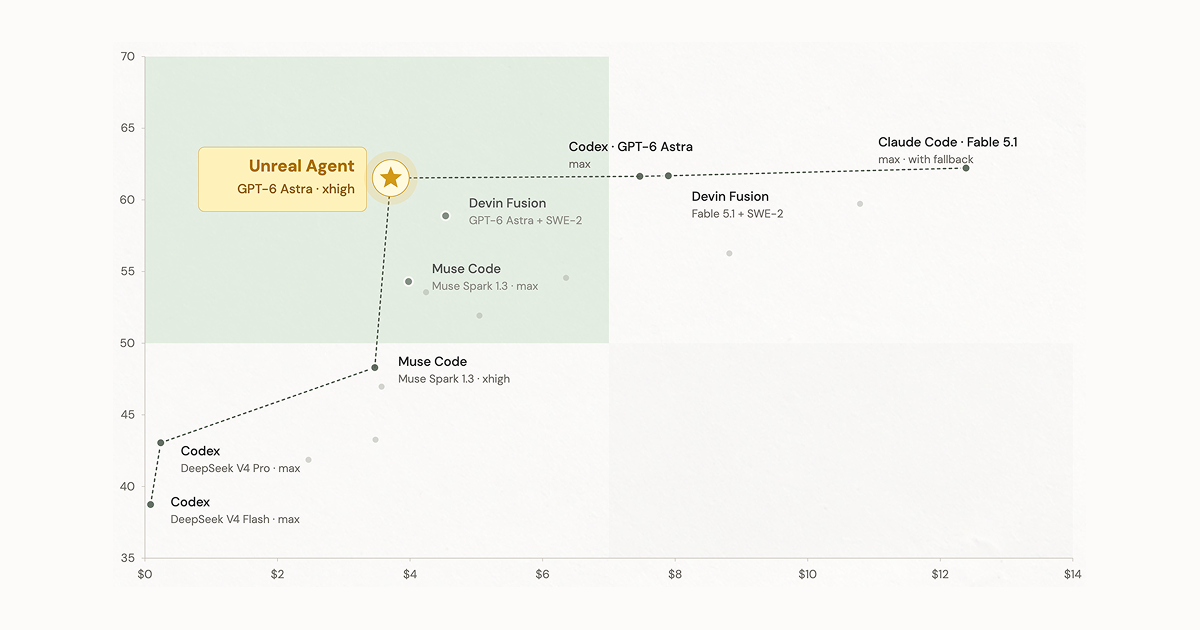
These are vendor-published benchmarks. Unreal Labs chose the comparisons, and the launch thread on Hacker News immediately poked at the headline chart, pointing out that it compares their harness on Astra at “xhigh” reasoning effort against Codex on Astra at “max.” Not exactly apples to apples. The per-benchmark tables hold up better than the hero graphic, but still.
The “up to” in “up to 40%” is doing real work too. Savings depend on your workload. Tasks dominated by long-running commands (big builds, heavy test suites) benefit most. Tasks that are mostly model thinking with few tool calls will see much less.
Also worth saying: Unreal Agent runs the model as an API you pay for. It cuts the harness tax, not the model’s price. Your per-token rates don’t change.
None of this kills the finding. The benchmark runs are public and reproducible through the Harbor framework, which is more than most launch-day claims can say. It just means the honest reading is “meaningfully cheaper on tool-heavy workloads,” not “flat 40% off everyone’s bill.”
How to try Unreal Agent yourself
The project lives on GitHub under an MIT license, written in Go. It picked up well over a thousand stars in its first couple of days, so the initial curiosity is real.
What you get in the repo:
- harness/, the Go library you can wire into your own stack
- cmd/, a runner executable in the spirit of
codex execorclaude -p - benchmarks/, runners compatible with the Harbor framework
Fair warning for the non-technical crowd: this is a developer tool. You’ll want Go installed and comfort in a terminal. There’s no shiny desktop app yet. If you’ve never touched a command line, file this one under “watch this space” rather than “install tonight.”
Setup in the simplest case is roughly: clone the repo, build the runner, point it at your model provider’s API key, give it a task. The documentation is sparse but the architecture is unusually well documented for a two-day-old project, with a full glossary and component breakdown in the README.
Why this matters even if you never touch Go
Say you’re not a developer and never will run this thing. The trend still pays you.
First, cost pressure like this spreads. We’ve seen the same movie before, with Cursor’s router cutting coding costs automatically and Cognition’s SWE-2 undercutting frontier pricing. Every time someone proves the same work can cost less, prices across the board drift down. Your existing tools get cheaper or better, no action required.
Second, free and open options keep maturing. Between Qwen Code as a free Claude Code alternative and now an open-source harness that trims the fat out of agent runs, the “I need a $200/month subscription to do real work” story gets weaker every month.
Third, if you do hire developers or run automation that touches coding agents, this is now a question worth asking: which harness are we using, and what’s it costing us in dead tokens? Before this week, almost nobody asked.
Takeaway
Unreal Agent won’t replace your current setup tomorrow, but it pokes a hole in a bill most people thought was fixed. If you run coding agents, audit how much your harness wastes on waiting; if you don’t, just enjoy the price war it starts. Star the repo, keep an eye on independent replications, and check whether your current tooling lets you steer mid-task. That last one, it turns out, is worth real money.