
Snapchat paid creators $1.8 million last month for AR lenses. Most of those lenses used to take real development skill. Easy Lens CLI changes that: connect your AI coding assistant, describe what you want, and it builds the whole thing for free.
The door just opened for non-coders
Snap announced Easy Lens CLI on November 18, and the pitch is almost absurd in its simplicity. You already use Claude Code, Codex, or Cursor for other projects. Connect your assistant to Snap’s tool, describe the lens you want in plain English, and it builds, tests, and publishes the AR experience for you.
Snap says a full game can go from idea to published lens in a single day. Without writing code yourself. That claim would’ve sounded like marketing fluff a year ago, but the company backs it with a real number: $1.8 million in payouts to Lens+ community creators last month alone.
For anyone who’s toyed with no-code app builders, this follows the same pattern we saw with tools like Bluesky Attie. Except this one has a payout program attached, which changes the math considerably.
What Easy Lens CLI actually is
Easy Lens CLI is a command-line tool that builds on Easy Lens, Snap’s existing prompt-to-lens app for web and mobile. The CLI version moves that same creation flow into the coding assistants developers already use.
Your AI assistant handles every step: building with more than 100 AR building blocks and 50+ AI asset generators, rendering preview videos, sending the lens straight to your phone for testing, fixing errors, and publishing. It even tracks performance after launch, all inside the same session.
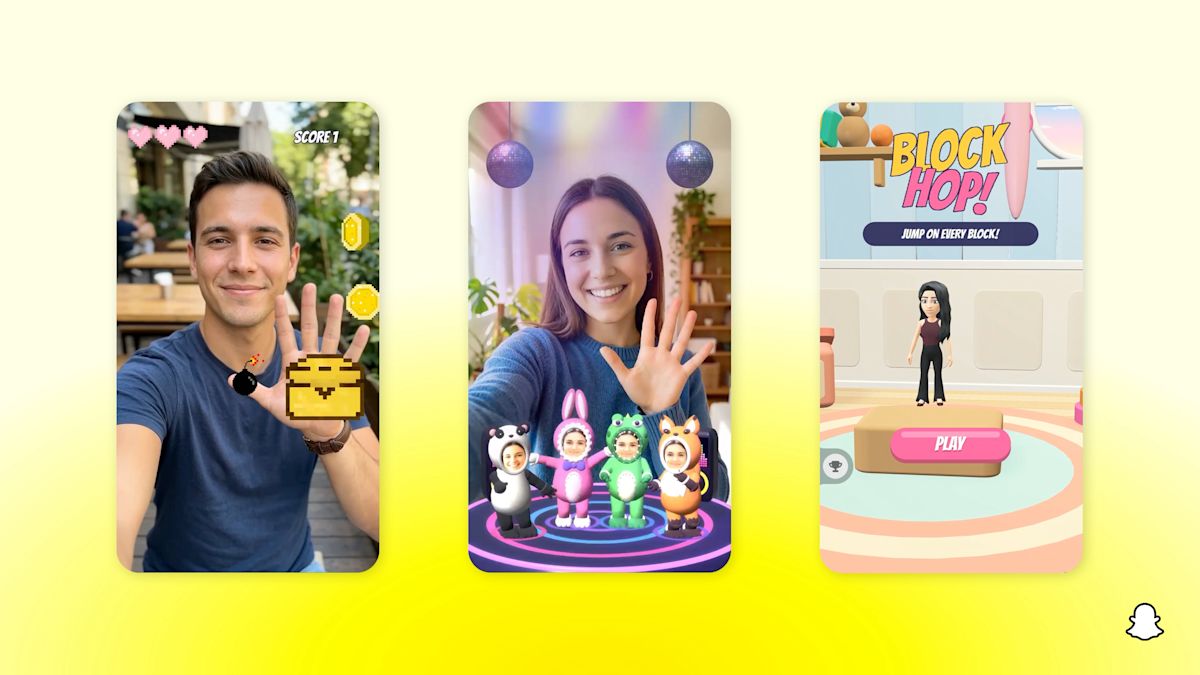
The scope covers Web Lens games with leaderboards, camera effects, and beauty filters. Game developers can port existing browser games to Snapchat as Web Lenses. Agencies can turn campaign videos and brand assets into AR experiences in a fraction of the usual production time.
One thing to keep straight from the start. Lenses built through the CLI go through the same content checks and review process as everything else on Snapchat. Your assistant builds fast, but Snap still reviews before anything goes live.
Setting it up on your computer
Installation takes a few minutes. Here’s the path (the official install page has the current builds):
- Visit easylens.snapchat.com/cli and grab the installer for your system. It runs on Mac, Windows, and Linux.
- Sign in with your Snapchat account. That’s the only account you need; the tool is free.
- Connect your AI assistant. Snap supports Claude Code, Codex, and Cursor, so pick whichever one you already pay for or run.
- Describe your first lens in plain words. Something like “a lens that adds falling snow and rosy cheeks when I smile” is a perfectly valid first prompt.
- Watch the build, then use the preview feature to send it to your phone. Test it in real lighting, moving around. Snap’s own docs stress this: what looks right on desktop can behave differently when someone points the camera at their dog.
If step 3 feels intimidating because you’ve never installed a coding tool, don’t panic. You’re not really coding. The assistant lives in a terminal window and does the work; you just talk to it.
Which assistant should you connect?
All three supported assistants can do the job. The differences are mostly about where they run and what you already have.
| Assistant | Made by | Where it runs | Best fit |
|---|---|---|---|
| Claude Code | Anthropic | Terminal | Long build sessions, complex games |
| Codex | OpenAI | Terminal | If you already pay for ChatGPT |
| Cursor | Anysphere | Desktop editor | Visual folks who like a file view |
Honestly, don’t overthink this choice. If you already subscribe to one of them, use it. Snap designed the CLI to work with your existing setup, not to sell you a new subscription.
The money part, without the hype
Yes, you can earn. Snapchat’s Lens+ Payouts program pays creators for the lenses they build, and Snap awarded $1.8 million to community creators last month through it.
Here’s the part launch-day coverage glosses over: that $1.8 million is split across an entire community of creators. Most of them make modest amounts. Snap’s own announcement is careful to note the total “is not a promise of earnings for any individual developer,” which is corporate-speak for: don’t quit your job yet.
The realistic framing looks like this. The tool removes the biggest cost of experimenting, which used to be learning AR development for months. Now the cost of trying is an afternoon. If your lens idea is genuinely fun and gets traction, payouts follow. If not, you’ve lost an afternoon and maybe gained a portfolio piece.
There’s also the agency angle nobody’s talking about. Businesses pay real money for AR marketing. A freelancer who can turn a brand’s campaign assets into a working Snapchat lens in a day now has a service to sell, and the CLI is a legitimate delivery pipeline. That’s arguably the strongest money path here, and it needs zero viral luck.
Just keep your shipping standards high. Our vibe coding security checklist applies to anything AI builds for you, lenses included, because sloppy output gets rejected in review no matter how fast it was generated.
Three tips before your first build
Start embarrassingly small. Your first lens should be a face filter, not a multiplayer game. Get one build through the full pipeline: build, phone test, submit, review. The second build goes smoother once you’ve seen the whole loop once.
Test on real people and real lighting. The preview video your assistant renders is not ground truth. Send it to your phone, walk outside, point the camera at a moving subject. AR lives or dies in motion.
Keep a prompt journal. When the assistant nails a lens, save the prompt that did it. When it fumbles, note what confused it. After five or six builds you’ll have a personal playbook, and that’s an asset nobody can take from you.
If publishing apps sounds more interesting than AR, we also covered how to ship your vibe-coded app to Google Play, which pairs nicely with this workflow. And Snap’s official announcement has the full feature list if you want the source material.
Is Easy Lens CLI worth your weekend?
Clear verdict: yes, if any of three things is true. You want a shot at Lens+ payouts and can spare a weekend. You do freelance or agency work where an AR deliverable would sell. Or you’ve been curious about AR but bailed when you saw Lens Studio’s learning curve.
Skip it if you expect passive income from one lazy prompt. That lens market is now open to millions of Snapchatters with AI assistants, and lazy prompts produce lazy lenses.
The window worth watching is the next few months. Early creators who learn the pipeline now, while it’s new, will have the prompt libraries and the review-track records when the crowd arrives. Easy Lens CLI is the cheapest experiment in the earn-with-AI space right now. The tool is free. The attempt costs an afternoon. And the payout program is already cutting real checks.