
Your car just learned to read your email. Google rolled out Personal Intelligence for Gemini in your car this week, which means the assistant on your dashboard can now pull from your Gmail, calendar, photos, and Maps history to answer questions while you drive. Whether that sounds amazing or slightly creepy probably depends on the day you’re having.
What Personal Intelligence actually is
Here’s the short version: Gemini has been in cars since late last year. It could play music, run navigation, and answer general questions. Fine, but generic. Yesterday Google upgraded it with something called Personal Intelligence, the same feature that landed in the Gemini app back in March.
The difference is context. With your permission, Gemini can now connect to the Google apps you already use: Gmail, Google Calendar, Google Photos, Google Maps, YouTube, and Search. So instead of giving you a generic answer, it gives you your answer.
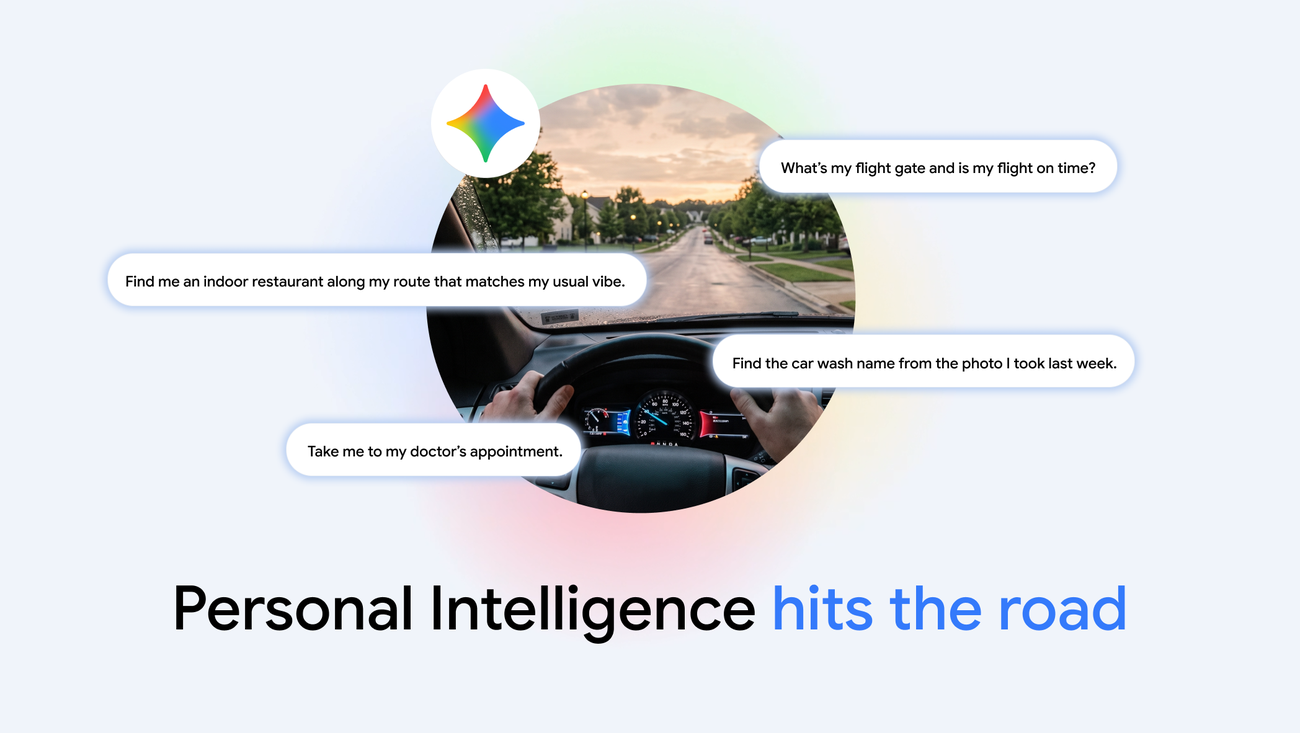
Ask “what’s my flight gate and is it on time?” and it checks the confirmation email, then checks for delays, then answers both in one shot. No hunting through your inbox at a red light. That’s the leap you get with Gemini in your car now, and honestly, it’s a good pitch.
There are some catches worth knowing before you get excited. The feature is rolling out to personal Google accounts for users 18 and up. Workspace business, enterprise, and education accounts are left out for now. And if you’re in the European Economic Area, Switzerland, the UK, or Nigeria, you’re excluded from this rollout entirely, at least for the moment.
Where Gemini in your car works today
Google is shipping this in two flavors, and the difference trips people up, so here’s the breakdown.
Android Auto is the app on your phone that projects onto your car’s screen. Most cars with a modern infotainment system support it. Personal Intelligence started rolling out there yesterday, so if you plug in or pair your phone today, you’re in the first wave.
Google built-in is different. That’s Google’s software running directly inside the car itself, no phone required. Think of certain Polestar, Volvo, and Honda models. Those cars get Personal Intelligence “in the coming months,” per Google. Not today.
| Android Auto | Google built-in | |
|---|---|---|
| Where the software runs | On your phone, projected to the dash | Inside the car itself |
| Personal Intelligence status | Rolling out now | Coming months |
| Needs your phone? | Yes, always | Only for personal answers |
| Works without opt-in? | Yes, with generic answers | Yes, with generic answers |
One quirk on cars with Google built-in: personal responses only happen while your phone is connected. The car doesn’t suddenly know your email on its own. That’s a deliberate privacy line Google drew, and honestly it’s a sensible one.
The stuff you can actually ask
This is where it gets interesting, because the demo examples from Google are less “look ma, the future” and more “oh, that would’ve helped me last Tuesday.”
A few real ones:
- On the way to the airport: “What’s my flight gate? And is my flight on time?” One question, two answers, zero digging through Gmail.
- Hunting for dinner in a town you don’t know: “Find me an indoor restaurant along my route that matches my usual vibe.” If you’re vegetarian, the shortlist won’t include steakhouses.
- Returning to somewhere you snapped a photo of: “Find the car wash from the photo I took last week and navigate there.” No scrolling your camera roll at a stoplight.
- “Take me to the coffee shop we were talking about yesterday.” Gemini does the digging through your conversations and just drives.
That last category is the sneaky-useful one. The “we were talking about” queries used to be impossible, because no assistant could see the thread of your life. Now the thread is the input.
Meanwhile, the basics still work exactly as before. Navigation, music, calls, general questions. If you never opt in, nothing breaks. Your answers just stay generic.
How to turn it on
Takes about a minute, and you do all of it from your phone. Gemini in your car picks up whatever you set here automatically.
- Open the Gemini app on your Android phone.
- Go into settings and find Personal Intelligence.
- Toggle it on, then pick which apps Gemini can connect to. Each app is a separate choice. Gmail doesn’t automatically grant Calendar.
- That’s it. The settings carry over to the car when you connect.
If you use a car with Google built-in, the same toggles apply, but remember the phone-connection rule above.
My suggestion: start with just two apps. Calendar and Maps give you most of the useful driving stuff, like appointment addresses and saved places. You can add Gmail later if you want flight and booking awareness. No need to hand over the whole archive on day one.
While you’re in those settings, it’s worth a detour: we put together five Gemini automations on Android worth setting up, and a couple of them pair nicely with driving.
The privacy trade-off, honestly
Google’s line is that privacy sits at the center of this feature. Apps stay disconnected until you switch them on. You can flip it off anytime in Gemini settings. Personal context, the company says, stays in its secure infrastructure and isn’t used to train the underlying AI models.
Do I take that 100% on faith? Not entirely. But the design here is genuinely opt-in at the app level, which is more than some competitors can say. If you’ve already let ChatGPT read your browser tabs, this is the same bargain in a different seat. Meta’s Muse assistant, for comparison, wants access to far more of your digital life from the start, and it just crossed 10 million downloads in six weeks. The assistant race is heating up, and “we only read what you let us read” is becoming the selling point.
The real risk isn’t dramatic. It’s small stuff. A passenger asks Gemini a question and gets an answer that references something private from your email. That’s it. That’s the most likely worst case for most people. If even that bothers you, keep Gmail unconnected and you’re fine.
Who should skip this
Some people should just wait, and that’s okay.
Rolling out in the UK or Europe? This one skips you for now. The same goes for Google accounts managed by a company or school, and for anyone under 18. And if your car runs Android Auto but your phone is a work device with strict policies, the feature may simply not appear in your settings.
There’s also the simpler reason: maybe you don’t want it. A voice assistant that only plays podcasts and gives directions is a perfectly valid way to live. Nothing about this update forces your hand.
What it says about where assistants are going
Zoom out for a second. In one week we’ve got Google connecting Gemini to your email in the car, Yelp teaching an AI to phone restaurants for you, and Perplexity running its entire agent locally on a Mac so nothing touches the cloud. The industry has landed on two opposite answers to the same question: should AI know everything about you, or nothing?
We watched an AI agent drive a real car through a fast food drive-thru a couple weeks ago, so the dash has been coming for a while. Google’s bet is “everything, but only with permission, per app.” The local-first crowd bets on “nothing leaves your device.” Most of us will end up with both, depending on the situation, and honestly that’s probably the right answer anyway.
For the daily commute, though, the personalized version is hard to beat. Traffic is when you least want to type, scroll, or dig. If Gemini in your car can shave one “ugh, where’s that address” moment per trip, it’s already paid for itself.
The takeaway
Turning on Gemini in your car takes about a minute, and it’s live on Android Auto right now. Open Gemini settings on your phone, switch on Personal Intelligence, connect Calendar and Maps first, and leave Gmail for later if you’re cautious. Then next drive, ask it something your old assistant couldn’t possibly have answered. You’ll know within ten seconds whether this is for you.
Sources: Google official announcement, TechCrunch coverage, Digital Trends